Godot Version
4.4.1 Stable
Question
I’m having an animation looping problem. As I understand it, to loop an animation in Godot should play from frame 1 to the end frame, then start at frame 1 again. Well, mine seems to be inserting extra unwanted frames to get back to frame 1.
My animation is very simple: two circles, scaling from 0.1 - 0.9 and animating the alpha on self-modulate to make them fade over time.
This is what it’s supposed to look like. This, looping.
However, if I check the loop option…
…this is what I get.
What am I missing here?
For some reason the looping animation player tries to tween from the last key to the starting one, I haven’t looked into a “real” fix for this since it’s easy enough to duplicate keys so the animation extends to the start and end. For example your Ring2 has keys on 2 seconds in, duplicate those onto 0 seconds.
1 Like
I’ve just this second found the solution! 
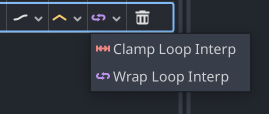
To the left of the trash icon on each animation track is Loop Wrap Mode. The default is the purple oval, which interpolates the end and start frames when the loop is to restart. Clicking this and changing it to the pink arrow thingies changes the mode to Clamp rather than Wrap and now it works.
Hopefully this helps anyone else with the same issue in the future.
2 Likes
Hey there it is! I figured there must be something better, no more duplicants for me!