Hello guys,
Is there like a tutorial or guide on how to configure/get going Godot with the Apple Vision?
I keep trying but striking out.
Thanks.
Could you share with us what you tried so far and what didn’t work?
2 Likes
Same as iOS , so you need Xcode with preinstalled modules for VisionOS.
Sure.
I am running Godot 4.8 beta 2, Xcode 27.2, on a M4 Mac. I am trying to deploy a test program to a Vision Pro running Vision OS 27. I created an IPA by going to Project Export and selecting Vision OS as the target. I have the right Team ID, that was one of the issues first. There were a couple of other settings that I had to change. Looked up the error messages. Now I get it to write the IPA without any errors or warnings. At the Vision Pro side the device is set to developer mode and I am now using the device hub (XCode 27) to send the program to the AVP. So the icon gets created at the device, it has the Godot logo, but I when I try to launch it it just flashes. Nothing Happens. So I don’t know what is wrong. The program I am pushing is a very simple 2d game from a a tutorial. My goal is to try to do a 3d game like some I have seen on YouTube, so I know it can work, but I wanted to start with a simple test. As I am writing this I just thought maybe I should try something even simpler, like a ‘hello world’?
1 Like
Thanks!
I’ll go through this next.
1 Like
Also here is critical parts
From my experience you can allow trust on iOS itself , but when I tested with Mac was better of export without sign at all. Play around with sign and also don’t expect to work inside the Xcode the virtual device deploy to physical.
It is working!
I don’t know if it was a combination of things but the last thing I tried from the last link you shared said:
Avoid using spaces when you choose your exported_xcode_project_name as this can lead to corruption in your Xcode project file.
It loaded ‘HelloWorld’ and then I was able to deploy a simple game. This gets me going for now to continue my learning. Once I do more complex 2d games I’ll try the RealiKit plug-in next to make 3d games.
THANKS!!!
1 Like
You can use Using SwiftGodotKit — SwiftGodot Tutorials | Documentation which should then play nicely with the Godot in your exported App,
Btw Reality Kit got a bit format requirements to format of models to be Pixar format need use Reality Composer Pro - Apple Developer which use to be part of Xcode, now separately downloaded and standalone in Xcode 27.
Thanks for those links, will go through them.
I have the 3d format side solved, I can export my 3d assets as USDZ from my 3d app. Although right now not animated but for my needs it will work. I think once I see something I made on 3d at the AVP it will get me even more motivated to keep going.
I’ll be back if (when) I get stuck. Thanks again.
So I kept going. I got the RealityKit plug-in working. I got the info from here:
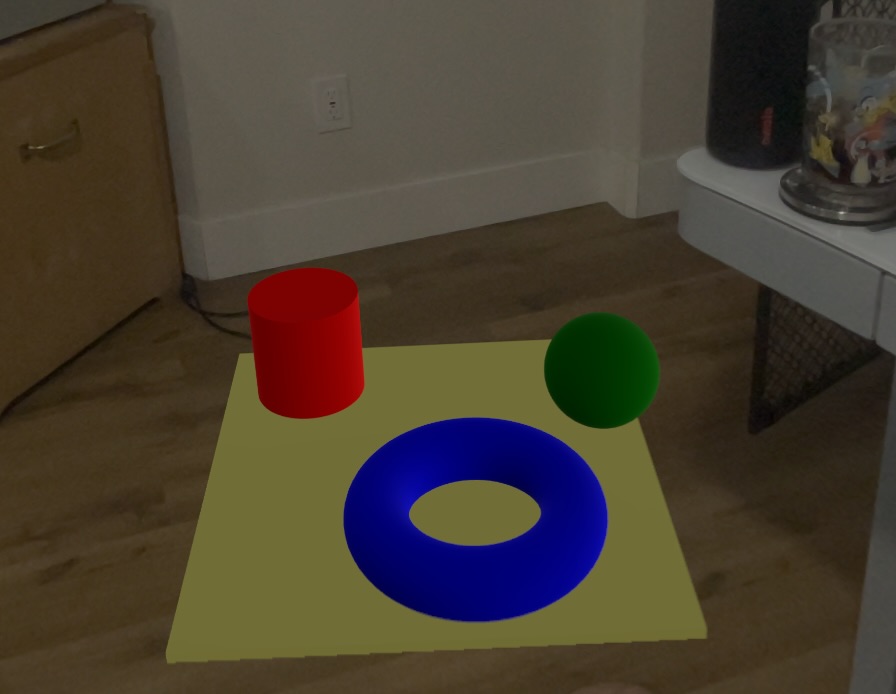
I now have floating (AR) godot content .  Shadows are not working on that sample scene, don’t know if it is because of the light type or a setting, they show on a regular Mac window. But this definitely keeps me going. I think I am ready to start creating my 3d games.
1 Like
Did you add some Light Source into scene?
I did. Do you get shadows? I am using a spotlight.
I don’t have Apple Vision but in AR on iPhone it does, best bet is try adding Directional Light which should fix it .

1 Like