Godot Version
v4.6.2.stable.mono.official [71f334935]
Question
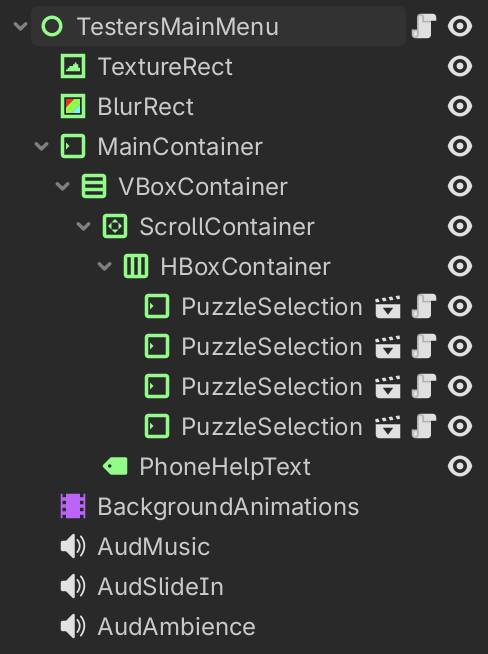
I have a background in my main menu which consists of a few simple control elements, and a TextureRect near the top, which I animate using an AnimationPlayer.
However, what I noticed is that as soon as I even add a single Position keyframe to the animation player that would control where the TextureRect is, the texture rect completely disappears.
I tried to diagnose the issue by first adding some prints, like so:
public override void _PhysicsProcess(double delta)
{
    base._PhysicsProcess(delta);
    GD.Print("POS:");
    GD.Print(_backgroundTexture.Position);
    GD.Print("GLOBALPOS:");
    GD.Print(_backgroundTexture.GlobalPosition);
}
And if I don’t add the position key to the animation player, then this is the output I get:
POS:
(0, 0)
GLOBALPOS:
(0, 0)
POS:
(0, 0)
GLOBALPOS:
(0, 0)
etc...
And indeed, during this time, the texture rect is perfectly visible. However, as soon as I add a single keyframe for the position, even if it doesn’t change and it’s just 0,0, I get the following output:
POS:
(0, 0)
GLOBALPOS:
(NaN, NaN)
POS:
(0, 0)
GLOBALPOS:
(NaN, NaN)
etc...
And at that point the TextureRect is no longer visible.
Any idea why this happens?
I have no other script that modifies the TextureRect in any way, here’s the full script that currently runs:
using Godot;

namespace GameNameNDASorry.Scenes.UI.Scripts;

public partial class TestersMainMenu : Control
{
    [Export] private MarginContainer _marginContainer;
    [Export] private AnimationPlayer _backgroundAnimations;
    [Export] private TextureRect _backgroundTexture;

    public override void _Ready()
    {
        base._Ready();
        DarthFader.Instance.FadeToClear(2f);
        _backgroundAnimations.Play("initial");
    }

    public override void _PhysicsProcess(double delta)
    {
        base._PhysicsProcess(delta);
        GD.Print("POS:");
        GD.Print(_backgroundTexture.Position);
        GD.Print("GLOBALPOS:");
        GD.Print(_backgroundTexture.GlobalPosition);
    }
}
Here’s my scene tree: