Godot Version
4.7 (stable)
What I’m Trying To Do:
I’m making a nonogram game. When playing a nonogram game, you’ll be given hints on how to fill out a grid through a series of numbers and colors (depending on if it’s a color/monochrome nonogram). Traditionally, as the player “correctly” fulfills the hints, they will automatically grey themselves out.
Because I’m using the RenderingServer to create all my nongram visuals, I ran into an issue of having to clear and redo individual hints every time the grid got updated. Because of how tedious and unoptimized that is, I’m attempting to redo the logic via a shader with limited success.
The idea is that I create a pixel art image with all the colors of the column/row hints, then pass that to each rendered hint to calculate how much of that image is shown. Then, whenever I need, I can update different pixel color alphas in gdscript to automatically grey out whatever part of the hints I need.
I actually got this part working quite well:
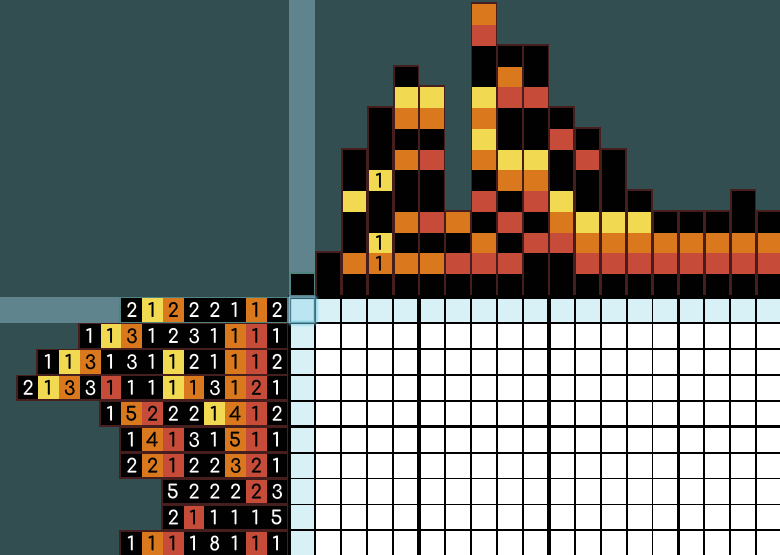
[Image description: A section of a nonogram grid. The left hints are what the hints look like when rendered normally through a series of add_lines and draw_string’s, and without a shader. The top hints have been modified to use a custom shader that shows a single axis of pixel art colors along a UV. The top hints have no numbers.]
The Issue:
While I got the shader working for a simple add_rect on each RID, it completely fell apart once I tried to add in the text.

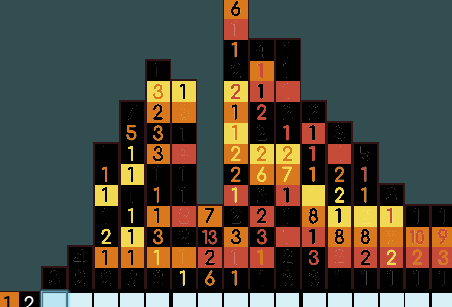
[Image Description: A zoomed in section of the nonogram grid. The left hints are rendered correctly (without a shader). The top hints are rendered incorrectly (with shader)]
As you can see, I tried to apply a luminance check in the shader that would change the color of the text to contrast with the color underneath. It doesn’t work at all. Numbers that should be black are white and vice versa.
This is what the numbers look like without the luminance check:
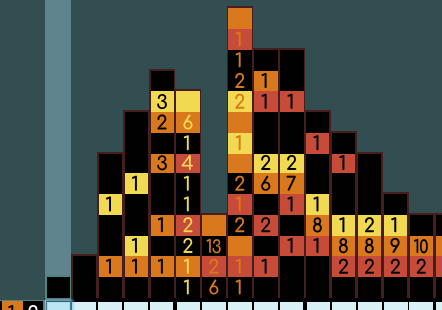
It seems that, with how I wrote the shader, it’s only applying the color from the first part of each onto all the text  .
I’m applying the shader to multiple RID’s, one for each column of the hint. Each column RID contains a Rect2 for the background colors and however many draw_strings needed to display all number hints.
Through research, I know Godot is treating each text item as its own UV which is what’s causing this weird behavior. My problem is I don’t know enough about shaders to know how to/if this is fixable.
Ideally, I grab the color pixels from my inputted image based on the world y coordinate of of the text item. Somehow.
Is there a way to make this possible? Or should I go back to re-rendering hints manually?
Shader Code:
shader_type canvas_item;

uniform sampler2D bar_hint_mask: filter_nearest; // pixel art mask of bar hint
uniform vec2 mask_size = vec2(10, 10); // size of bar_hint_mask in pixels
uniform int notch = 0; // column/row currently iterating through
uniform int pixels_shown = 8; // how many pixels of this row/column to show
uniform bool is_vertical; // whether to iterate through bar_hint_mask vertically/horizontally

uniform vec2 notch_size = vec2(20.0, 20.0); // size of rect over entire hint

group_uniforms ColorsToReplace;
uniform vec3 default_font_color: source_color; // Color of font to replace
uniform vec3 default_bg_color: source_color; // Color of bg to replace

group_uniforms Luminance;
uniform float luminance_cutoff: hint_range(0.0, 1.0) = 0.5;

varying vec2 pixel_pos;

void vertex() {
	pixel_pos = VERTEX;
}

void fragment() {
	vec4 new_color;
	vec4 cur_color = COLOR;

	// iterating through the given art along the given notch (within the limits of pixels_shown)
	if (!is_vertical) {
		new_color = texture(bar_hint_mask, vec2(UV.x * float(pixels_shown) / mask_size.x, float(notch) / (mask_size.y - 1.0)));
	}
	else {
		new_color = texture(bar_hint_mask, vec2(float(notch) / (mask_size.x - 1.0), UV.y * float(pixels_shown) / mask_size.y));
	}

	// update COLOR based on current color
	if (cur_color.rgb == default_bg_color) {
		// if the bg color, replace with bar_hint_mask (Code works)
		cur_color.rgba = new_color.rgba;
	}
	else if (cur_color.rgb == default_font_color) {
		vec4 special_color = texture(TEXTURE, UV); // workaround for getting actual text alpha
		// (Code doesn't work)
		vec2 text_uv = pixel_pos / notch_size; // use current pixel pos within notch_size??

		if (special_color.a > 0.0)
		{
			vec4 text_color = texture(bar_hint_mask, vec2(float(notch) / (mask_size.x - 1.0), text_uv.y));
			cur_color.rgb = text_color.rgb;

			// Luminance check
			//float lum = dot(text_color.rgb, vec3(0.2126, 0.7152, 0.0722));
			//bool filter = lum > luminance_cutoff;
			//if (filter) {
				//cur_color.rgb = vec3(0.0,0.0,0.0); // Make text black
			//}
			//else {
				//cur_color.rgb = vec3(1.0,1.0,1.0); // Make text white
			//}
		}
	}

	COLOR = cur_color;
}
The last thing to share is that I used a method of getting pixel_pos and dividing by the size of the area the text is on top of to hopefully get a normalized position. I was attempting to recreate the success of this shader but I have no idea what I’m doing and it didn’t work at all.