Godot Version
4.7
Question
I have code to throw ravens, and currently I have two ravens to summon already placed in below my map. When you call the throw function, it moves one of the ravens over to the RavenSpawnPoint and then it starts moving. Which one it throws should be decided by the CurrentRavens integer.
The problem is, when CurrentRavens == 2 it throws both of them rather than just one, then when I press it again it only fires Raven1 as it should, but that means it isn’t running the full thing twice, just the throw function.
Does anyone know why this is happening?
func _input(event: InputEvent) -> void:


	if Input.is_action_just_pressed("Summon 1") and CanThrowRaven and CurrentRavens > 0:
		RavenSpawnPoint.look_at(get_global_mouse_position())
		RavenSpawnPoint.position = Vector2(40, 0).rotated(RavenSpawnPoint.global_rotation)

		if CurrentRavens == 2:
			Raven2.Throw(RavenSpawnPoint.global_position, -45)
		if CurrentRavens == 1:
			Raven1.Throw(RavenSpawnPoint.global_position, -45)

		RavenSpawnPoint.position = Vector2(0, 0)
		CurrentRavens -= 1
Don’t use Input.is_action_just_pressed() in input event handler. Instead check if the event is a pressed action.
I changed it to if event.is_action(“Summon 1”) and it still had the same issue.
Is this what you meant or did I misundertsand?
Try event.is_action_pressed(...)
Same story, unfortunately.
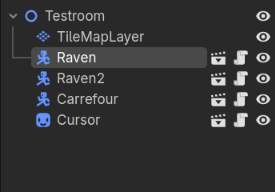
Post your scene tree and code in Throw()
 func Throw(Location, Rotation):
	global_position = Location
	ProjectileSprite.look_at(get_global_mouse_position())
	IsThrown = true
	ProjectileSprite.visible = true
	SitSprite.texture = load("res://Translucent.png")

func _physics_process(delta: float) -> void:
	if IsThrown:
		velocity = Vector2(Speed, 0).rotated(ProjectileSprite.global_rotation)
		if is_on_wall():
			IsThrown = false
			velocity = Vector2 (0, 0)
			ProjectileSprite.visible = false
			SitSprite.texture = load("res://Player/Sprites/Ravens/Raven_wall.png")


	move_and_slide()
In which script is the _input() function?
It’s in the player script.
Well it shouldn’t be there because each raven will then get the input event and execute the corresponding code. It also makes no sense that each raven has a current raven count and a reference to other ravens i.e. Raven1 and Raven2. Those shouldn’t be held in ravens themselves but in some node “above” that controls all ravens.
I misunderstood your post. It’s in the player’s
Which one is that in the scene tree screenshot you posted?
Carrefour. That’s her name.
You mean everything in my player? Okay…
 class_name PlayerPawn extends CharacterBody2D

#Variables

@export var Sprite : Sprite2D


	#Ravens
var MaxRavens : int = 2
var CurrentRavens : int = 2
var CanThrowRaven : bool = true
var RavenIndex : int = 0
var RavenColor : int = 0

@export var RavenSpawnPoint : Node2D
@export var Raven1 : Raven
@export var Raven2 : Raven

	#Movement
var WalkSpeed : float = 100
var IsWalkingLeft : bool = false
var IsWalkingRight : bool = false
var CanMoveLeft : bool = true
var CanMoveRight : bool = true
var Direction : bool = false

var JumpSpeed : float = -400
var IsJumping : bool = false
var CanJump : bool = true

var FallSpeed : float = 100
var IsFalling : bool = false
var CanFall : bool = true


func _physics_process(delta: float) -> void:

	if IsJumping:
		velocity.y = JumpSpeed
		JumpSpeed = JumpSpeed / 1.075
		if JumpSpeed > -30 :
			EndJump()
	if CanFall and is_on_floor() == false and IsJumping == false:
		velocity.y = FallSpeed
		FallSpeed = velocity.y + 200 * delta
	if is_on_floor() and not IsJumping:
		velocity.y = 0
		FallSpeed = 100
	if is_on_ceiling() and IsJumping:
		EndJump()


	#left and right
	#Horizontal movement unputs
	if Input.is_action_just_pressed("Left"):
		IsWalkingLeft = true
		if Direction == false:
			Sprite.scale.x = -1
			Direction = true
	if Input.is_action_just_released("Left"):
		IsWalkingLeft = false


	if Input.is_action_just_pressed("Right"):
		IsWalkingRight = true
		if Direction == true:
			Sprite.scale.x = -1
			Direction = false
	if Input.is_action_just_released("Right"):
		IsWalkingRight = false

	#Update
	if IsWalkingLeft and CanMoveLeft:
		velocity.x = WalkSpeed * -1
	else:
		if not (IsWalkingRight and CanMoveRight):
			velocity.x = 0

	if IsWalkingRight and CanMoveRight:
		velocity.x = WalkSpeed
	else:
		if not (IsWalkingLeft and CanMoveLeft):
			velocity.x = 0


	move_and_slide()


func _input(event: InputEvent) -> void:

	#Jumping
	if Input.is_action_pressed("Jump") and CanJump and is_on_floor():
		Jump()
	if Input.is_action_just_released("Jump"):
		EndJump()

	#Throw Raven
	if event.is_action_pressed("Summon 1") and CanThrowRaven and CurrentRavens > 0:
		RavenSpawnPoint.look_at(get_global_mouse_position())
		RavenSpawnPoint.position = Vector2(40, 0).rotated(RavenSpawnPoint.global_rotation)

		if CurrentRavens == 2:
			Raven2.Throw(RavenSpawnPoint.global_position, -45)
		if CurrentRavens == 1:
			Raven1.Throw(RavenSpawnPoint.global_position, -45)

		RavenSpawnPoint.position = Vector2(0, 0)
		#CurrentRavens -= 1


#Jump Functions (start and end)
func Jump():
	JumpSpeed = -400
	IsJumping = true
func EndJump():
How did you determine that?
It was just guesswork really.
Though after testing that’s not the case. I commented one out and it still had the same effect.
And what effect is that? How does it look? Can you post a video?
Usually the second one spawns just behind the other like here but some times it randomly come in at the top. It also has both sprites displayed for some reason.
…I found the problem.
I accidentally duplicated it instead ofdragging it in. I feel kinda stupid now.
Thanks for all your help though!