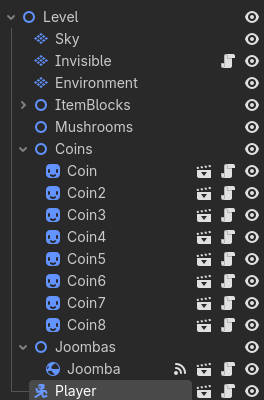
Heya, i’m making a short Mario sort of game in order to learn Godot, and I’m trying to make the Mushroom health system. For this i’m using an @export var HP on the player that is an int value, and I’m trying to modify it in the Mushroom script to be updated to 2 whenever the Player collects the Mushroom. However, for some reason it just refuses to work, the HP value just simply doesn’t update to 2 no matter what I try. I don’t know if it’s a problem with my reference of the player or whatever, but it just doesn’t want to function properly. The mushroom has it’s own scene, and is instantiated into the main level scene via the Item Block script. Here is the code:
player.gd
extends CharacterBody2D

@export var IFrames = false
@export var HP : int = 1 :
	set(new_value):
		if new_value == 2: #Get Mushroom
			Animator.play("Mushroom Transition")
			print(HP)
		elif new_value == 1: #Lose Mushroom
			IFrames = true
			Animator.play("Normal Transition")
			await Animator.animation_finished
			Animator.play("IFrames")
			await Animator.animation_finished
			IFrames = false
		elif new_value == 0: #Game Over
			$CanvasLayer/Control/GameOver.visible = true
			get_tree().paused = true
			await get_tree().create_timer(2.0).timeout
			get_tree().reload_current_scene()
	get:
		return HP

@onready var Animator := $AnimationPlayer
@onready var Collision := $CollisionShape2D
const SPEED = 200.0
var JUMP_VELOCITY = -275.0

func _physics_process(delta: float) -> void:
	# Add the gravity.
	velocity += get_gravity() * delta
	# Handle jump.
	if Input.is_action_pressed("ui_up") and is_on_floor():
		velocity.y = JUMP_VELOCITY

	if Input.is_action_just_released("ui_up") and velocity.y < 0:
		velocity.y = lerpf(velocity.y, 0.0, 0.75)

	# Get the input direction and handle the movement/deceleration.
	# As good practice, you should replace UI actions with custom gameplay actions.
	var direction := Input.get_axis("ui_left", "ui_right")
	if direction:
		velocity.x = direction * SPEED
	else:
		velocity.x = move_toward(velocity.x, 0, SPEED)

	move_and_slide()
mushroom.gd:
extends RigidBody2D

@onready var Player = get_node("/root/Level/Player")
@onready var Direction := 75
@onready var RayCasts := [$RayCastLeft, $RayCastRight]
var Can_Collide := true

func _physics_process(delta: float) -> void:
	linear_velocity = Vector2(Direction, linear_velocity.y)
	for RayCast: RayCast2D in RayCasts:
		if RayCast.is_colliding():
			if RayCast.get_collider() is TileMapLayer:
				if Can_Collide:
					Can_Collide = false
					Direction = -Direction
					await get_tree().create_timer(1.0).timeout
					Can_Collide = true

func _hit(body: Node) -> void:
	if body == Player:
		Player.HP = 2
		queue_free()
itemblock.gd:
extends Sprite2D

@onready var Player := $"../../Player"
@onready var Animator := $AnimationPlayer
@onready var Mushroom_Scene = preload("res://Scenes/mushroom.tscn")
@onready var Mushrooms = $"../../Mushrooms"
@export var Hit := false
@export var Item : String

func _hit(body: Node2D) -> void:
	if body == Player:
		if not Hit:
			Hit = true
			Animator.play("hit")
			if Item == "Coins":
				Variables.Coins += 5
			elif Item == "Mushroom":
				var Mushroom = Mushroom_Scene.instantiate()
				Mushrooms.add_child(Mushroom)
				Mushrooms.global_position = global_position - Vector2(0, 30)
I don’t think the setter should be responsible for doing so much. I recommend simply creating a function to increment or change this value, which will in turn update your property. Move the code that handles everything else outside of the setter and inside this new function.
You set it to two here but it will not call the set-function from your character script so you wont get any of the behaviours. Create a function that does what your set function does now and call that function instead.
You can simply write @export var HP: int = 1
Then write a function inside that same CharacterBody2D which sets the HP value.
You can call it like any other function player.SetHp(2)
You just need to get a reference to your player, which you already have.
Thanks, that solved it now, but i still do not understand why I couldn’t simply just modify the export var directly instead of modifying it via a function?
extends CharacterBody2D

@export var IFrames = false
@export var HP : int = 1
@onready var Animator := $AnimationPlayer
@onready var Collision := $CollisionShape2D
const SPEED = 200.0
var JUMP_VELOCITY = -275.0

func set_health(new_value):
HP = new_value
if new_value == 2: #Get Mushroom
Animator.play(“Mushroom Transition”)
elif new_value == 1: #Lose Mushroom
IFrames = true
Animator.play(“Normal Transition”)
await Animator.animation_finished
Animator.play(“IFrames”)
await Animator.animation_finished
IFrames = false
elif new_value == 0:
 Over
game_over()

func game_over():
$CanvasLayer/Control/GameOver.visible = true
get_tree().paused = true
await get_tree().create_timer(2.0).timeout
get_tree().paused = false
get_tree().reload_current_scene()

func _physics_process(delta: float) → void:
# Add the gravity.
velocity += get_gravity() * delta
# Handle jump.
if Input.is_action_pressed(“ui_up”) and is_on_floor():
velocity.y = JUMP_VELOCITY

if Input.is_action_just_released("ui_up") and velocity.y < 0:
	velocity.y = lerpf(velocity.y, 0.0, 0.75)

# Get the input direction and handle the movement/deceleration.
# As good practice, you should replace UI actions with custom gameplay actions.
var direction := Input.get_axis("ui_left", "ui_right")
if direction:
	velocity.x = direction * SPEED
else:
	velocity.x = move_toward(velocity.x, 0, SPEED)

move_and_slide()
Mushroom script now:
extends RigidBody2D

@onready var Player = get_node(“/root/Level/Player”)
@onready var Direction := 75
@onready var RayCasts := [$RayCastLeft, $RayCastRight]
var Can_Collide := true

func _physics_process(delta: float) → void:
linear_velocity = Vector2(Direction, linear_velocity.y)
for RayCast: RayCast2D in RayCasts:
if RayCast.is_colliding():
if RayCast.get_collider() is TileMapLayer:
if Can_Collide:
Can_Collide = false
Direction = -Direction
await get_tree().create_timer(1.0).timeout
Can_Collide = true

func _hit(body: Node) → void:
if body == Player:
Player.set_health(2)
queue_free()
Your setter doesn’t work because it doesn’t change the value of the member variable. If you write a property using setter and getter it is the responsibility of the setter to change the actual member variable.
That means the exported property should be coded like this:
@export var HP : int = 1 :
	set(new_value):
		HP = new_value
		if new_value == 2: #Get Mushroom
			Animator.play("Mushroom Transition")
			print(HP)
		elif new_value == 1: #Lose Mushroom
			IFrames = true
			Animator.play("Normal Transition")
			await Animator.animation_finished
			Animator.play("IFrames")
			await Animator.animation_finished
			IFrames = false
		elif new_value == 0: #Game Over
			$CanvasLayer/Control/GameOver.visible = true
			get_tree().paused = true
			await get_tree().create_timer(2.0).timeout
			get_tree().reload_current_scene()
	get:
		return HP