Hello, I am trying to make a 3D point and click horror game, akin to At Dead of Night, only I’m actually trying to make it in the engine, not the weird mp4 approach that game did. I’m making a system of nodes that determine where I move to and how, and right now I’m starting with my most basic one: The MoveNode, consisting of an Area3D and and a collision box, which would 1. Detect a click from the player and 2. Transmit its position somehow so the player can begin to move directly to that node.
That 2nd one is where I’m having a major headache over something that I feel should be quite simple… how the hell do I get the node instance’s position? I’ve tried so many things from signals to sorting through groups in a for loop for the exact node I clicked on, I’ve googled I don’t know how many different variations of the same question, and redone my approach at least 5 times. There’s nothing I could find on the internet that really helps me out, so I figured I’d ask in here.
tl;dr how do I get the global position of a node instance from a mouse click (no raycast involved) and transmit that data back to my player character so they can move to it?
Area3D specifically inherits CollisionObject3D, which has a signal called input_event which can easily detect if you click on it with a mouse. Simply add a script to your Area3D or connect it’s input_event signal and you can detect mouse clicks and get it’s global position.
extends Area3D


func _on_input_event(camera: Node, event: InputEvent, event_position: Vector3, normal: Vector3, shape_idx: int) -> void:
	if event is InputEventMouseButton:
		print(global_position)
I think you are overcomplicating things. You can achieve the movement detecting wehre the cursor is on the screen and even map it to the keys to replicate them.
Once you have the direction, using movement with fixed steps and head bob you should be able to achieve the effect.
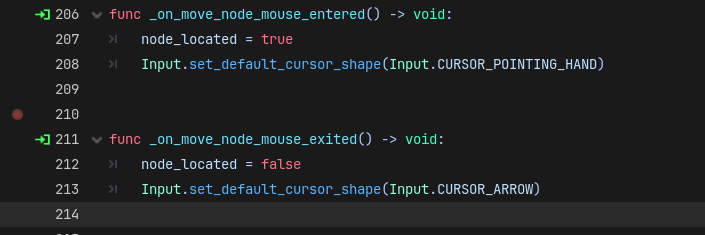
Hello, sorry it took me a week to get back to you. At the moment, the mouse_entered() and mouse_exited() signals of the Area3D are connected to my player script, where they tell my player whether or not they are actually hovering over the Area3D. node_located is used as a check for my clicking/movement code, to determine if I should actually move upon clicking.
While I am aware of the on_input_event() signal, I’m stumped as to how I can take the position of the node I’m clicking on, and send it TO my player, who can then move to that location. Your example just prints the position to console, so I feel I should specify that I don’t want the player to ever actually read the position at all. I just want the character to automatically move to the exact coordinates of the node. Below is where the movement would be handled, which at the moment just shows whether or not my mouse is detecting the node. The TODO is from when I thought I would be making progress LOL
		ClickAction.MOVE:
			#TODO change this to tweens from the player coordinate to the MoveNode coordinate
			if node_located == true:
				print("MoveNode Detected")
			elif node_located == false:
				print("No Node Detected")
The goal is to put the code that gets the position of the node and moves my player to it under this if node_located == true statement. I really just don’t know what the best way of accessing the object is, because even when I write code for the signal below, I simply don’t know how to GET that pos value
extends Area3D

var pos : Vector3 = self.global_position

func _on_input_event(camera: Node, event: InputEvent, event_position: Vector3, normal: Vector3, shape_idx: int) -> Vector3:
	if event is InputEventMouseButton:
		return pos
	else:
		return Vector3.ZERO
My code prints the position to the console because I don’t know what your player character is. I print it out to show that you can easily get the position of the node you just clicked on, then you can either call a central manager node, or simply find the player by reference and send them the Vector2 of the current node they clicked on.
The easiest way to identify a Player is adding it to a Group. Then, when the movement is detected.
If there is only one Player, the something like: player = get_tree().get_first_node_in_group(“Player”) should work.
From there, you handle the move like adding to the player. amethod named: move_to accepting the new position as parameter.
Alright, so, after some more reading, I finally figured out how to move the variable. I made an autoload singleton with a variable for my node’s position defined in there, then used the on_input_event() signal in my Area3D to update that position to its own position. The only problem with this is that it seems to not work at all with duplicates of the same Area3D (which I need to duplicate many times for my movement to work).
Right now I have 3 MoveNode’s (MoveNode, MoveNode2, MoveNode3) and despite all having the correct signals and all sharing the same script as the original, clicking on any of them only moves me to the original MoveNode (clicking on MoveNode2 or MoveNode3 just moves me to MoveNode). So, the position of my movenodes isn’t changing based on what instance I clicked, which I’m not sure what to do about if I’m using signals to do all the communicating.
#My MoveNode

extends Area3D

var pos : Vector3 = self.global_position

func _on_input_event(camera: Node, event: InputEvent, event_position: Vector3, normal: Vector3, shape_idx: int) -> void:
	if event is InputEventMouseButton:
		EventBus.movenode_position = pos
#My player moving to the position, which is just a teleport for now

class_name PlayerController extends CharacterBody3D

ClickAction.MOVE:
			if node_located == true:
				print("MoveNode Detected")
				self.global_position = EventBus.movenode_position
			elif node_located == false:
				print("No Node Detected")
Here’s the relevant code for how my click actions are working
class_name PlayerController extends CharacterBody3D

enum ClickAction {
	NONE,
	TURN_LEFT,
	TURN_RIGHT,
	TURN_AROUND,
	MOVE
}

#Detects my mouse click. You can ignore the stuff about state for this.
func _unhandled_input(event: InputEvent) -> void:
	if event is InputEventMouseButton:
		if event.button_index == MOUSE_BUTTON_LEFT and event.pressed:
			if state != State.IDLE:
				return

			var action := get_click_action(event.position)
			execute_click_action(action)


#Returns a ClickAction based on where on the screen the player is clicking.
func get_click_action(mouse_position: Vector2) -> ClickAction:
	var viewport_size := get_viewport().get_visible_rect().size

	# Bottom takes priority so bottom corners count as 180°
	if mouse_position.y >= viewport_size.y * 0.8:
		return ClickAction.TURN_AROUND

	if mouse_position.x < viewport_size.x * 0.15:
		return ClickAction.TURN_LEFT

	if mouse_position.x > viewport_size.x * 0.85:
		return ClickAction.TURN_RIGHT

#ClickAction.MOVE is returned if the player clicks elsewhere than
#the left, right, or bottom of the screen, aka the middle
	return ClickAction.MOVE

#Executes movement based on click
func execute_click_action(action: ClickAction) -> void:

	match action:
		ClickAction.TURN_LEFT:
			turn_left()

		ClickAction.TURN_RIGHT:
			turn_right()

		ClickAction.TURN_AROUND:
			turn_around()

		ClickAction.MOVE:
			if node_located == true:
				print("MoveNode Detected")
				self.global_position = EventBus.movenode_position
			elif node_located == false:
				print("No Node Detected")
My clicks seem to be behaving correctly, so I don’t believe the problem lies here. “MoveNode Detected” is printed when I click any of the three MoveNodes, but I only ever move to one of them, which indicates the problem is that EventBus.movenode_position is only ever being set to the global position of the very first, original MoveNode, and never its duplicates.
Areas can visually overlap, only, that isn’t happening here (if I understand what you mean), because I don’t have them overlapping while I am encountering this problem; I have placed one MoveNode on each side of my player, I can’t even see two at the same time from my starting position. Additionally, each node is set to make itself invisible if my character is currently inside of it, so I can’t be clicking on that same node when I am inside of it and getting sent to the same node.
Now as for signals, pressing the green arrow next to each function shows that all of the nodes are, in fact, connected, and seemingly connected correctly. The problem absolutely lies in the signals, only, I really can’t pin where, or why. Again, the problem is that the position isnt updating correctly, I’m just not sure why it’s ignoring the seemingly properly connected duplicates.
Don’t use input event handler in player script to detect clicks. You already detect them on areas so you don’t need to do this roundabout using a global variable. Simply connect the signals directly to the player and move the player in the signal handler.