Godot Version
4.5
Question
I’ve been working with post processing and shaders for the first time. Specifically I want to selectively pixelate a layer in my game while keeping everything else non-pixelated.
I’ve managed to hack together a couple of Compositor Shaders (not sure if that’s what they’re called?) which create the desired effect and separated rendering with layers, but I’m now stumped at how to render both my pixelated and non-pixelated views together.
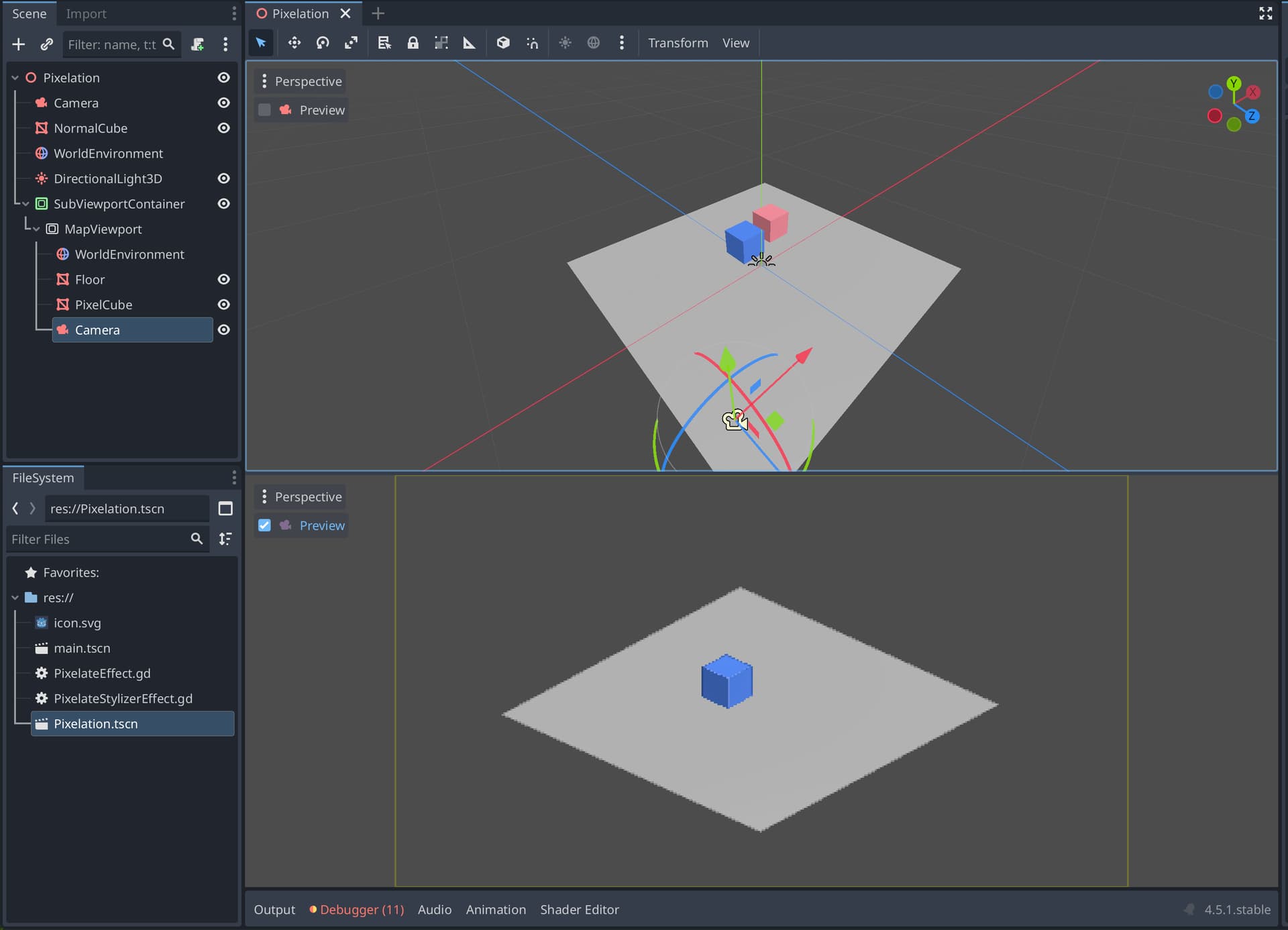
Ideally I’d like to be able to sandwich non-pixelated objects between pixelated objects. This would require rendering based on depth, but I’m not exactly sure how to achieve this.
As of now my scene looks like this:
Pixelation
├── 🎥 Camera
├── ◼️ NormalCube
├── 🌍 WorldEnvironment
├── 💡 DirectionalLight3D
└── 🧩 SubViewportContainer
    └── 🖼️ MapViewport
        ├── 🎥 Camera
        ├── ◼️ Floor
        ├── ◼️ PixelCube
        └── 🌍 WorldEnvironment
The issue is that the second viewport is just rendering on top of the first, hiding it entirely.
Would anyone be able to nudge me in the right direction? Is this even possible?
I’ve pushed up a minimal reproduction here: GitHub - leo-petrucci/selective-pixelation-demo