There seems to be strangely little advice on this topic, or I somehow can’t figure out the search terms to find any of it.
I want to have moons in my skies that can move independently from the sky background and perhaps even have animations. I am thinking of something like animated decals that can float around on the sky dome governed by their own rules, but so far I’ve been completely unable to find anything on that subject among the many guides for making skies and day-night cycles.
It’s been a common enough feature in games for decades, so I am sure there must be something that can be done in Godot for this.
Any pointers on how to learn more on this subject?
Right now all it does is to rotate the DirectionalLight3D around it’s x-axis and go dark during half the cycle, and having the sky set to PhysicalSkyMaterial so it goes black while the sun is off.
Adding another DirectionalLight3D for the moon will only cause to be light to come from the position where the moon should be, but there’s no actual object there.
There is no object for the sun either, but the sun is so bright that you can’t see it inside the light source anyway.
Creating a scene with the sky background and celestial objects and using a SubViewport to project that scene on the sky of the current scene seems like a relatively easy thing to do. (And lets you make the sky with 3D modeling and animations with no needs to prerender or use shaders.)
Creating a SubViewport node with a Camera3D linked to it and using that camera’s view as the sky texture is easy enough.
You can just place faraway spheres into the scene, even without an additional subviewport, or render circles in a sky shader similar to how the default sun is done.
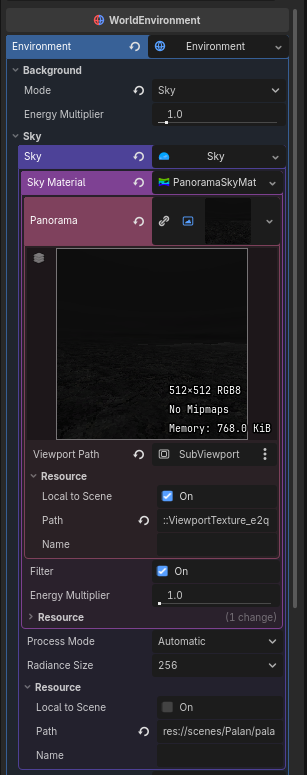
I am currently working on trying to get the sky to show a PanoramaSkyMaterial that is using a ViewportTexture.
The Viewport Path is set to the node “Node3D > SubViewport”.
The SubViewport has a Camera3D matched to it, and inspecting it it is indeed showing what the camera is currently seeing.
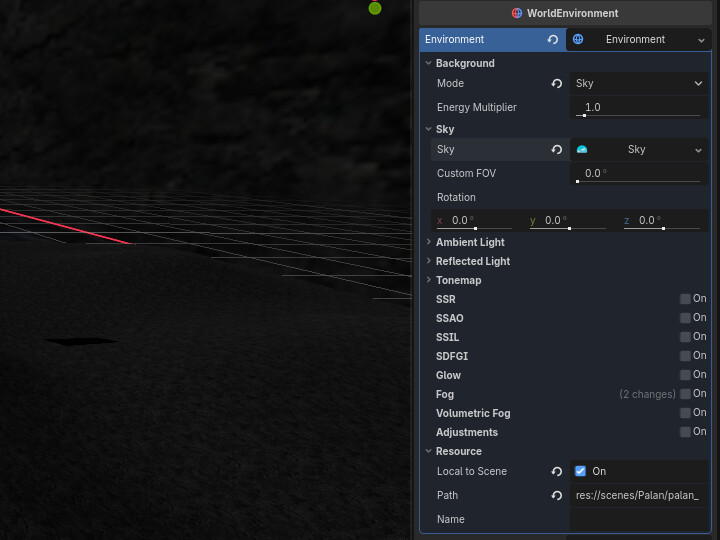
But the world environment appears to receiving no data from the SubViewport and as such the sky is showing a pink and black checkerboard instead. Sometimes I can see the sky texture updating in real time in the editor when I move the camera, but when I try to run the game, there is no sky texture at all.
Sending the SubViewport image as a ViewportTexture to a MeshInstance3D works though. The PlaneMesh is textured with what the Camera3D sees.
Turning off the Godot editor and starting it again, the 3D view now also can’t get the data from the SubViewport anymore. Neither can the MeshInstance3D. But when running the scene, the texture does appear on the Mesh. Very confusing.
I found this note in the ViewportTexture documentation, but I don’t know what it means:
Note: A ViewportTexture is always local to its scene (see Resource.resource_local_to_scene). If the scene root is not ready, it may return incorrect data (see Node.ready).
Yes, everything needs to be local to scene. You’ll likely have more problems coming your way though. The texture that panorama material expects needs to be in equirectangular projection (hence “panorama”), which cannot easily be rendered in real time.
You’d want to use a sky shader instead and composit the viewport texture in screen space.
I got the sky working, though of course with PanoramaSkyMaterial there is severe stretching distortion.
Instead, in the WorldEnvironment, in the Environment settings, set Background to Canvas, and the Canvas Max Layer to -1.
Create a CanvasLayer node as child of the root node, and set its layer to -1 as well.
Then create a TextureRect node as the child of the CanvasLayer node, and assign it a ViewportTexture, which will be the SubViewport node that holds the Camera3D that is looking at whatever scene is meant to be displayed on the sky. It doesn’t show in the editor, but will be there when running the scene.
All that’s left is to create script that makes the Camera3D’s orientation match the player’s view camera.
Should work but it’s a bit complicated as you need to maintain an additional environment node for the subviewport and you render an extra full screen image on the canvas layer that’s not really necessary. Much simpler to do a direct composite of the subviewport texture in a sky shader.
As for the camera, just copy main camera’s global transform, fov and near/far on ever frame.
You also need to make sure that viewport sizes match, either by using a full rect viewport container that automatically stretches the viewport or by manually copying the size in a script.
I got it working as I was planning it, and I think it’s pretty simple.
The script to have the viewport camera follow the player camera is actually just this. (All the examples I couldn’t get to work made it much more complicated.)
extends Camera3D

@export var target: Node3D

func _process(delta):
	global_rotation=target.global_rotation
You mean I could have the subviewport just record the moving objects and blend them into a shader sky? That would have a long list of significant advantages. Any pointers of how such a thing would be done?
Convert the procedural sky material to a shader, plug the viewport texture into it, sample the viewport texture using SCREEN_UV and just mix that with whatever the shader would normally output. Use viewport texture’s alpha as the mixing factor.