Godot Version
Godot 4.5.1
Question
Hello everyone. I found this video on Youtube and, as a Godot user, wondered how a spline-based collision shape similar to the one found in the video down below could be made in Godot.
Do you have any idea ?
https://www.youtube.com/watch?v=evxr8Sf-zoM
This could be a GAME-CHANGER for Godot, especially for generating procedural collisions.
Nothing in a game engine can really be spline. Everything must be triangles. The colliders in that video are triangles as well created by tessellating curves. You can do the same in godot by writing a script that tessellates any curve (or parametric surface) of your choice into a convex or concave mesh collider.
2 Likes
Interesting … But how to tesselate a curve into “mesh” collider ?
I’ll admit I’m not 100% sure if this is the same thing, but you can make a CSGPolygon3D follow a Path3D, by settings its mode to MODE_PATH.
You can also enable use_collision to have collision generated (see CSGShape3D)
1 Like
By some math and building a mesh using Godot’s mesh creation classes. In fact you don’t need that much math at all. Curve3D can deliver you tessellation in wanted resolution. Just need to interpret it in a way that fits your needs and assemble the vertex data for the mesh.
1 Like
I’m going to explore this too. As of now, i’ve managed to achieve quite a similar result thanks to @gentlemanhal in #post 4.
So first i must create a Path3D and add some points. Then I add a CSGPolygon3D node underneath it. It is not necessary to make it a child of Path3D.
In the Inspector, set CSG mode to Path, then set the path node with your Path3D node created earlier.
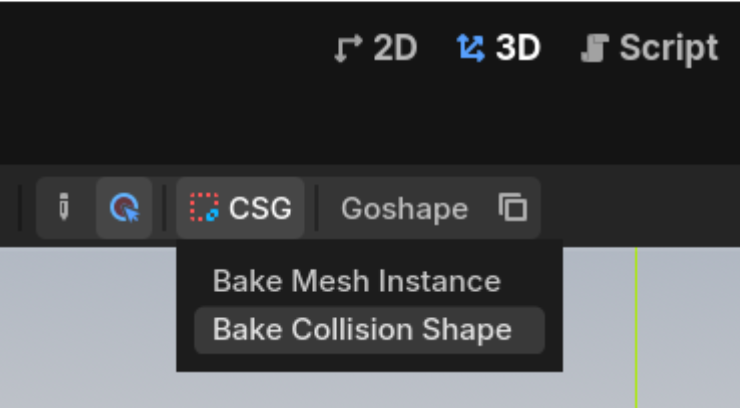
In the top bar, go to CSG > Bake Collision Shape, and that’s it. A Collision shape is generated.
My goal now is to create a custom script that’ll automate this process. I’ll share it with when completed.
Thank you very much, @normalized and @gentlemanhal for your precious pieces of advice  .
.
3 Likes