Godot Version
Godot 4.7.2 (Started 4.6+)
Question
So I came back to Godot after a while and it’s been a month or two since I resumed and I’m facing a probably typical problem in programming yet too complex to handle myself currently.
Running print_tree_pretty(): (# Sorry for long scrolling but please understand my problem)
┖╴Game_system
┠╴Game_GUIs (#GUI)
┃ ┠╴Save_button
┃ ┠╴Load_button
┃ ┠╴Abort_button
┃ ┠╴Autosave_CheckBox
┃ ┠╴End_turn_button
┃ ┠╴Map_name_text
┃ ┃ ┖╴SaverNode_mnt
┃ ┠╴Faction_Income_and_Status
┃ ┃ ┠╴RS
┃ ┃ ┃ ┠╴Title
┃ ┃ ┃ ┠╴G_amount
┃ ┃ ┃ ┃ ┖╴SaverNode
┃ ┃ ┃ ┠╴Income
┃ ┃ ┃ ┃ ┖╴SaverNode
┃ ┃ ┃ ┠╴Unit_count
┃ ┃ ┃ ┃ ┖╴SaverNode
┃ ┃ ┃ ┖╴Unit_networth
┃ ┃ ┃ ┖╴SaverNode
┃ ┃ ┖╴WM
┃ ┃ ┠╴Title
┃ ┃ ┠╴G_amount
┃ ┃ ┃ ┖╴SaverNode
┃ ┃ ┠╴Income
┃ ┃ ┃ ┖╴SaverNode
┃ ┃ ┠╴Unit_count
┃ ┃ ┃ ┖╴SaverNode
┃ ┃ ┖╴Unit_networth
┃ ┃ ┖╴SaverNode
┃ ┠╴Tile_Info_and_Status
┃ ┃ ┠╴Hovered_Tile_Info
┃ ┃ ┃ ┠╴Unit_Image
┃ ┃ ┃ ┠╴Terrain_Image
┃ ┃ ┃ ┖╴Defense_Bonus
┃ ┃ ┠╴Unit_Stats_Icon
┃ ┃ ┃ ┠╴HP
┃ ┃ ┃ ┠╴Unit_Count
┃ ┃ ┃ ┠╴Fuel
┃ ┃ ┃ ┠╴Ammo_1
┃ ┃ ┃ ┖╴Ammo_2
┃ ┃ ┖╴Unit_Stats_String
┃ ┃ ┠╴HP_string
┃ ┃ ┠╴Unit_count_string
┃ ┃ ┠╴Fuel_string
┃ ┃ ┠╴Ammo_1_string
┃ ┃ ┖╴Ammo_2_string
┃ ┠╴Target_Info_and_Status
┃ ┃ ┠╴Hovered_Tile_Info
┃ ┃ ┃ ┠╴Unit_Image
┃ ┃ ┃ ┠╴Terrain_Image
┃ ┃ ┃ ┖╴Defense_Bonus
┃ ┃ ┠╴Unit_Stats_Icon
┃ ┃ ┃ ┠╴HP
┃ ┃ ┃ ┠╴Unit_Count
┃ ┃ ┃ ┠╴Fuel
┃ ┃ ┃ ┠╴Ammo_1
┃ ┃ ┃ ┖╴Ammo_2
┃ ┃ ┖╴Unit_Stats_String
┃ ┃ ┠╴HP_string
┃ ┃ ┠╴Unit_count_string
┃ ┃ ┠╴Fuel_string
┃ ┃ ┠╴Ammo_1_string
┃ ┃ ┖╴Ammo_2_string
┃ ┖╴Log_ panel
┃ ┖╴Log_text
┃ @VScrollBar┠╴@VScrollBar@142
┃ @Timer┠╴@Timer@143
┃ ┖╴SaverNode_Logtxt
┠╴Game_Map_Viewport
┃ ┖╴SubViewport (# RIGHT HERE !! I would like to have these built - in Nodes to remember their children.)
┃ ┠╴Panel
┃ ┠╴Terrain_map
┃ ┃ ┠╴SaverNode_tm
┃ ┃ ┠╴Docks_
┃ ┃ ┃ @Node┠╴@Node@144
┃ ┃ ┃ ┖╴SaverNode
┃ ┃ ┠╴Docks_2
┃ ┃ ┃ @Node┠╴@Node@145
┃ ┃ ┃ ┖╴SaverNode
┃ ┃ ┠╴Docks_3
┃ ┃ ┃ @Node┠╴@Node@146
┃ ┃ ┃ ┖╴SaverNode
┃ ┃ ┠╴Docks_4
┃ ┃ ┃ @Node┠╴@Node@147
┃ ┃ ┃ ┖╴SaverNode
┃ ┃ ┠╴Factory_
┃ ┃ ┃ @Node┠╴@Node@148
┃ ┃ ┃ ┖╴SaverNode
┃ ┃ ┠╴Airport_
┃ ┃ ┃ @Node┠╴@Node@149
┃ ┃ ┃ ┖╴SaverNode
┃ ┃ ┠╴Factory_2
┃ ┃ ┃ @Node┠╴@Node@150
┃ ┃ ┃ ┖╴SaverNode
┃ ┃ ┠╴HQ_red
┃ ┃ ┃ @Node┠╴@Node@151
┃ ┃ ┃ ┖╴SaverNode
┃ ┃ ┠╴Factory_3
┃ ┃ ┃ @Node┠╴@Node@152
┃ ┃ ┃ ┖╴SaverNode
┃ ┃ ┠╴Airport_2
┃ ┃ ┃ @Node┠╴@Node@153
┃ ┃ ┃ ┖╴SaverNode
┃ ┃ ┠╴Airport_3
┃ ┃ ┃ @Node┠╴@Node@154
┃ ┃ ┃ ┖╴SaverNode
┃ ┃ ┠╴Factory_4
┃ ┃ ┃ @Node┠╴@Node@155
┃ ┃ ┃ ┖╴SaverNode
┃ ┃ ┠╴Factory_5
┃ ┃ ┃ @Node┠╴@Node@156
┃ ┃ ┃ ┖╴SaverNode
┃ ┃ ┠╴Factory_6
┃ ┃ ┃ @Node┠╴@Node@157
┃ ┃ ┃ ┖╴SaverNode
┃ ┃ ┠╴City_
┃ ┃ ┃ @Node┠╴@Node@158
┃ ┃ ┃ ┖╴SaverNode
┃ ┃ ┠╴City_2
┃ ┃ ┃ @Node┠╴@Node@159
┃ ┃ ┃ ┖╴SaverNode
┃ ┃ ┠╴City_3
┃ ┃ ┃ @Node┠╴@Node@160
┃ ┃ ┃ ┖╴SaverNode
┃ ┃ ┠╴City_4
┃ ┃ ┃ @Node┠╴@Node@161
┃ ┃ ┃ ┖╴SaverNode
┃ ┃ ┠╴City_5
┃ ┃ ┃ @Node┠╴@Node@162
┃ ┃ ┃ ┖╴SaverNode
┃ ┃ ┠╴City_6
┃ ┃ ┃ @Node┠╴@Node@163
┃ ┃ ┃ ┖╴SaverNode
┃ ┃ ┠╴City_7
┃ ┃ ┃ @Node┠╴@Node@164
┃ ┃ ┃ ┖╴SaverNode
┃ ┃ ┠╴City_8
┃ ┃ ┃ @Node┠╴@Node@165
┃ ┃ ┃ ┖╴SaverNode
┃ ┃ ┠╴City_9
┃ ┃ ┃ @Node┠╴@Node@166
┃ ┃ ┃ ┖╴SaverNode
┃ ┃ ┠╴Airport_4
┃ ┃ ┃ @Node┠╴@Node@167
┃ ┃ ┃ ┖╴SaverNode
┃ ┃ ┠╴City_10
┃ ┃ ┃ @Node┠╴@Node@168
┃ ┃ ┃ ┖╴SaverNode
┃ ┃ ┠╴City_11
┃ ┃ ┃ @Node┠╴@Node@169
┃ ┃ ┃ ┖╴SaverNode
┃ ┃ ┠╴Airport_5
┃ ┃ ┃ @Node┠╴@Node@170
┃ ┃ ┃ ┖╴SaverNode
┃ ┃ ┠╴Airport_6
┃ ┃ ┃ @Node┠╴@Node@171
┃ ┃ ┃ ┖╴SaverNode
┃ ┃ ┠╴City_12
┃ ┃ ┃ @Node┠╴@Node@172
┃ ┃ ┃ ┖╴SaverNode
┃ ┃ ┠╴City_13
┃ ┃ ┃ @Node┠╴@Node@173
┃ ┃ ┃ ┖╴SaverNode
┃ ┃ ┠╴City_14
┃ ┃ ┃ @Node┠╴@Node@174
┃ ┃ ┃ ┖╴SaverNode
┃ ┃ ┠╴Airport_7
┃ ┃ ┃ @Node┠╴@Node@175
┃ ┃ ┃ ┖╴SaverNode
┃ ┃ ┠╴City_15
┃ ┃ ┃ @Node┠╴@Node@176
┃ ┃ ┃ ┖╴SaverNode
┃ ┃ ┠╴City_16
┃ ┃ ┃ @Node┠╴@Node@177
┃ ┃ ┃ ┖╴SaverNode
┃ ┃ ┠╴City_17
┃ ┃ ┃ @Node┠╴@Node@178
┃ ┃ ┃ ┖╴SaverNode
┃ ┃ ┠╴City_18
┃ ┃ ┃ @Node┠╴@Node@179
┃ ┃ ┃ ┖╴SaverNode
┃ ┃ ┠╴City_19
┃ ┃ ┃ @Node┠╴@Node@180
┃ ┃ ┃ ┖╴SaverNode
┃ ┃ ┠╴Docks_5
┃ ┃ ┃ @Node┠╴@Node@181
┃ ┃ ┃ ┖╴SaverNode
┃ ┃ ┠╴Airport_8
┃ ┃ ┃ @Node┠╴@Node@182
┃ ┃ ┃ ┖╴SaverNode
┃ ┃ ┠╴City_20
┃ ┃ ┃ @Node┠╴@Node@183
┃ ┃ ┃ ┖╴SaverNode
┃ ┃ ┠╴City_21
┃ ┃ ┃ @Node┠╴@Node@184
┃ ┃ ┃ ┖╴SaverNode
┃ ┃ ┠╴City_22
┃ ┃ ┃ @Node┠╴@Node@185
┃ ┃ ┃ ┖╴SaverNode
┃ ┃ ┠╴Airport_9
┃ ┃ ┃ @Node┠╴@Node@186
┃ ┃ ┃ ┖╴SaverNode
┃ ┃ ┠╴Airport_10
┃ ┃ ┃ @Node┠╴@Node@187
┃ ┃ ┃ ┖╴SaverNode
┃ ┃ ┠╴Airport_11
┃ ┃ ┃ @Node┠╴@Node@188
┃ ┃ ┃ ┖╴SaverNode
┃ ┃ ┠╴City_23
┃ ┃ ┃ @Node┠╴@Node@189
┃ ┃ ┃ ┖╴SaverNode
┃ ┃ ┠╴City_24
┃ ┃ ┃ @Node┠╴@Node@190
┃ ┃ ┃ ┖╴SaverNode
┃ ┃ ┠╴Docks_6
┃ ┃ ┃ @Node┠╴@Node@191
┃ ┃ ┃ ┖╴SaverNode
┃ ┃ ┠╴City_25
┃ ┃ ┃ @Node┠╴@Node@192
┃ ┃ ┃ ┖╴SaverNode
┃ ┃ ┠╴City_26
┃ ┃ ┃ @Node┠╴@Node@193
┃ ┃ ┃ ┖╴SaverNode
┃ ┃ ┠╴City_27
┃ ┃ ┃ @Node┠╴@Node@194
┃ ┃ ┃ ┖╴SaverNode
┃ ┃ ┠╴City_28
┃ ┃ ┃ @Node┠╴@Node@195
┃ ┃ ┃ ┖╴SaverNode
┃ ┃ ┠╴City_29
┃ ┃ ┃ @Node┠╴@Node@196
┃ ┃ ┃ ┖╴SaverNode
┃ ┃ ┠╴City_30
┃ ┃ ┃ @Node┠╴@Node@197
┃ ┃ ┃ ┖╴SaverNode
┃ ┃ ┠╴City_31
┃ ┃ ┃ @Node┠╴@Node@198
┃ ┃ ┃ ┖╴SaverNode
┃ ┃ ┠╴Docks_7
┃ ┃ ┃ @Node┠╴@Node@199
┃ ┃ ┃ ┖╴SaverNode
┃ ┃ ┠╴City_32
┃ ┃ ┃ @Node┠╴@Node@200
┃ ┃ ┃ ┖╴SaverNode
┃ ┃ ┠╴City_33
┃ ┃ ┃ @Node┠╴@Node@201
┃ ┃ ┃ ┖╴SaverNode
┃ ┃ ┠╴City_34
┃ ┃ ┃ @Node┠╴@Node@202
┃ ┃ ┃ ┖╴SaverNode
┃ ┃ ┠╴Docks_8
┃ ┃ ┃ @Node┠╴@Node@203
┃ ┃ ┃ ┖╴SaverNode
┃ ┃ ┠╴Factory_7
┃ ┃ ┃ @Node┠╴@Node@204
┃ ┃ ┃ ┖╴SaverNode
┃ ┃ ┠╴Factory_8
┃ ┃ ┃ @Node┠╴@Node@205
┃ ┃ ┃ ┖╴SaverNode
┃ ┃ ┠╴HQ_white
┃ ┃ ┃ @Node┠╴@Node@206
┃ ┃ ┃ ┖╴SaverNode
┃ ┃ ┠╴Airport_12
┃ ┃ ┃ @Node┠╴@Node@207
┃ ┃ ┃ ┖╴SaverNode
┃ ┃ ┠╴Docks_9
┃ ┃ ┃ @Node┠╴@Node@208
┃ ┃ ┃ ┖╴SaverNode
┃ ┃ ┠╴Docks_10
┃ ┃ ┃ @Node┠╴@Node@209
┃ ┃ ┃ ┖╴SaverNode
┃ ┃ ┠╴Factory_9
┃ ┃ ┃ @Node┠╴@Node@210
┃ ┃ ┃ ┖╴SaverNode
┃ ┃ ┖╴Docks_11
┃ ┃ @Node┠╴@Node@211
┃ ┃ ┖╴SaverNode
┃ ┠╴Unitlayer (# ← The Node in question)
┃ ┃ ┠╴SaverNode_ul
┃ ┃ ┠╴RED_Unit_tank_a(#0)
┃ ┃ ┃@Node ┖╴@Node@227
┃ ┃ ┠╴RED_Unit_infantry(#1)
┃ ┃ @Node ┖╴@Node@243
┃ ┃ ┠╴RED_Unit_mech(#2)
┃ ┃ @Node┃ ┖╴@Node@259
┃ ┃ ┠╴RED_Unit_tank_b(#3)
┃ ┃@Node ┃ ┖╴@Node@275
┃ ┃ ┠╴RED_Unit_bomber(#4)
┃ @Node ┃ ┖╴@Node@285
┃ ┃ ┠╴WHITE_Unit_infantry(#0)
┃ @Node┃ ┃ ┖╴@Node@301
┃ ┃ ┠╴WHITE_Unit_infantry(#1)
┃ @Node ┃ ┃ ┖╴@Node@317
┃ ┃ ┠╴WHITE_Unit_infantry(#2)
┃ @Node ┃ ┃ ┖╴@Node@333
┃ ┃ ┖╴WHITE_Unit_infantry(#3)
┃ @Node ┃ ┖╴@Node@349
┃ ┠╴HighlightLayer
┃ ┠╴Game_Cursor
┃ ┃ ┖╴SaverNode_cu
┃ ┖╴MapCamera
┠╴SaverNode_gs
┠╴Button_upload_original_map_data
┖╴Button_reset_map
The Unit_layer code:
## Display/Instantiates new Units here.
# Have you ever played Advance Wars or it's series? This is pretty much similar to that. Hope it helps
@icon ("uid://etfgwrex725c")
class_name Unitlayer extends TileMapLayer

@export var game: game_system # The top parent for the game system, Just below "Ingame_scene" which handles the save
@export var tilemap: TerrainMap # Siblings below
@export var unitlayer: Unitlayer # <- Please remember your kids (units)
@export var cursor: Cursor
@export var hl_layer: Highlightlayer # Siblings above

var curr_selected_unit: Units
@export var SAVE_all_units: Dictionary = {} # <- I use to give this annotation to make it easier for me to find what to save in SaverNode
@export var SAVE_RED_units: Dictionary = {}
@export var SAVE_WHITE_units: Dictionary = {}
@export var SAVE_tiles_in_map: Array[Vector2i] = []
@export var SAVE_all_children: Array[Node] = []

const UNIT_SCENES: Dictionary = { # List of all scenes (effectively resource) all which inherits a base scene "Units"
	Singleton.ALL_UNITS.INFANTRY: "uid://bn6n7cuarnq47",
	Singleton.ALL_UNITS.MECH: "uid://dhue1h8jgoevo",
	Singleton.ALL_UNITS.TANK_Z: "uid://c8gknic7ylcwu",
	Singleton.ALL_UNITS.TANK_A: "uid://bitsm2ysrnttd",
	Singleton.ALL_UNITS.TANK_B: "uid://vqv72qtne8xl",
	Singleton.ALL_UNITS.BATTERY: "uid://c2k5sdkcln5eb",
	Singleton.ALL_UNITS.ARTILLERY_A: "uid://bld3ix0umrmd",
	Singleton.ALL_UNITS.ARTILLERY_B: "uid://ctdbro8ia3tvh",
	Singleton.ALL_UNITS.MISSILES: "uid://ch7paf671s14g",
	Singleton.ALL_UNITS.AA_TANK: "uid://l45now20vxi0",
	Singleton.ALL_UNITS.ROCKETS: "uid://yqga420aht71",
	Singleton.ALL_UNITS.APC: "uid://culnbcfe4n5pb",
	Singleton.ALL_UNITS.SUPPLIER: "uid://p6b6yyrtxatj",
	Singleton.ALL_UNITS.FIGHTER_A: "uid://crqd2g8nc3rtp",
	Singleton.ALL_UNITS.FIGHTER_B: "uid://dmnpkhiwa14xp",
	Singleton.ALL_UNITS.BOMBER: "uid://btirx05nfnpbc",
	Singleton.ALL_UNITS.RADAR_PLANE: "uid://ciig1pe077xrn",
	Singleton.ALL_UNITS.B_COPTER: "uid://l86vmc041xs5",
	Singleton.ALL_UNITS.T_COPTER: "uid://0t2diq5iojy6",
	Singleton.ALL_UNITS.SUPER_MISSILE: "uid://ggorpk2ipx8l",
	Singleton.ALL_UNITS.BATTLESHIP: "uid://jim3bl3nh3ex",
	Singleton.ALL_UNITS.CARRIER: "uid://bpwbyxqaesj5y",
	Singleton.ALL_UNITS.LANDER: "uid://ctleaj0li0hcx",
	Singleton.ALL_UNITS.SUBMARINE: "uid://c4j0roqocaol1",
}

func _ready() -> void:
	var new_tileset = TileSet.new() # Fixed tileset (contains movable and targetable tiles)
	SAVE_tiles_in_map = tilemap.get_used_cells()
	unitlayer.tile_set = new_tileset
	new_tileset.tile_shape = TileSet.TILE_SHAPE_HALF_OFFSET_SQUARE # Which is also why it's slightly complicated
	unitlayer.scale = tilemap.scale
	_load_all_children()

func _get_free_id(faction: Singleton.FACTION) -> int:
	const MAX_IDS: int = 40
	var dict: Dictionary
	match faction:
		Singleton.FACTION.RED:
			dict = SAVE_RED_units
		Singleton.FACTION.WHITE:
			dict = SAVE_WHITE_units
	for n in MAX_IDS:
		if not dict.has(n):
			return n
	push_error("Counted 40 but somehow reached here! Maybe adjust MAX_IDS above this line?")
	return -1

func fuel_check(faction: Singleton.FACTION) -> void:
	print("Checking fuel: ", faction)

func _on_prop_durability_changed_by_unit(coords: Vector2i, amount: int, faction: Singleton.FACTION): # Send the data to tilemap and trigger
	tilemap._on_prop_durability_changed(coords, amount, faction)

func check_tile_occupied(tile: Vector2i) -> bool:
	for i_units in SAVE_all_units:
		if i_units == tile:
			return true
	return false

func _on_unit_ordered(cmd: Singleton.ALL_UNITS, cost: int) -> void:
	game._change_g_amount(game.SAVE_curr_turn, -cost)
	_deploy_unit(cmd, game.SAVE_curr_turn)

func _deploy_unit(unit: Singleton.ALL_UNITS, faction: Singleton.FACTION,\
location: Vector2i = Vector2i(-1, -1), set_hp: int = 99):
	var predeploy: bool = false
	print(unit, ", ",faction)
	for u in UNIT_SCENES:
		if u != unit:
			continue
		else:
			var spawn: Vector2i
			var loc: Vector2i
			if location == Vector2i(-1, -1): # Normal deployment
				spawn = cursor.SAVE_tile_coords
				loc = unitlayer.map_to_local(spawn)
			else:	# Pre-deployed units
				spawn = location
				loc = unitlayer.map_to_local(location)
				predeploy = true
			var key = UNIT_SCENES[u]
			var l = load(key)
			var i = l.instantiate()
			var id = _get_free_id(faction)
			i.tile_coords = spawn
			i.unit_coords = loc
			i.faction = faction
			i.number_id = id
			i.name = "%s_%s(#%s)" % [Singleton.FACTION.keys()[faction], i.Unitname, id]
			add_child(i)
			i._create_save()
			i.global_position = unitlayer.to_global(loc)
			if predeploy == true:
				i.is_unit_ready = true
				i.hp = set_hp
			SAVE_all_units[spawn] = i.name
			var packedunitdata: Array = [i.name, spawn] # [Node name, Coords]
			match faction:
				Singleton.FACTION.RED:
					SAVE_RED_units[id] = packedunitdata
				Singleton.FACTION.WHITE:
					SAVE_WHITE_units[id] = packedunitdata

func _save_all_children() -> void: # My attempt that didn't work
	for c in get_children():
		if c is Units:
			if c not in SAVE_all_children:
				SAVE_all_children.append(c)

func _load_all_children() -> void: # My attempt that didn't work pt.II
	for c in SAVE_all_children:
		add_child(c)
	_save_all_children() # Debug

func _refresh_all_units() -> void:
	for c in get_children():
		if c is Units:
			c.is_unit_ready = true
			c.change_ready_status()

func get_unit_movable(tile: Vector2i) -> void:
	for c in get_children():
		if c is Units:
			if c.tile_coords == tile:
				for p in c.get_child(0).sn_properties_to_save:
					print(p)
				print(c.texture)
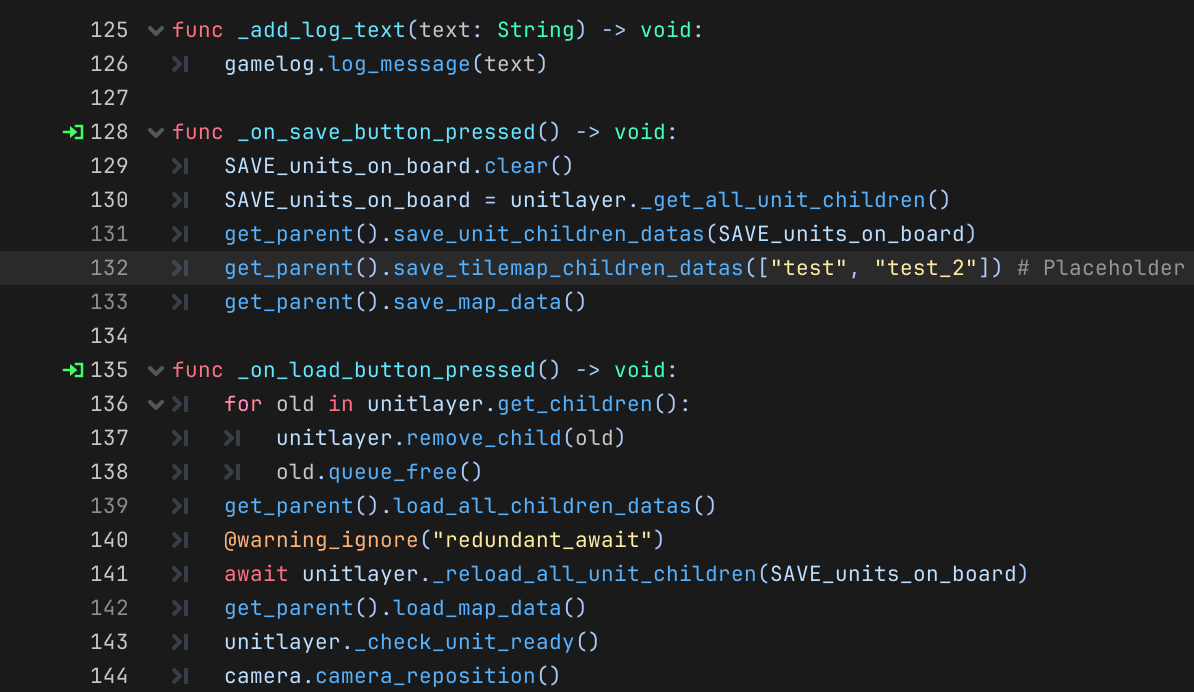
Now for the actual question. What do I need to do in order to make sure that the dynamically created nodes will not disappear?
Things I want to consider:
- The children doesn’t disappear, or it make sure it comes back on load.
- The children doesn’t change it’s name since it’s initialization (since my code uses it to distinguish)
Another thing I want to mention is about my save method, I watched Queble’s (a Youtuber) video:
link: https://www.youtube.com/watch?v=OXp25cZDpEw
And I have a feeling that my current situation is what blindly following this method has lead to.
Apologize for making this long, and it is much appreciated if someone could give me a little push to resolve this issue!
If you need more information, I can paste them along the way!