Hi!
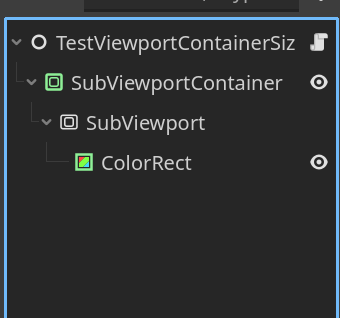
I’m using a SubViewport inside a SubViewportContainer to render a shader onto a ColorRect and extract the result as a texture. I call this function multiple times, updating shader parameters every time, but I keep getting the same image — even though the shader parameters are changing.
Here’s the relevant code:
class_name PlanetTextureGenerator
extends SubViewportContainer

var normal := Vector3.UP
var mesh_pos := Vector2i(0, 0)
var chunks: int = 1
var tiles_pos_texture: Texture2D

@onready var viewport: SubViewport = %SubViewport
@onready var rect: ColorRect = %ColorRect

func _ready() -> void:
	# Hide the SubViewportContainer in play mode
	if not Engine.is_editor_hint():
		visible = false

## Sets required parameters before generating textures
func setup(_chunks: int, tiles_pos: Texture2D) -> void:
	self.chunks = _chunks
	self.tiles_pos_texture = tiles_pos
	self.rect.material = shader_material

## Applies all parameters to the shader material
func update_shader() -> void:
	shader_material.set_shader_parameter("points_data", tiles_pos_texture)
	shader_material.set_shader_parameter("normal", normal)
	shader_material.set_shader_parameter("mesh_pos", mesh_pos)
	shader_material.set_shader_parameter("chunks", chunk_max)
	prints("NEW SHADER PARAMETERS:", tiles_pos_texture, normal, mesh_pos, chunk_max)
	if rect:
		rect.material = shader_material

## Generates a tile texture for a specific chunk
func generate_tiles_texture(_normal: Vector3, row: int, col: int) -> Texture2D:
	prints("GENERATING TEXTURE FOR", _normal, row, col)
	self.normal = _normal
	self.mesh_pos = Vector2i(row, col)

	update_shader()
	print(rect.material.get_shader_parameter("mesh_pos"))

	viewport.render_target_update_mode = SubViewport.UPDATE_ONCE
	await RenderingServer.frame_post_draw

	var image: Image = viewport.get_texture().get_image().duplicate()
	image.save_png("res://debug/shader_output_{}_{}_{}.png".format([normal, row, col], "{}"))
	var texture := ImageTexture.create_from_image(image)
	return texture
I verified that different values are being passed into the shader using prints(), but the generated textures are still identical.
When I change the shader parameters manually in the inspector, the ColorRect updates correctly and the texture result changes as expected.
This makes me think the shader does react to parameter changes — but maybe it’s not updating properly when set via code.
Any insights or suggestions would be greatly appreciated!
If the names are spelled slightly incorrectly (for example capitalisation, use of underscores) or the values aren’t the right variable type (e.g. Vector2 instead of Vector3), Godot won’t actually throw an error but silently ignore the function call.
If there’s no mistake there, are you maybe setting the same uniforms from another location? (even for a different shader) If the resource isn’t set to “local to scene”, uniforms apply to all instances of the shader script.
In my case, there is only one instance using this shader, and I have also made sure the material is set to “Local to Scene” — but unfortunately, that didn’t solve the problem.
The issue is that the generate_tiles_texture() function keeps producing the same texture, even when I change the shader parameters before rendering (I’ve confirmed that the parameters are updated correctly using print()).
So it seems like the SubViewport is not updating when triggered from code, even though I:
update all shader parameters,
set viewport.render_target_update_mode = SubViewport.UPDATE_ONCE,
and await RenderingServer.frame_post_draw.
Interestingly, when I manually change the shader parameters in the Inspector, the texture is updated correctly. So the shader works — it’s just that triggering the render through code doesn’t seem to force the SubViewport to redraw with new parameters.
That’s really interesting — thank you for sharing!
It might actually be related to the fact that I’m writing the script directly in the SubViewportContainer, instead of creating a Node and adding the SubViewport setup inside it like you did.
Unfortunately, I won’t be able to test this approach in my project until Thursday evening, but it’s very encouraging to know that this setup can actually work.
I managed to find a bit of extra time — and I’ve found the actual cause of the issue!
In another part of my code, I was calling this function for each chunk:
var mat = material_manager.create_material({
    "voronoi_texture": await parent.PLANET_TEXTURE_GENERATOR.generate_tiles_texture(normal, row, col)
})
Using print(), I noticed that the generate_tiles_texture() function always returned the same (last generated) texture, because of the await. The calls were overlapping, and the shader parameters were getting overwritten before the viewport had a chance to render.
To fix this, I added a simple lock mechanism to ensure that only one texture is generated at a time. Here’s what it looks like:
var _shader_render_lock := false

func generate_tiles_texture(direction: Vector3, row: int, col: int) -> Texture2D:
	while _shader_render_lock:
		await get_tree().process_frame

	_shader_render_lock = true

	normal = direction
	mesh_pos = Vector2i(row, col)
	update_shader()

	sub_viewport.render_target_update_mode = SubViewport.UPDATE_ONCE
	await RenderingServer.frame_post_draw

	var img: Image = sub_viewport.get_texture().get_image()
	img.save_png("res://debug/shader_output_{}_{}_{}.png".format([direction, row, col], "{}"))

	_shader_render_lock = false
	return ImageTexture.create_from_image(img)
This completely solved my problem — each call now gets the correct texture based on its own parameters.