Godot Version
4.7.1
Question
I’m creating a sidescroller platformer, and I’m having some issues with Terrains in my Tileset that I can’t explain.
I’m using a Terrain that is set up like this, using Match Corners and Sides:
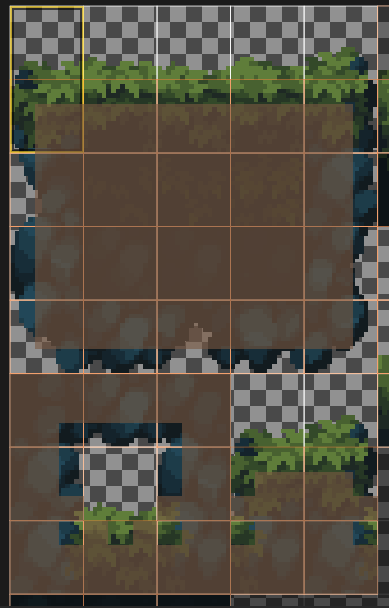
(Please note that the top row of tiles are 16x32 where the bottom 16x16 is the texture origin)
This works fine for most shapes in my game, except that the bottom half of this Terrain is never used, so ‘holes’ in the TileMapLayer are missing some details.
To illustrate this, I’ve create an example scene using this terrain and filling in everything except for a few tiles in the center:
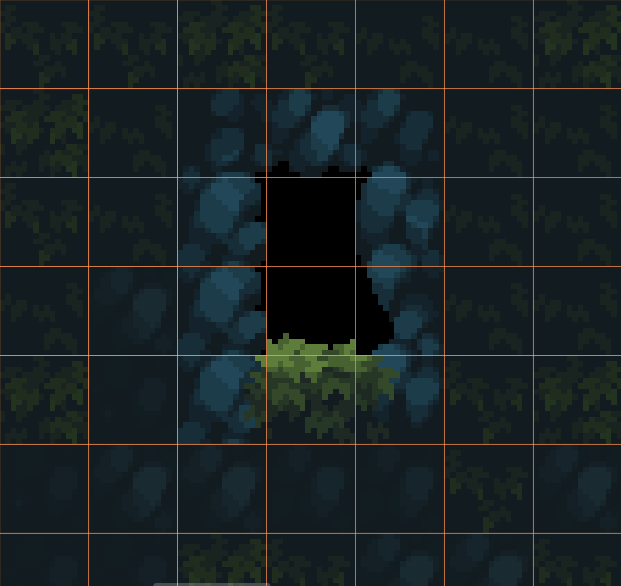
I’m looking at the diagonal tiles to the top-left and top-right of the grassy texture in particular. Those should have a small corner of grass, but I can’t seem to achieve that. What am I missing?