Godot Version
4.7.2
Question
Hi!
I’m trying to render a mesh but I want all the triangles to be ordered by their average depth instead of on a pixel-by-pixel basis.
This means that each triangle of my mesh has one depth value z (the average of all three vertices’ depth) and every pixel of the triangle is rendered at depth z.
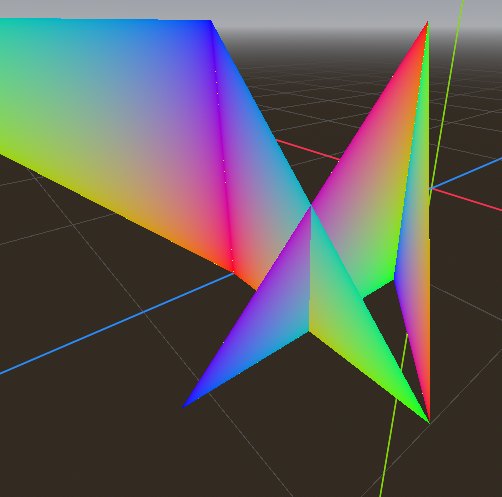
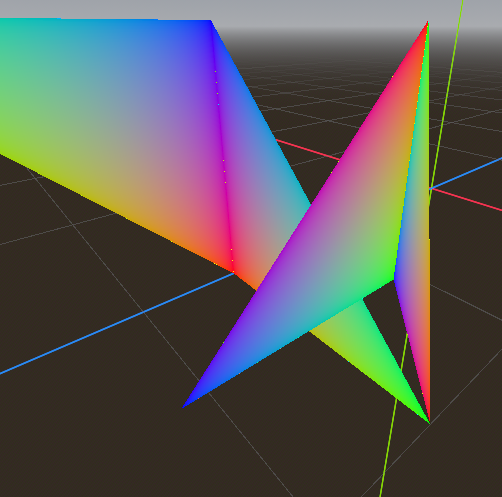
For reference here are two comparison images. The first one is standard Godot rendering, the triangles intersect correctly. The second one sorts the triangles by average depth so one of the triangles shows in front of the other for all its pixels. The second image is what I’m trying to achieve.
I tried building a shader for it but the fragment shader cannot access individual vertices values, only the interpolation of them. With a very convoluted shader I managed to reverse-engineer both the barycentric coordinates and the average depth of the triangle inside of the fragment shader. And while this renders properly, it’s also very very slow so it’s not a viable solution.
Is there a way to either control how faces of a mesh are depth-sorted or to access vertex info from the fragment shader?
What’s the exact purpose of this?
The mesh I’m rendering is created by a Gaussian-Splatting inspired method. During training it uses a custom cuda renderer in order to be differentiable. Since it inherits a lot of the code from Gaussian-Splatting it first sorts the triangles by depth before rendering them. So the intended rendering for the mesh is unconventional and if I render it in the normal Godot way I’m losing a lot of quality
I’m not aware there’s a way to elegantly do painter’s algorithm out of the box.
A slow solution would be to disable depth test, re-sort triangles every frame and create a new mesh.
You can try this though. In the fragment function, write the triangle center depth to DEPTH output, for all pixels in a triangle. To avoid complex realtime calculations, pre-process the mesh, adding a custom vertex attribute that stores the center. You can also store it in an unused standard attribute like vertex color.
Here’s a quick demo:

@tool extends Node3D

@export_tool_button("MAKE MESH") var make_mesh = preprocess_mesh

func preprocess_mesh():
	var arrays := []
	arrays.resize(Mesh.ARRAY_MAX)
	arrays[Mesh.ARRAY_VERTEX] = PackedVector3Array();
	arrays[Mesh.ARRAY_COLOR] = PackedColorArray();
	arrays[Mesh.ARRAY_NORMAL] = PackedVector3Array();  # passing triangle centers in NORMAL attribute
	# create a dummy triangle soup
	for i in 32:
		var center := Vector3.ZERO
		for v in 3:
			arrays[Mesh.ARRAY_VERTEX].append(Vector3(randf_range(-1, 1), randf_range(-1, 1), randf_range(-1, 1)))
			center += arrays[Mesh.ARRAY_VERTEX][-1]
		center /= 3.0
		arrays[Mesh.ARRAY_NORMAL].append_array([center, center, center])
		var color = Color().from_ok_hsl(randf(), 1.0, randf_range(0.2, 0.8));
		arrays[Mesh.ARRAY_COLOR].append_array([color, color, color])
	$MeshInstance3D.mesh = ArrayMesh.new()
	$MeshInstance3D.mesh.add_surface_from_arrays(Mesh.PRIMITIVE_TRIANGLES, arrays)
shader_type spatial;
render_mode cull_disabled, unshaded;

varying vec4 triangle_center;

void vertex() {
	triangle_center = MODELVIEW_MATRIX * vec4(NORMAL, 1.0);
}

void fragment() {
	ALBEDO = COLOR.rgb;
    vec4 clip = PROJECTION_MATRIX * triangle_center;
    DEPTH = (clip.z / clip.w) * 0.5 + 0.5;
}
Thank you for this answer! It is indeed a valid way of doing it and it works for unindexed meshes but my troubles started when trying to do the same thing with an indexed one.
I don’t know how to pre-process the mesh in a context where some vertices are shared by multiple triangles. I think that sadly your solution is the only reasonable one and I’ll have to work with unindexed meshes from now on.
Not sure why would a triangle soup mesh need indexing in the first place.
Godot lets you convert it easily. Bring your mesh into surface tool by calling SurfaceTool::create_from(). Then call SurfaceTool::deindex(), and then get the mesh back via SurfaceTool::commit()