Trying to set a destination level for a door through code

Godot Version

4.7.2

Question

Hi everyone, I tried to find an answer by searching the forums but came up empty. It’s my first post as well so apologies for any mistakes.

I am making a sci-fi rpg where the player’s ship travels to different planets/locations. I’m trying to make it so that the airlock of the ship (which is the ShipLevelTransition) changes the target level based on what planet the player selects from a map ui in another scene.

This is my map UI where that planet_scene is set:

class_name Planet extends CanvasLayer

@onready var go_to_planet_button: Button = $Control/GoToPlanetButton
@export_file("*.tscn") var planet_scene: String
@export var target_transition_area: String = "LevelTransition"

func _on_go_to_planet_pressed() -> void:
	go_to_planet_button.pressed.connect(load_next_planet)
	pass

func load_next_planet() -> void:
	GalaxyMap.hide_planet_information()
	GalaxyMap.hide_menu()
	GalaxyMap.traveling_to_planet(planet_scene, target_transition_area)

This is my galaxy map autoload:

extends CanvasLayer

signal planet_changed

func traveling_to_planet(planet_scene: String, target_transition_area: String) -> void:
	planet_changed.emit(planet_scene, target_transition_area)
 ##ShipLevelTransition connects to this signal
	pass

In my ShipLevelTransition script, these are the relevant parts and looks like this in the editor:

@tool
class_name ShipLevelTransition extends LevelTransitionInteract

@export_file("*.tscn") var level #want to be able to change this via the planet_scene passed in from the map UI.
@export var target_transition_area: String = "LevelTransition"


func _ready() -> void:
	super()
	GalaxyMap.planet_changed.connect(_player_entered)


func player_interact() -> void:
	_player_entered(PlayerManager.player)
	pass


##handles the level change as the player enters the area2d
## target_transition_area is just the name of the target node
func _player_entered(_player: Node2D) -> void:
	if level == null:
		level = planet_scene
	LevelManager.load_new_level(planet_scene, target_transition_area, get_offset() )
	pass


func _on_area_entered(_a: Area2D) -> void:
	PlayerManager.interact_pressed.connect(player_interact)
	pass
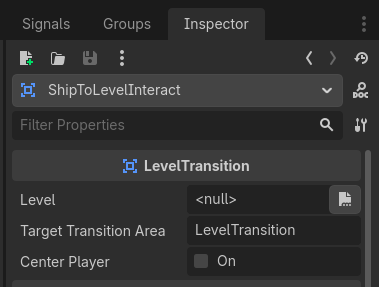
Currently, when the player interacts with the airlock, the game crashes and I get this error:

Error at (16, 17): Identifier "planet_scene" not declared in the current scope.

I’ve been looking at this problem for the whole day and I think I’m a bit lost at this point. It’s clear that planet_scene is getting lost somewhere along the signal chain but I’m not sure where. Please let me know if you know have an answer and I’m definitely open to trying a different method to solving this if needed.

this error usually points to a specific script/its location.

Usually you want to make sure that each signal or method defines all parameters that you want to pass. E.g. in the ShipLevelTransition class, in _player_entered, there is no argument for the planet scene.

currently:
func _player_entered(_player: Node2D) -> void:

but it probably should be:
func _player_entered(_player: Node2D, planet_scene: String) -> void:

The same goes for the GalaxyMaps’ planet_changed signal.

You have some mismatches going on here.
The first thing I would do is properly define the signal.
signal planet_changed(planet_scene:String, trans_area:String)

Now you emit that signal in the autoload:
planet_changed.emit(planet_scene, target_transition_area)
And connect to that signal in ShipLevelTransition with:
GalaxyMap.planet_changed.connect(_player_entered)

However as substain mentions, your definition of _player_entered does not match the signal emitted as it only has the one parameter and it isn’t either of the parameters you emit.
func _player_entered(_player: Node2D) -> void:

It looks to me like you are mismatching the connections.
Maybe:
#GalaxyMap.planet_changed.connect(_player_entered)
GalaxyMap.planet_changed.connect(_player_interact)
However you would still need to redefine the functions so that they accept the proper parameters.

So maybe something like this:

func player_interact(planet_scene:String, trans_area:String) -> void:
	_player_entered(PlayerManager.player, planet_scene, trans_area)

func _player_entered(_player: Node2D, planet_scene:String, trans_area:String) -> void:
	if level == null:
		level = planet_scene
	LevelManager.load_new_level(planet_scene, trans_area, get_offset() )

And then this function doesn’t look right at all:

func _on_area_entered(_a: Area2D) -> void:
	PlayerManager.interact_pressed.connect(player_interact)

Here you are creating a signal connection when an area node enters an area?
I don’t think that is what you want to do.

The variable planet_scene doesn’t exist in ShipLevelTransition so when it reaches the line level = planet_scene, it has no idea what you mean. It doesn’t know that planet_scene exists in another script elsewhere; you have to pass the value through signals.

Your comment says that ShipLevelTransition listens to the planet_changed event emitted by the galaxy map. In the handler for that event, you most likely want to set the level variable to the value sent through and use that in your _player_entered handler. Something like this:

# NB: You'll need to connect this method to the planet_changed signal on your galaxy map
func _on_planet_changed(planet_scene: String, target_transition_area: String) -> void:
self.level = planet_scene
self.target_transition_area = target_transition_area

# And update this method like so:
func _player_entered(_player: Node2D) -> void:
if level != null:
LevelManager.load_new_level(level, target_transition_area, get_offset())

Yep that worked! Thank you, I’ve been reading the documentation on signals and with your explanation I’m starting to understand how to pass in arguments through signals a bit better now.