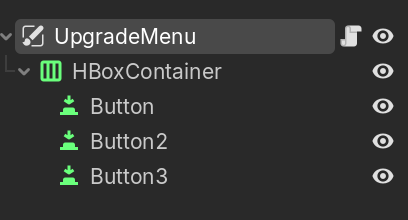
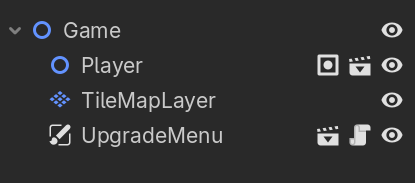
I am trying to make an upgrade system for my game. I want to make it so that when I press the button that says “Option 1”, the player’s movement speed is increased to 300 rather than 100.
Currently, when the button is pressed, nothing happens. I have tried everything I know to get it to do something, but nothing works. What’s supposed to happen is that there is a resource called ‘SpeedUp’ that is extended from a BaseUpgrades resource, and has a function ‘apply_upgrade’ that changes the player’s speed. When the button is pressed, the speed upgrade is added to an array on the player that stores all the upgrades (although there is just the one for now). In the physics_process function, a for loop goes through the array and applies the upgrades on the player.
upgrade_1.gd
class_name SpeedUp
extends baseUpgrades

func apply_upgrade(player: Player):
    #sets the player speed to 300 and also prints out the new speed
	player.SPEED = 200
	print(player.SPEED)
baseUpgrades.gd
class_name baseUpgrades
extends Resource

# Called on the player to apply the upgrade on them
func apply_upgrade(player: Player):
	pass
option1.gd
extends CanvasLayer

#handles the button presses

@onready var target = "res://Scripts/player.gd"

var Speed = SpeedUp.new()

# Called when the node enters the scene tree for the first time.
func _ready() -> void:
	pass # Replace with function body.

#when the button is pressed
func _on_button_pressed() -> void:
	#adds the speed upgrade to the array
	target.upgrades.append(Speed)
	#tests if the button works
	print('test')
player.gd
class_name Player
extends CharacterBody2D

var SPEED : int
var upgrades : Array[baseUpgrades] = []

func _ready() -> void:
	SPEED = 100

func _physics_process(_delta: float) -> void:

	if Input.is_action_just_pressed("test_upgrade_menu"):
		print(SPEED)

	# Get the input direction and handle the movement/deceleration.
	var direction := Input.get_axis("move_right", "move_left")
	if direction:
		velocity.x = direction * SPEED
	else: #slows down the player when movement key is released
		velocity.x = move_toward(velocity.x, 0, SPEED)

	# Get the input direction and handle the movement/deceleration.
	var axis := Input.get_axis("move_up", "move_down")
	if axis:
		velocity.y = axis * SPEED
	else:
		velocity.y = move_toward(velocity.y, 0, SPEED)
		pass

	#goes through the list of upgrades
	for x in upgrades:
		#applies the upgrade to player
		x.apply_upgrade(self)

	move_and_slide()
I added the player node to a global group, but I’m not sure what else I need to do because its still not working. Also it doesn’t let me autoload it either because apparently the name ‘Player’ is invalid, and must not collide with an existing global class name.
If you added your player to the player group and your player has the class_namePlayer then it would be something like:
extends CanvasLayer

var Speed = SpeedUp.new()

#when the button is pressed
func _on_button_pressed() -> void:
    # Get the player node
    var target = get_tree().get_first_node_in_group("player")
    # Check if it's valid or not
    if is_instance_valid(target) and target is Player:
        #adds the speed upgrade to the array
        target.upgrades.append(Speed)
If you want to go the Autoload way then it would be something like:
# Autoload called Globals
extends Node

var player: Player
class_name Player
extends CharacterBody2D


func _ready() -> void:
    # Assign the player
    Globals.player = self

# rest of the code
extends CanvasLayer

var Speed = SpeedUp.new()

#when the button is pressed
func _on_button_pressed() -> void:
    # Get the player node from the autoload
    var target = Globals.player
    # Check if it's valid or not
    if is_instance_valid(target) and target is Player:
        #adds the speed upgrade to the array
        target.upgrades.append(Speed)
Sorry for the late reply, but to answer your question:
Putting the player node in a global group solved the error, and the code was put in the *_*button_pressed function in option1.gd
Like this:
extends CanvasLayer

var target
var Speed = SpeedUp.new()

# Called when the node enters the scene tree for the first time.
func _ready() -> void:
	pass # Replace with function body.

#when the button is pressed
func _on_button_pressed() -> void:
	#adds the speed upgrade to the array
    #This gets the player node from the group and sets that as the 'target'
	target = get_tree().get_first_node_in_group("Game-Wide-Nodes")
	#if the target is valid, it will add the 'Speed' upgrade to array 'upgrades'    on the player script
    if is_instance_valid(target):
		target.upgrades.append(Speed)
	#tests if the button works
	print('test')
Like I mentioned, this made the error go away, but the button still doesn’t do anything. AS you can see, the button should print ‘test’ when clicked, but it doesn’t even do that as of now. This script is attached to a canvas layer scene called ‘upgrade_menu’, which is a child of the main game scene.
in the script ‘option1.gd’, I have connected a Button.pressed signal, which corresponds to ‘Button’ on the upgrade menu scene tree. Thats what the on_button_pressed function is in option1.gd.
Here:
#when the button is pressed
func _on_button_pressed() -> void:
	#adds the speed upgrade to the array
    #This gets the player node from the group and sets that as the 'target'
	target = get_tree().get_first_node_in_group("Game-Wide-Nodes")
	if is_instance_valid(target):
		target.upgrades.append(Speed)
	#tests if the button works
	print('test')
Is this what you meant, or were you referring to something else?
This is the example the docs give for connecting a signal in code.
Forgive me if I’m being dense, but isn’t this what I showed in my code snippet? From what I can tell, they connected the signal the same way I did, and it created a new function in the corresponding script, just like mine.
Connecting via code requires calling the connect() function. Look at the docs section on connecting signals again. Merely making a function you want to handle the signal won’t do anything without explicitly connecting the signal to that function by calling connect().
I think I know what you mean now. However, would it still work if I connected the signal through the engine? Because that’s what I’ve done, I just didn’t realize until now. The docs mention this as a valid way to connect signals, but my code still isn’t working.