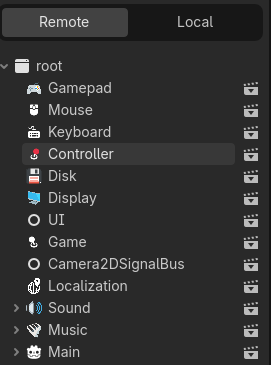
You may remember I go on a lot about naming and how important it is. Both functions and variables use the same naming convention. In this case, set is a callable. It’s a Variantvariable that stores a function. It’s what allows us (if we want) to do Functional Programming in GDScript - which is a completely different paradigm from the Object-Oriented Programming approach we have been discussing in this thread. It’s also what allows us to use Lambdas in GDScript. Both set and get are callables that are assigned to default setters and getters like so:
var counter: int = 0:
	set(value):
		counter = value
	get():
		return counter
Overriding them like this is useless. However, we can do things like this:
var counter: int = 0:
	set(value):
		counter += value
	get():
		return counter -= 1
Now every time we assign a value, it actually adds it to counter, and every time we check the value, it subtracts one from the total. still useless. But now we get to this:
You cannot call super() on a setter (or getter) that is overloaded inline like we have done above because it does not have a function name we can override. Furthermore, set and get are callables that do not exist outside of the initial declaration of a variable (i.e. the line in which the reserved word var is used). Which means I cannot change what it does in an inherited class, because I cannot access it.
However, if, when I declare the variable in the base class, I can assign the set and/or get callable to a function I define somewhere else (typically in the script) - and that function can be overridden (and have super() called) in classes that inherit the variable.
So, if I didn’t assign functions to the callable, then I would have to put all that code for the PlayerHealth component in the base Health node, and I would have to add logic to know when it’s on a Player vs an Enemy (or a Tree).
This is a pretty good summary, and its been on my mind while coding in godot a lot.
I can’t say I understand the rule “Nodes should never know about their parents“
Mby I am too dumb to get it, but to me the workaround to solve this is much more costly than the problem itself.
I made a small ui project template for godot recently and met all the problems you described here as well.
Now, I don’t feel qualified to say that the way I’ve done thigs is good or not so feel free to take everything with salt =).
The UI changes for the player. This one is a nasty problem. Here are the solutions I took into consideration:
Make the UI “local“ - the HP bar becomes a child of the player and the player update is in the hp setter or you assign the HP bar to the player somewhere along
Autoloads
NodePaths - I use to do this when I started godot, you get the root and then walk to the ui node….
Use groups on the player or the UI - then you can access it from everywhere without caring about anything.
Use resources - while you can not have multiple “scripts” on a node, you CAN have multiple resources with scripts attached on one node. Link the resource to both player and UI and you’ve got yourself a middleman.
In my small project I ended up using autoloads for some things like game state, and background sounds despite not liking autoloads…
For button events I use something that probably breaks the rule (“Nodes should never know about their parents“) since I am calling a parent method. The “proper” way of doing it would have forced me to set up a lot of signals (“workaround to solve this is much more costly than the problem itself”).
For UI updates I used a resource (more of as a proof of concept). And added a change signal on the resource property. Tho signals are optional since you can just access the property directly.
Its a bit more cleaner to use resources than to fill your scene with nodes only to add additional scripts.
For a long time I tried avoiding autoloads and resources because you can only access the scripts from the file manager and I prefer accessing them from the scene (a godot plugin could probably solve this).
But recently I caved and now I try to get used to using the file manager for accessing scripts.
The autoloads are the annoying part that I am thinking about right now.
It kinda makes sense for settings, since some of them have global implications so why wouldn’t it be a global script?
But for the sounds …. =|
I want to have access to the background music (witch may be multiple sounds/songs that are playing at once), I worked around using an autoload that has signals, and the parent node subscribes to it and changes the background music when it needs to. (almost the exact example Hoveringskull is presenting as being wrong except mby that I didn’t bother to add warning suppressions).
I dont know if its just me overthinking but composition feels wrong for certain things like sounds.
Let’s say I have 3 buttons that have a button pressed sound
I could add a AudioStreamPlayer node on each or I could just emit a global signal that plays the same sound.
Why have multiple AudioStreamPlayer nodes instead of one?
It has the disadvantage of restarting the sound when another button is pressed but depending on how you look at it it may be a good thing=).
I am still reading on some of the links you have placed in your summary but something really caught my eye. Having like a score for code modules is something that didn’t even cross my mind.
I really want to give it a go one of these days and see how different approaches compare.
I also had this problem about buttons where I used signals.
One way to do it is to simply connect the code of thru their click signal from the main scene script like say the menu component, or from maybe the start screen itself, since it will 100% know what it is supposed to do with the button. You don’t have to emit that “I am clicked what are your orders”, just have the manager already tell them “When u are clicked, here is what to do”
With regards to the sound, u can just create a new scene that has button as the root, and then add the audiostream there inside the button’s gd script, whether you want to hard code cause the menu buttons always make the same sound or whether u want it dynamic with @export because the f-off button has to emit an angry insult instead for the gag game u are build, well that depends on your needs.
With regards to the OOP concept @OriginalBadBoy, it’s the drag and drop design and the fact that u can nest anything on top of everything in a tree structure. That makes it very flexible, but also very confusing for newbies because there are too many paths to a solution, and some are better than others
I dont disagree, coming from Unity was quite confusing as you can just create an object and pile as many scripts on as possible which technically makes more sense in my OOP mind.
As you say , once the tree structure clicks its fine. Most things can be working around with autoloads and signals anyway (or events if you are using C#). In some ways Godot forces you to think a bit more out of the box, which is never a bad thing.
I am not sure I understand what you are referring too when you say “connect the code of thru their click signal from the main scene script“
I load the buttons later on and the scene that has the buttons doesnt really know where the buttons are located in the tree, so I have a local signal and a parent reference on the scene root.
For the sounds, yes that is certainly a solution. But now behind the scenes you end up with
Button1:
-AudioStreamPlayer
Button2:
-AudioStreamPlayer
and so on…
For “unknown” reasons to me, I do not like this =D
Let me address those specifically. I generally don’t agree with having them as hard rules. Let alone something that quality should be judged on, although I think it’s fine to self impose things like this if it makes sense in a specific project context.
Why? If that was the case then engine designers would have never included get_parent() into node api. On top of that, quite a few node types are designed to work as parent-child tandems that can even be considered tightly coupled. A node is not required to be used as an encapsulated module. It can be if you want it to, but there are myriad other ways to employ it. It’s highly flexible.
Again, some nodes are designed to do precisely that. You’re fighting the engine by insisting on this.
“Simple to understand” is quite relative. Some code in a large project will have to be complicated simply by the nature of the problem it solves. You may get stuck if you insist on simplicity at all costs. Better to be pragmatic than dogmatic.
Sometimes copying is the least troublesome way to proceed. It’s much better to repeat code than to maintain a wrong set of abstractions.
I am sure you are right regarding the inefficiency but idk….
It feels wrong =))
I am loading them “dynamically”, not the buttons exactly but the scene that has the buttons (mainmenu/options/about etc…)
Basically is something like → ManagerNode (alway available) → Dynamically loaded custom Scene ( MainMenu → Many other nodes → Button → click signal to MainMenu → MainMenu calls method from ManagerNode by reference)
Wich ends up breaking the rule “Nodes should never know about their parents“
But I dont necessarily agree with it so its fine XD
Sometimes godot can open your mind. LMAO I sound like I am talking about consuming crack.
Why would the main menu need to call the manager node though? If u just need to open the setting menu for example, u can just get it yourself and get the parent of the main menu and then put the menu in.
Or if u exit to main screen, just forcibly transit the scene with get_tree().change_to_scene()
What’s your use case here?
Do not listen to hooverskull… that guy got no brain. He made his architecture worse than his original with no value add. Even I as an application dev don’t agree with applying web patterns in godot.
Can I just say, in as friendly a way as possible, that reading these posts ^^^ is quite difficult when whole words are substituted with abbreviations (yes, I mean ‘u’…). OK, I’ll admit it; I’m old, and very unfamiliar with the latest trends. Just sayin’. Peace.
Oh yeah, probably should have mentioned that.
I do not use get_tree().change_to_scene()
I stopped using it a while ago since it was “slow”.
In my first attempt I had all the menus in the scenes and just toggled the visibility.
Based on that I tried loading the menu as a child instead of using get_tree().change_to_scene() and to my surprise this was faster
Yes, that is the correct way… also it tells me I have replied to you 3 times and if I want to talk more, u and I should get a room, but I dun swing that way XD
@lordadentus and @StJava in response to your discussion…here’s how I handle button click sounds, and a few other things with my User Interface Plugin. I have a Screen class.
screen.gd
## A default screen that is tracked by the UI autoload. All buttons in the screen are automatically
## hooked up to play the click sound set up in the Sound autoload. It also allows you to set a
## default control for when the screen loads, and tracks the last button pressed for when a player
## returns to this screen.
@icon("res://addons/dragonforge_user_interface/assets/textures/icons/screen.svg")
class_name Screen extends Control

## The control that receives focus by default when starting.
@export var default_focused_control: Control

# For tracking the last focused button when traversing menus.
var _button_last_focused: BaseButton
# The button to use if no default button is set.
var _default_button_focus_fall_back: BaseButton


func _ready() -> void:
	hide()
	visibility_changed.connect(_on_visibility_changed)
	child_exiting_tree.connect(_on_control_removed)
	child_entered_tree.connect(_on_control_added)
	_connect_buttons(self)
	UI.register_screen(self)


func _on_visibility_changed() -> void:
	if visible:
		_set_focus()


func _on_control_added(node: Node) -> void:
	_connect_buttons(node)

func _on_control_removed(node: Node) -> void:
	_disconnect_buttons(node)


# Sets focus for a control for keyboard and gamepad users. Picks the last
# button that had focus, then the default if set, then defaults to the first
# button it finds on the screen.
func _set_focus() -> void:
	if _button_last_focused:
		_button_last_focused.grab_focus()
	elif default_focused_control:
		default_focused_control.grab_focus()
	elif _default_button_focus_fall_back:
		_default_button_focus_fall_back.grab_focus()


# Stores the currently selected button for focusing upon exiting and re-entering
# the screen. Only buttons are tracked, since to enter or exit a screen, you
# must typically be on a button.
func _on_button_focused(button: BaseButton) -> void:
	_button_last_focused = button


# Play the default button pressed sound stored in [Sound] (if [Sound] exists).
func _on_button_pressed() -> void:
	if get_tree().root.has_node("Sound"):
		var sound: Variant = get_tree().root.get_node("Sound")
		sound.play_ui_sound(sound.get_sound("button_pressed"))


# Connects any button in the passed node for the button click sound and for
# default focus. Does the same for any buttons farther down the tree.
func _connect_buttons(node: Node) -> void:
	for subnode in node.get_children():
		if subnode is BaseButton:
			if not _default_button_focus_fall_back:
				_default_button_focus_fall_back = subnode
			subnode.pressed.connect(_on_button_pressed)
			subnode.focus_entered.connect(_on_button_focused.bind(subnode))
		_connect_buttons(subnode)


# Disconnects any button the passed node for the button click sound and for
# default focus. Does the same for any buttons farther down the tree.
func _disconnect_buttons(node: Node) -> void:
	for subnode in node.get_children():
		if subnode is BaseButton:
			if _default_button_focus_fall_back == subnode:
				_default_button_focus_fall_back = null
			subnode.pressed.disconnect(_on_button_pressed)
			subnode.focus_entered.disconnect(_on_button_focused.bind(subnode))
		_disconnect_buttons(subnode)
(It used to be longer.)
Now, it just makes sure that the first element gets focus so that you can navigate any screen with the keyboard or controller. If my Sound Plugin is around, it has a configurable button click sound (with a default). Every button in my UI has a click sound, and I don’t have to worry about it. Finally it registers itself with the UI Autoload:
ui.gd
extends Node

var _screens: Dictionary[String, Screen]
var _current_screen: Screen


## Registers a new screen to the UI autoload ensuring only one screen at a time
## is open. (Used by the [Screen] object.)
func register_screen(screen: Screen) -> void:
	_screens[screen.name] = screen


## Opens a new [Screen] and closes the currently open screen.
func open_screen(screen: Screen) -> void:
	if _current_screen:
		_current_screen.hide()
	_current_screen = screen
	_current_screen.show()


## Opens a new [Screen] by the screen's name and closes the currently open screen.
func open_screen_by_name(screen_name: String) -> void:
	if _current_screen:
		_current_screen.hide()
	_current_screen = _screens[screen_name]
	_current_screen.show()


## Opens a new [Screen] by the screen's name without closing the currently open screen.
func open_pop_up_by_name(screen_name: String) -> void:
	_screens[screen_name].show()


## Closes a [Screen] by the screen's name.
func close_screen_by_name(screen_name: String) -> void:
	_screens[screen_name].hide()
Which all it does is open and close screens, so that only one is open at a time. I can reference them by their name - which anyone who needs to can know. They’re stored in a globally-accessible Dictionary.
And for buttons that don’t use the UI, you can access it through Sound anyway.
There are lots of reasons to use Autoloads. I use a bunch of very small ones instead of large global ones.
The benefit being that if I don’t need one, I can remove it. Every single one of those autoloads, is 120 lines of code (not including comments and whitespace) or less.
Between all my autoloads, less than 1,000 lines of code. They’re not bad if you manage them and how they are used. Making things atomic helps with that. If I don’t need gamepad support, I can take that out. Same with localization, or 2D camera support. And this example doesn’t have 3D stuff in it.
Thank you for the example, it is an interesting approach!
In my project I added myself a “small” constraint to avoid using nodepaths since it is a project template I want people to be able the modify the UI structure without having to touch the code (too much).
Doing something like what you did in the “_connect_buttons“ is kinda what I tried to avoid. It would work if I used a node group for buttons, then I could get all the buttons and connect the signals without relying on paths/a specific structure.
For UI I made this choice of instantiating/removing each screen instead of just toggling the visibility. So I still need this “local“ script to add and remove scene, the autoload would end up only passing on signals from the buttons.
It made sense to me since the change_scene logic is inside the “local“ script, which is a parent of the UI scene, to just pass on a reference to itself and let the scene handle the signal.
The scene has its own local signals to the buttons witch can be done manually in the editor or through code or whatever.
The settings autoload is what bugs me. It feels like it will have too much stuff as more settings are added.
I’ll solve that problem when I get to it=) for now it is small enough to not worry.
If I didn’t took into consideration these self constraints for the template I do not think I would have worried that much about the structure of the code.
I tested the first version into a game jam and when I met with any problems I just went back to nodepaths. A finished project is always better than a “well structured” unfinished one (in my opinion).
I don’t think you understand what I’m doing then. I’m not using node paths at all. I’m scanning the tree and attaching signals. That’s it.
Using a Group requires one to manually add each button to the group. Which defeats the purpose of a template.
That’s a choice. One based on inexperience IMO. Those screens do not take up a lot of room in RAM. The bottleneck in Godot games is almost always graphics, and when it’s not, it is procedural generation. No one ever comes on here saying, “How do I make my UI take up les room in RAM?” or “How do I increase the performance of my UI?”
And so the only consideration is how fast does my UI appear when the player pauses the game?
There is no change_scene logic in my UI script. only helper functions. All the logic is in my Game Template, which was hiding under under Main in my last screen shot.
And yes, you can hook up signals through the editor or code. I do that with a generic button script:
class_name OpenScreenButton extends Button

## The name of the screen to open as it appears in the inspector.
@export var screen_to_open: String


func _ready() -> void:
	pressed.connect(_on_button_pressed)


func _on_button_pressed() -> void:
	UI.open_screen_by_name(screen_to_open)
Which means a Screen doesn’t need to know where another one is to open it. It just sends a request to the UI. This means that the screens are loosely couple instead of tightly coupled.
Your method works until your menus get complicated. In my screen shot above, each of the screens is a separate Scene. So if I want to link the Settings buttons to Controls, Audio, etc. I either need to @export a bunch of variables to link those buttons and pass the values down, or do something else. I chose the solution I have now.
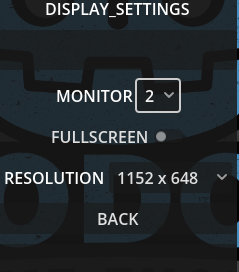
I don’t have a settings autoload per se. I have a few. But none of them store any data. That is stored by the individual Control nodes on each screen. For example in my Display Screen I have an OptionButton that allows you to change the Monitor:
So the value gets saved in the settings file by Display, but Display does not have a variable representing it. Likewise, when Display starts up, it loads the data from the settings file, and if it exists sets it in DisplayServer.
I’ve tested my template now in 5 game jams, two 2 professional games, plus 4 game jams I started but didn’t finish.
Every time I use it, I go back and refactor the plugins based on things I’ve learned. Which are the lessons I am trying to impart to you now.
I think you being goaded @dragonforge. Give it a rest.
I recognize your code as clean, even if it does break the rules that an object should be self contained and should know all it needs inside itself without outside injections like this.
It’s a matter of preference with top down and bottom up. He also said he didn’t agree with me and my approach was the opposite of yours.
I wish I had someone like you in my team doing web dev honestly. I’d kill for code like this rather than all the copy paste code monkeys I used to have to work with.
When posting in the forums, I always keep in mind the future reader who finds this thread. Sometimes you can’t convince the person you’re talking to in the moment, but you might convince the future reader who doesn’t have an emotional stake.
No, this is my bad, I thought get_children() returns only the first level children. So I assumed wrongly that there may be a structure there.
I just downloaded the plugin to look more into it, tho one of the reason I avoided using already existing templates is because to me they feel like they have too many things in it.
And I appreciated it. Not only the lessons but also the time you put into the response.
Here I disagree a little with you, not in the sense that what you are saying is incorrect but more like, what if I am the one saying these questions?
Don’t get me wrong, I GET IT, focusing time and energy on gathering crumbs is better spent on planting crops or whatever analogy fits in here.
All I can say is why waste something that you can not waste XD (please take this more as a joke).