Thnks bro this definition will save my test definitely 
Well game is working now on windows.. i will DD the process soon 
1 Like
Wow I got 10 views and 9 downloads 
 0 followers
  .. ( i know it took time)
1 Like
When you create a software, if you want windows to not be alarmed, you need to pay for a signing key. It’s an anual fee and it’s clearly not recommended to purchase one yet. This key serves one purpose : certify your company so that the OS can eventually be sure the executable belongs to you, and it’s not another version that tries to mimick your software for malicious intents.
That being said, if you don’t sign your exe, it’s not problematic. The error message just says the source is unverified, meaning it might be malicious.
Just download your exe, if you need the pck file, you need to transmit it aswell. You can also pack the pck when exporting so that it is embedded within the exe. Eventually, if you get an error message when executing the file, click on the “see more” button, and you’ll have the ability to still execute it.
2 Likes
Okok . Wel i know about this little much but not that much.. thnks for clearing 
2 Likes
Firstly, ‘Well done on getting your first game completed and published..!'.
I had no issues getting my Windows 11 to execute it, after the standard warning screen (I’m quite used to that; it poses no problem for me when I trust the source…). I ran the game twice, and got a resounding ‘Game Over..!’ very quickly each time. Why..? I’m an official ‘old git’, very much unused to playing video games at all (76, next birthday…), so panicked, pressing keys, mouse and game controller buttons and joysticks, blindly. It did run, however, I just didn’t know how to play it. Soooooo… Suggestions..? OK, I’m old, but I am not that deaf. The sound, when it kicked in, was horrendously LOUD..! First suggestion, then… Add a menu entry leading to a screen whereby the Player may adjust some parameters (Sound FX volume..? Music (if present…) volume..? Perhaps keyboard settings (my keyboard is a French ‘AZERTY’, other countries have other set-ups…).
Second suggestion… Add a menu entry to a screen explaining at least how to control the game, and what options, or actions, to expect (how to gain points, or recover Health, or whatever…). Without this, it’s a matter of trial and error (fun, but short-lived…).
There, that’s enough for now. Congratulations, again, on your first success. Onward, now, and upward..!
Peace.
4 Likes
Ok.. sir.. i got it that’ not your problem i know it’s little complex.. but the main logic is to start press “s” . And the. “W” for move forword “x” for backword, “a” for left “d” for right “q” for reducing gears and “e” for increasing gears. To increase speed. And “z” for automatic movement front and backword. And “c” for repair. “F” for fire. “ R” for reload bullet. And surely i will set the voice problem and add setting menu also with a little tutorial at beginning….
Thanks for trying and feedback. I will fix these things.
Thnks for everything and I do like to be that energetic when be in your age. 76 but still courage to try new things. I respect that…
1 Like
It’s sooo confusing lol
2 Likes
Not that much  .. i hd not discribed shooting system yet
1 Like
Maybe add a version that runs in the browser.
2 Likes
Yes surely
1 Like
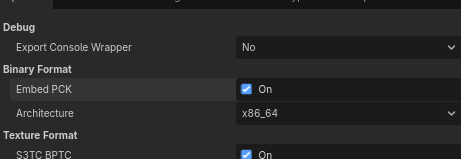
Umm what this will do BRO??
1 Like
It’ll make the PCK and EXE file one file, so you don’t have to use a zip.
1 Like
Okay.. i will use this with my new game  thnks
thnks
1 Like