This was a really interesting read, as was the Command Pattern link. It got me thinking about two things I was working on this weekend and new ways to refactor them. The first is a Sing-along Song feature. The second is how I share States between Players vs Enemies/NPCs and how the main difference is needing to get player input.
Sing-Along Songs
So I’ve had this idea on the back-burner for a while. The idea was to display lyrics to a song, and then have a bouncing goblin dance on the syllables of the song as it plays in time to the song. It was an idea I wanted to add to the credits of a game jam, and I put it on the back burner.
Yesterday, I started re-building that game jam game from scratch, moving from Godot 4.4 to Godot 4.7, and incorporating all the things (and templates/plugins) I’ve implemented since then. I thought I’d start with the sing-along song feaure.
I decided to implement it using the Localization CSV feature, as I’d already implemented and tested it with my Localization Plugin.
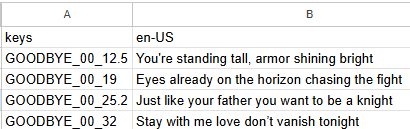
I did this for three reasons. The first, it made it easy to copy and paste the lyrics into Google Sheets. Each line got its own cell. Second, I could use the string replacement feature. Third, I could later add translations if I wanted just by adding columns.
I decided to add the time marks for when each lyric should show up after the song title, and parse that information. this gave me unique strings so that they wouldn’t conflict with other translations. I got it working, and even was able to handle fractions of a second, and instrumental sections by having blank “translations” at timestamps.
Pausing worked, but I thought it would be really cool to rewind and fast-forward. Unfortunately, I didn’t have a way to do that. My implementation was to create a Dictionary with the timestamp as the key, and the lyrics as the value. Once an entry is played, I delete it, and it looks for the next timestamp.
I had considered using an AnimationPlayer. I had considered an iterator. I’m wondering if the Command Pattern would be appropriate here though. Especially for the bouncing goblin, who needs to know where he’s bouncing from and to.
Here’s the current code:
class_name LyricsLabel extends Label

@export var song_title: String
@export_file_path("*.csv") var lyrics_location: String

var timer: float = 0.0
var lyrics: Dictionary[float, String]


func _ready() -> void:
	_load_lyrics()


func _process(delta: float) -> void:
	if lyrics.is_empty():
		return

	timer += delta

	var first_key = lyrics.keys()[0]

	if timer >= first_key:
		text = lyrics[first_key]
		lyrics.erase(first_key)


func _load_lyrics() -> void:
	var file: FileAccess = FileAccess.open(lyrics_location, FileAccess.READ)

	if not file:
		print("Error opening file: ", FileAccess.get_open_error())
		return

	while !file.eof_reached():
		var line_data: PackedStringArray = file.get_csv_line()
		if line_data[0].contains(song_title.to_upper()):
			var second_mark: float = float(line_data[0].get_slice("_", 2))
			var minute_mark: float = float(line_data[0].get_slice("_", 1)) * 60.0
			var time: float = second_mark + minute_mark
			if line_data[1].is_empty():
				lyrics[time] = ""
			else:
				lyrics[time] = line_data[0]
States
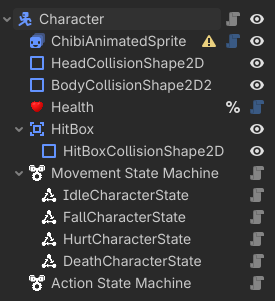
I have a base Character scene. (See above.) It has states in it that are shared by everyone. Idle, Fall, Hurt, and Death.
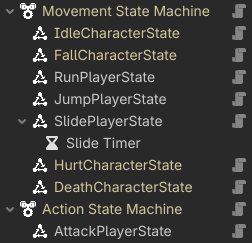
But then the Player needs specific states that handle player input. Run needs input every frame from the player to stay active. Jump requires a button press, and allows you to let go early. Slide requires the slide button to be help down every frame. Attack requires a button press. The last three all have various cooldown timers.
When an Enemy moves, it typically moves towards a patrol point or chases the Player. The logic is not the same. Likewise when it attacks, I use the Hitbox to determine if the player is in range and then make the attack.
When I made the first version of the game, the Enemy AI was really hard to design. But I’m thinking that if I created a Command Pattern to issue the same commands to the Player and Enemy objects, it would not only simplify the number of custom states I need, but also allow for more natural-looking Enemy AI. As a bonus, I think it might solve another problem I’ve been struggling with, which is how to create cutscenes.
One way to do this would be to translate the way the AI works. Instead of moving towards a destination, an Enemy could send the Command to move towards a destination. Just like a plyer would hold down the movement key and decide whether or not to move towards the enemy.
Conclusion
Anyway, just some things I’m working out based on what I read here, and thought I’d share and see if anyone else had any thoughts.