|
Attention | Topic was automatically imported from the old Question2Answer platform. |
 |
Asked By | slavi |
How to attach the created node (stored in the “instance” variable) not to the current one (and not to its child nodes), but to the parent nodes and in particular to /root?
public partial class Inst : Node
{
    [Export] PackedScene prefab;
    public override void _Ready()
    {
        // var instance = prefab.Instantiate();
        Node3D instance = (Node3D)prefab.Instantiate(); //Here I use Node3D to be able to set the position
        GetTree().Root.AddChild(instance);
        instance.Position = new Vector3(1,1,0);
    }
}
The problem is that I only managed to attach to the current and child, any attempt to attach above ends with a runtime error.
At the moment, the scene structure is as follows:
-Node3D
–node [script inst]
—Node3D
The structure of the scene in the variable “prefab” (although I think it doesn’t really matter)
-StaticBody3D
–Sprite3D
These options work
AddChild(instance);
GetNode("/root/Node3D/Node/Node3D").AddChild(instance);
GetNode("/root/Node3D/Node").AddChild(instance);
These options don’t work
GetNode("/root").AddChild(instance);
GetNode("/root").AddChild((Node)instance);
GetParent().AddChild(instance);
GetTree().Root.AddChild(instance);
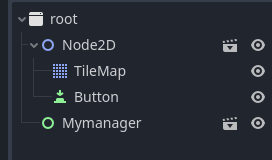
The main idea of these experiments that I want to achieve is to attach several scenes to the root. For example, start with the “Managers” scene and use it to load and unload scenes of the levels of the game world
-root
–Managers
–SomeLevelOfWorld1
–SomeLevelOfWorld2
GetTree().Root.AddChild(instance);
This is the way; there’s something else wrong with the script if this causes an error - debug it and find out (i.e. has the prefab been assigned a value?).
Using SceneTree — Godot Engine (stable) documentation in English
However, you’re essentially implementing godot Singletons (AutoLoad).
spaceyjase | 2023-03-30 10:51
Yes, the prefab is assigned, and it is created correctly if some other commands are used, for example “GetNode(”/root/Node3D/Node/Node3D").AddChild(instance);" or just “AddChild(instance);”
Perhaps I do not understand some nuances, or maybe the problem is on Godot’s side?
E 0:00:01:0628 Godot.NativeInterop.NativeFuncs.generated.cs:332 @ void Godot.NativeInterop.NativeFuncs.godotsharp_method_bind_ptrcall(IntPtr , IntPtr , System.Void** , System.Void* ): Parent node is busy setting up children, add_child() failed. Consider using add_child.call_deferred(child) instead.
<C++ Error> Condition “data.blocked > 0” is true.
<C++ Source> scene/main/node.cpp:1136 @ add_child()
Godot.NativeInterop.NativeFuncs.generated.cs:332 @ void Godot.NativeInterop.NativeFuncs.godotsharp_method_bind_ptrcall(IntPtr , IntPtr , System.Void** , System.Void* )
NativeCalls.cs:5859 @ void Godot.NativeCalls.godot_icall_3_655(IntPtr , IntPtr , IntPtr , Godot.NativeInterop.godot_bool , Int32 )
Node.cs:582 @ void Godot.Node.AddChild(Godot.Node , Boolean , Godot.Node+InternalMode )
Inst.cs:14 @ void Inst._Ready()
Node.cs:1783 @ Boolean Godot.Node.InvokeGodotClassMethod(Godot.NativeInterop.godot_string_name& , Godot.NativeInterop.NativeVariantPtrArgs , Godot.NativeInterop.godot_variant& )
Inst_ScriptMethods.generated.cs:31 @ Boolean Inst.InvokeGodotClassMethod(Godot.NativeInterop.godot_string_name& , Godot.NativeInterop.NativeVariantPtrArgs , Godot.NativeInterop.godot_variant& )
CSharpInstanceBridge.cs:24 @ Godot.NativeInterop.godot_bool Godot.Bridge.CSharpInstanceBridge.Call(IntPtr , Godot.NativeInterop.godot_string_name* , Godot.NativeInterop.godot_variant** , Int32 , Godot.NativeInterop.godot_variant_call_error* , Godot.NativeInterop.godot_variant* )
slavi | 2023-03-31 03:26
Parent node is busy setting up children, add_child() failed
Perhaps this isn’t allowed in Ready as the scene tree is still busy (I do the same but not in Ready, only when required). The other references that work are to different nodes. Using deferred, as answered by the other poster, pushes this back until the next frame that likely means the node is no longer busy.
spaceyjase | 2023-03-31 07:26
I did a little experiment, created a script and attached it to all nodes
public override void _Ready()
{
    GD.Print("READY" + Name);
}
And I found out that if a year has children, then the Ready method of each of its children is executed first, and only then the Ready of the node itself is executed.
So “root” is loaded last?
And the moment that I don’t understand: the node doesn’t exist yet until its Ready method is executed?
slavi | 2023-04-02 08:10
This might help: Using SceneTree — Godot Engine (stable) documentation in English
I suspect that Root is iterating its children so adding another child is probably the engine being sensible (bad things usually happen if a loop is modified while in use), although I haven’t checked the source.
spaceyjase | 2023-04-02 08:16