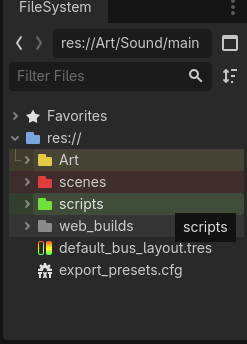
Ik, strange question, but do you prefer using just default color of all folders, or use different colors for folders?
- Multiple colors for different folders
- Single color for all folders
0
voters
Ik, strange question, but do you prefer using just default color of all folders, or use different colors for folders?
I’d never noticed until just now that other colours were available. ‘Default’ is fine, for me. (Minimalist..? Me..? Maybe…). 
I always use colors.
Wait… Folders can be colored?
Lol. That is exactly what I thought. Who knew? Perhaps I will start since @normalized does so it must help in some way.
Wait, you think using colorized folders will make you more like me? Be careful what you wish for… 
Seriously though, it helps a bit with navigating the file system window, especially as the directory structure of a project grows more complex. Besides, all the cool kids are doing it…
There are not enough colors for my project structures. 
I use search (filter), why visually scan the file structure?
I agree. There should be at least 256 colors to choose from.
I’d also like having some icon overlays on top of folder icons… like skulls, hearts and eggplants.
Well, they are not mutually exclusive.
Also, colored folders look like you know what you’re doing… even when you don’t.
I think there should be option to create custom colors with RGB, it would be simple but great solution
I’m an odd one.I use folder colors to prioritize my folders. Like, red is for scripts and scenes, orange is for asset folders, and teal is for the junk folder where I put all my test scenes lol.
Plus you can have the same colors in Explorer or God forbids SharePoint, if using Win 10+ (right-click folder look for the options where you can colour folders, voilà!)
Cheers!
Is that a thing 
I don’t think it serves any real purpose, but it’s the kind of thing I do to feel “productive” while procrastinating.
I feel the same about any activity concerning project directory organization… except perhaps naming conventions.
Oh, I have just discovered guide lines in the editor! How many times have I thought “I wish it had guidelines like Gimp” and I accidently clicked the ruler and dragged, and hey presto (or should I say voilà), a guideline! Is it new? I am genuinely surprised at my own editor ignorance. First colours on folders, and now guidelines!
Oh I can see that becoming a real thing for me too.
It’s been since Godot 3 
Every time you colour a folder, a programmer learns what the heck one of these shader functions actually does