Hi! I finally got around to giving Godot a closer look, I spend some of this weekend fiddling around making a 3rd person controller. Some things I’ve come to appreciate is the res folder being like unity’s resources folder but basically your entire game sits in it and you can just grab anything.. that’s cool, then the other thing is signals, being baked into the nodes.. that’s also super cool. For someone that’s been working with Unity for a few years, that’s one of the first things you struggle with, the question of how do I get things to talk to each other and maintain refs, etc. Anyway, just a bit of praise and a question for those of you that have been working with the engine for longer. Thanks!
5 Likes
Coming from Unreal: A documentation that is actually readable and useful.
14 Likes
that’s pretty funny.. sad too, lmao. Thanks for sharing.
1 Like
Speed.
I use C# but even with that and the compilation times, Godot compiles / builds over twice as fast as Unity. Prototyping is much more pleasant as a result.
8 Likes
The editor  I love working with it. It has quite a lot of nice features and plenty of things are explained inside tooltips or are linked to the documentation.
1 Like
Source code.
6 Likes
Oh that’s a good one, I’m curious how it’s come into play for you? are you able to extend parts in a way that it’s still useable if you grab a new version? (provided they didn’t rework the bit you extended)
Nice, mind elaborating a bit? compared to the previous engines you were in, what’s so nice about it?
Sure! 
Almost everything is explained in tooltips. Nodes, their properties, project settings etc. You can hover on many things and see what it does or how it should be used etc. It saves a lot of time looking things up.
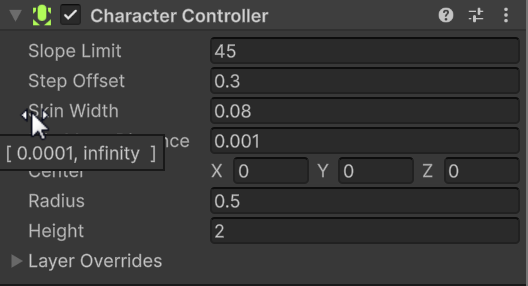
I tried to find a similiar example for Godot and Unity:
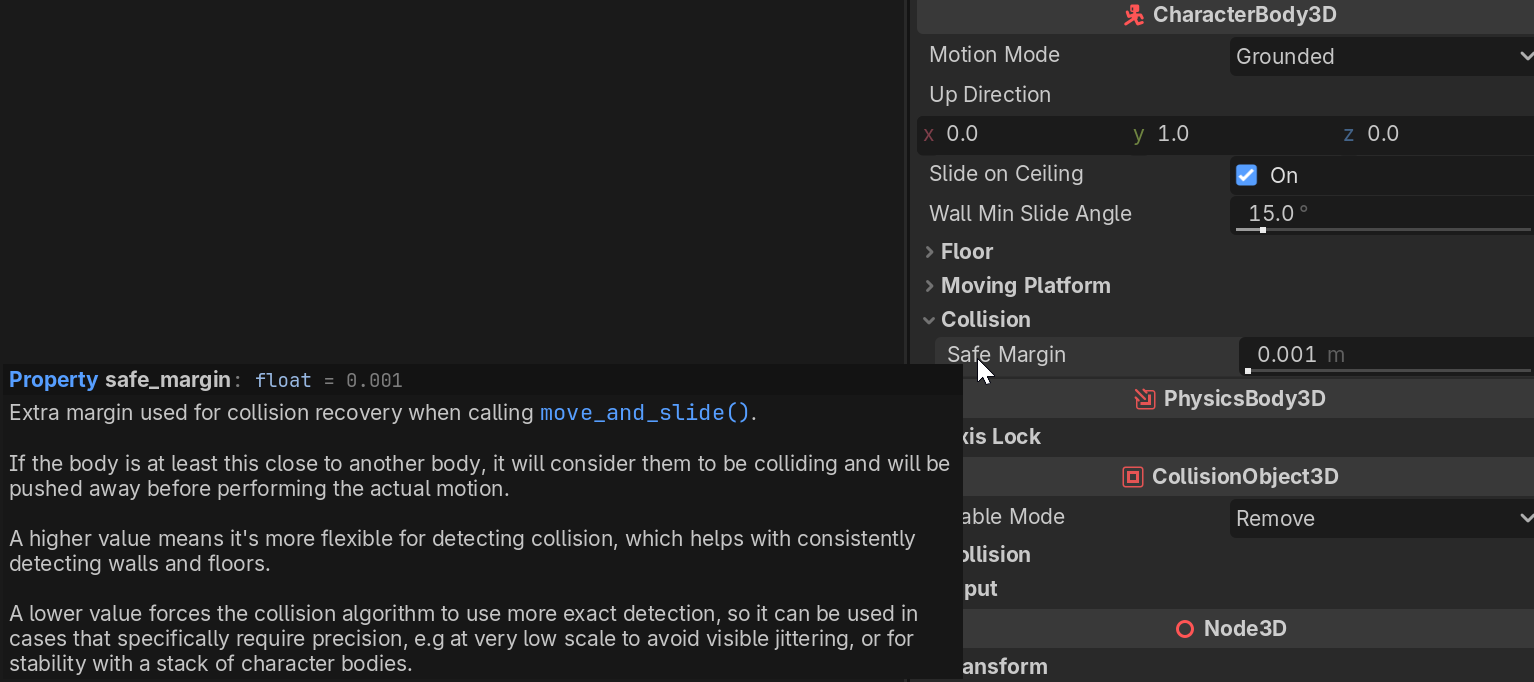
Of course there are more helpful tool tips in Unity, but I can’t remember them being such detailed.
In this example you have to click the  to go to the docs to read what skin width actually means.
5 Likes
Ah yeah, that’s great for onboarding – I wonder if there’s a verbose mode toggle which gives you something more chill like unity’s once you know everything, that almost seems like tutorial mode or something, cool stuff though thanks for sharing.
Coming from Unity … Its not Unity!
Coming from UE .. It doesn’t need a super computer to run something simple.
Coming from GameMaker .. I can actually do stuff I want.
7 Likes
Coming from years of professional Unreal Engine and from some other industry engines I’d prefer to forget:
Stability.
Godot has had a level of version stability that I’ve rarely come across. When even big engines (like UE) change patch levels (not to mention versions), so many things break.
You open an existing project and your 75-100GB of scenes, code, and assets in the latest patch, and you’ll have weeks of regression testing ahead of you.
Usually, you end up giving up at some point and development forever locks at that level - which is oddly enough considered “normal” in the dev world.
With Godot, I’ve got projects that started in 4.0 Beta and have had consistent forward progress with only fairly minor regressions. They were usually even documented in advance, which was awesome.
Another huge win in my opinion is the mostly text-based scenes, objects, and code. It’s SO easy to manage version changes compared to all the binary bs of Unreal. You change a blueprint in UE and good luck doing the diff if someone else on the project also changed it. Your only way to survive is via partitioning, which sometimes isn’t really possible.
With Godot, I’ve made changes to an asset someone else on our team changed, and the merge was literally just simple code diffs and an easy merge.
7 Likes
The source in UE4 (for example) is available when you’re using it for development, but in my experience trying to change “small things” can result in weeks-long deep dives.
A great example of this was adapting the “fortnight-style” character controller networking stuff to a multiplayer space game.
It was an absolute nightmare of tangled code, much of it going all the way back to the Unreal Tournament days.
In the end, you have to just reimplement half of it from scratch.
4 Likes
I primarily meant the ability to look into how something is implemented under the hood, in order to completely understand how it’s working. I look at the source code quite a bit in this respect.
I also like Godot’s source code in terms of style and design choices. It’s simple and it uses object orientation in a measured manner, which is always a plus in my book.
For extending I primarily use GDExtension mechanism. That’s more likely to keep the whole thing forward compatible.
I did do some direct source code interventions, primarily for fun.
5 Likes
Oh, I forgot another one:
Godot’s language support is so much nicer than many other engines. Supporting 4 languages in some of my prior games meant maintaining piles and piles of proprietary tables and workflows, while for Godot it’s actually really easy to maintain element-by-element translation with a simple key-value CSV.
4 Likes
Great points from everyone, figured I’d pull together a summary for anyone skimming:
Documentation — Godot’s docs are actually readable and useful, especially compared to Unreal’s — @Toxe
Speed — Compile times are 2x+ faster than Unity even with C#, making prototyping much more pleasant — @tibaverus
Editor UX — Detailed inline tooltips on nodes, properties, and project settings means less time leaving the editor to look things up — @trizZzle
Source Code — Not just available but well-written — simple, measured OOP. Great for understanding how things actually work under the hood. For extending, GDExtension is the forward-compatible path — @normalized
Stability — Projects started in 4.0 beta still work with only minor, documented regressions. Compare that to Unreal where a patch update can mean weeks of regression testing — @longplay_games
Text-Based Scenes — Merging and diffing scene files is trivial compared to binary formats. No more impossible blueprint conflicts — @longplay_games
Localization — Multi-language support is dead simple with key-value CSVs instead of proprietary table workflows — @longplay_games
It’s not the other Engines — Not Unity, doesn’t need a supercomputer like Unreal, and actually lets you do what you want unlike GameMaker — @OriginalBadBoy
6 Likes
Coming from Unity and proprietary C++ game code GDScript is a blessing. Haven’t found anything I am missing yet.
3 Likes
Coming from Unity, I find Godot so much better to work with. Unity is just a bloated mess.
The one thing I do mention all the time is that you can download and install Godot faster than it takes to start up Unity (Hub + Unity + Visual Studio).
6 Likes
The whole engine and this cool community.
9 Likes
When I first came to Godot from Unity, GDScript felt like a toy language. Simple syntax, no multiple inheritance, optional typing, no curly braces? I immediately reached for C# thinking “this is the real option.”
But here’s the thing: I’m a solo indie dev with 30+ years of programming experience, and I’ve been stuck in analysis paralysis for years trying to build the ‘right’ architecture. GDScript forced me to stop overthinking. The simplicity isn’t a limitation - it’s intentional design that keeps me moving forward instead of bikeshedding implementation details.
I just built a working turn-based tactical game in a week because GDScript let me focus on gameplay instead of fighting the language. That’s what makes Godot special to me - it’s built for people who need to ship, not just architect.
9 Likes