GlobalTweens
Sorry i don’t have images, but you can play demo
Universal Tween Toolkit for Godot 4.x — One line. Infinite motion. Develop without overthinking.
This repository hosts two versions of the same toolkit, kept on separate branches so
that each one stays clean and self-contained:
| Version | Branch | What it is |
|---|---|---|
| v1 — Classic | main |
The original toolkit: a single root GlobalTweens.gd singleton with 69+ ready-to-use tween animations, plus the tweens-demo/ example project. |
| v2 — Refactored (this branch) | v2 |
Full rewrite as a proper Godot plugin: 153 curated catalog animations in 16 categories, the original 112+ classic helpers (backward compatible), a safety layer (GT_Safe), anti-spam, unified options, interactive demo, full docs and a headless self-check. |
Note: the two branches are intentionally not merged.
v2replacesmain’s file
layout entirely (rootGlobalTweens.gdandtweens-demo/exist only in v1). If you
want to adopt v2 as the default, merge thev2branch intomain.
v2 at a glance
- Catalog mode —
GlobalTweens.play(node, "category.name", opts):
16 categories:hit,jump,death,squish,slime,player,boss,
ui_buttons,ui_text,ui_generic,environment,fog,flash,camera,fx,generic. - Classic mode — the original helpers, unchanged:
pop_scale,shake,float_loop,
beat_pulse,camera_trauma,scene_fade_change, … all 112+ functions. - Safety layer (
GT_Safe) — every animation snapshots the node state before
running and restores it when finished, stopped or killed. A node can never be
left permanently distorted, even after spamming animations. - Anti-spam — one active animation per kind per node; new plays kill old ones and
restore their start state. - Unified options —
dur,loops,delay,trans,easework the same way
across every animation. - Error handling — invalid calls (null/freed nodes) never crash: choose
GlobalTweens.error_mode = "crash" | "warn" | "ignore". - Interactive demo —
examples/demo_scene.tscn(run the project to explore). - Self-check —
tools/selfcheck.tscnplays every animation headless and reports
errors:godot --headless --path . res://tools/selfcheck.tscn.
Repository layout (v2)
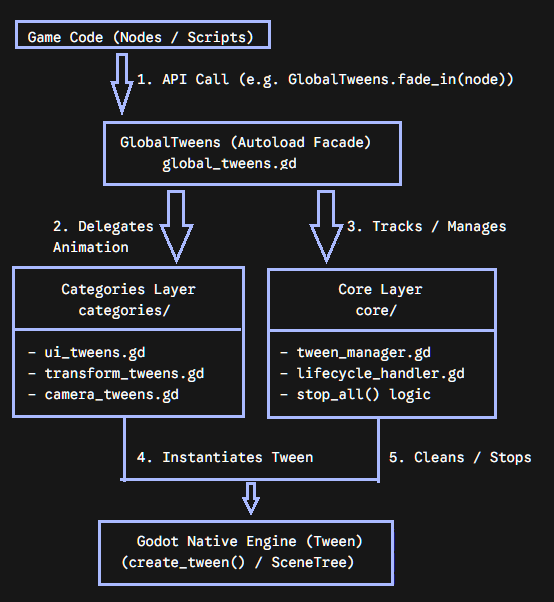
addons/global_tweens/
  global_tweens.gd        autoload singleton (classic helpers + catalog dispatcher)
  core/                   gt_safe.gd, gt_factory.gd, gt_catalog.gd
  categories/             16 category scripts, one per animation family
  plugin.cfg
docs/                     README, ANIMATIONS (full catalog), OPTIONS, SAFETY, CLASSIC
examples/                 demo scene + script
tools/                    self-check scene (headless validation)
project.godot             autoload + demo main scene already configured
Quick start (v2)
# Catalog mode (recommended)
GlobalTweens.play($Enemy, "hit.knockback", {"dir": Vector2.LEFT, "power": 120.0})
GlobalTweens.play($Player, "player.dash", {"dur": 0.25})
GlobalTweens.play($TitleLabel, "ui_text.emphasis")

# Await a tween
await GlobalTweens.play($Enemy, "jump.arc", {"height": 80.0}).finished

# Classic helpers (backward compatible)
GlobalTweens.pop_scale($Button, 1.3, 0.2)
GlobalTweens.float_loop($Coin, 8.0, 2.0)

# Control
GlobalTweens.stop($Enemy)         # kill + restore
GlobalTweens.stop_all()           # stop everything
GlobalTweens.reset($Enemy)        # stop + clear pause
Installation (v2)
- Copy the
addons/global_tweens/folder into your project. - Enable the plugin:
Project > Project Settings > Plugins > enable GlobalTweens
(this registers theGlobalTweensautoload automatically). - Done — the global
GlobalTweenssingleton is available everywhere.
License
MIT — free to use, modify, and distribute.