It’s possible to get that but it’s not simple.
Example:
extends Control

var paragraph = TextParagraph.new()

@export var font:Font

var text = "Hello world!\nAnother line.\nAnd another one that's long so it breaks whenever it needs to."

func _ready() -> void:
	# Add the text to the paragraph with the loaded font and with font size 32
	paragraph.add_string(text, font, 32)
	# Set the max width to 300
	paragraph.width = 300


func _draw() -> void:
	# Get the primary text server
	var text_server = TextServerManager.get_primary_interface()
	var x = 0.0
	var y = 0.0
	var ascent = 0.0
	var descent = 0.0
	# for each line
	for i in paragraph.get_line_count():
		# reset x
		x = 0.0
		# get the ascent and descent of the line
		ascent = paragraph.get_line_ascent(i)
		descent = paragraph.get_line_descent(i)

		# get the size of the line from the paragrah
		var line_size = paragraph.get_line_size(i)
		# prepare the tight rect
		var line_tight_rect = Rect2()
		# get the rid of the line
		var line_rid = paragraph.get_line_rid(i)
		# get all the glyphs that compose the line
		var glyphs = text_server.shaped_text_get_glyphs(line_rid)

		# for each glyph
		for glyph in glyphs:
			# Extract info about the glyph
			var glyph_font_rid = glyph.get('font_rid', RID())
			var glyph_font_size = Vector2i(glyph.get('font_size', 8), 0)
			var glyph_index = glyph.get('index', -1)
			var glyph_offset = text_server.font_get_glyph_offset(glyph_font_rid, glyph_font_size, glyph_index)
			var glyph_size = text_server.font_get_glyph_size(glyph_font_rid, glyph_font_size, glyph_index)
			# draw a red rect surrounding the glyph
			var glyph_rect = Rect2(Vector2(x, y + ascent) + glyph_offset, glyph_size)
			if glyph_rect.has_area():
				draw_rect(glyph_rect, Color.RED, false)
				if not line_tight_rect.has_area():
					# initialize the tight rect with the first glyph rect if it's empty
					line_tight_rect = glyph_rect
				else:
					# or merge the glyph rect
					line_tight_rect = line_tight_rect.merge(glyph_rect)
			# get the advance (how much the we need to move x)
			var advance = glyph.get("advance", 0)
			# add the advance to x
			x += advance

		# draw the tight rect
		draw_rect(line_tight_rect, Color(0, 1, 0, 0.4))
		# draw the size of the line from the paragraph
		draw_rect(Rect2(Vector2(0, y), line_size), Color.BLUE, false)

		# update y with the ascent and descent of the line
		y += ascent + descent

	# draw the paragraph to this canvas item
	paragraph.draw(get_canvas_item(), Vector2.ZERO)
Result:
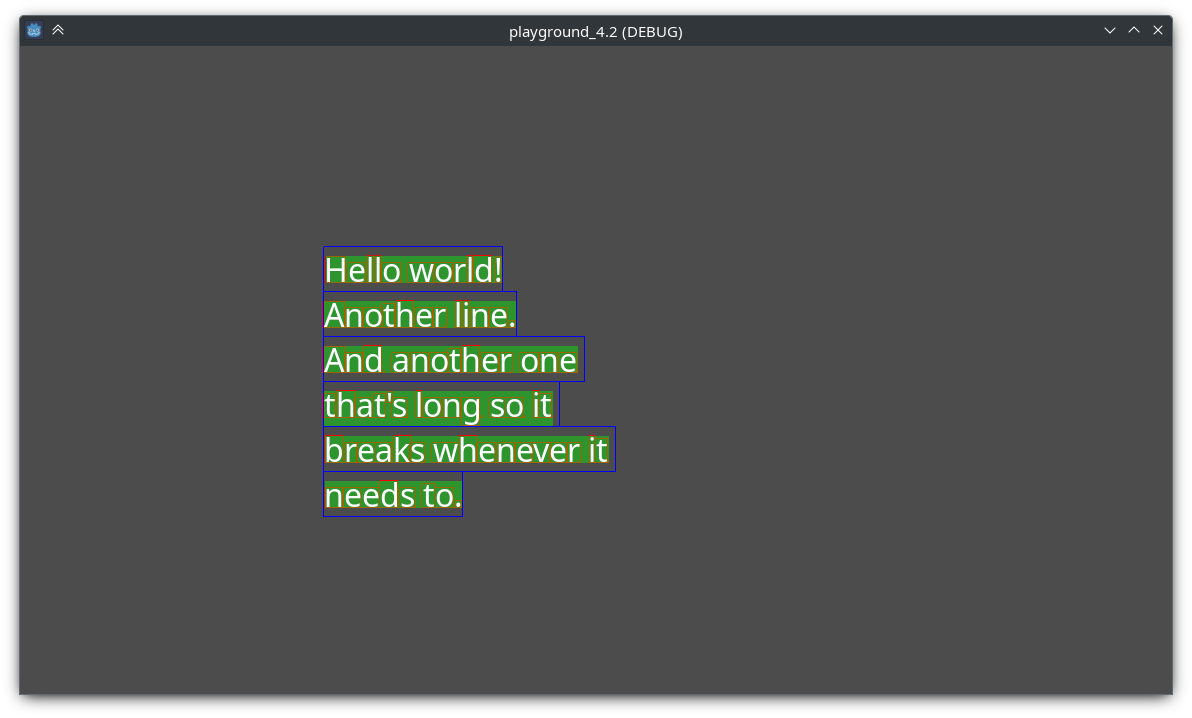
Red: The bounding box of the glyph
Green: The tight bounding box of the line
Blue: The bounding box of the line