I have an account on GodotBuilder. I’ve heard from them via email and I will have some more information shortly. I just need to hear back from them first. I think this is an excellent option and it looks good so far. 
1 Like
I am going to order a build of Godot 4.6.2 PCK encrypt ready export templates tonight on GodotBuilder. I will give them a test and verify that the generated PCK files are indeed encrypted. Then, I’ll report back my experience.
It is indeed $6.00 (current price) to build a template. I’m not sure if that all of them or what and I am looking into that now; I think it is for one. Either way a deal! If you need or want custom or encrypt ready export templates this looks like the low hassle way to go.
Currently GodotBuilder supports up to Godot 4.6.2, with plans to support Godot 4.6.3 sometime soon. I’ll have to back-port, but I think I can handle that.
More soon…
4 Likes
Thanks for keeping us informed 
1 Like
I have good news to report. I had a Linux export template made with GodotBuilder and it’s system. The system is very easy to use. It’s basically select a Godot version (more on this). Select a PCK encryption key (can autogen) if desired. Select the target (Windows, Linux, etc) for your export template build. Build! This will build a ‘default’ Godot template with all version supported features included. Payments is made to start the build ($6.00 per target).
The system presents a page with the build status and details. Keeping this page open you can watch the build progress. When its done it updates this page with a download link to a compressed template file as well as other log data. The system also notifies you via email when the build is done which is nice. Just click and download the template and then open your Godot editor and go the manage exports templates option. The cool thing here is that they include everything you need to just ‘file’ import the compressed template file. It’s important not to rename it. You may have to remove previous templates, I am not sure here as I used a fresh Godot install.
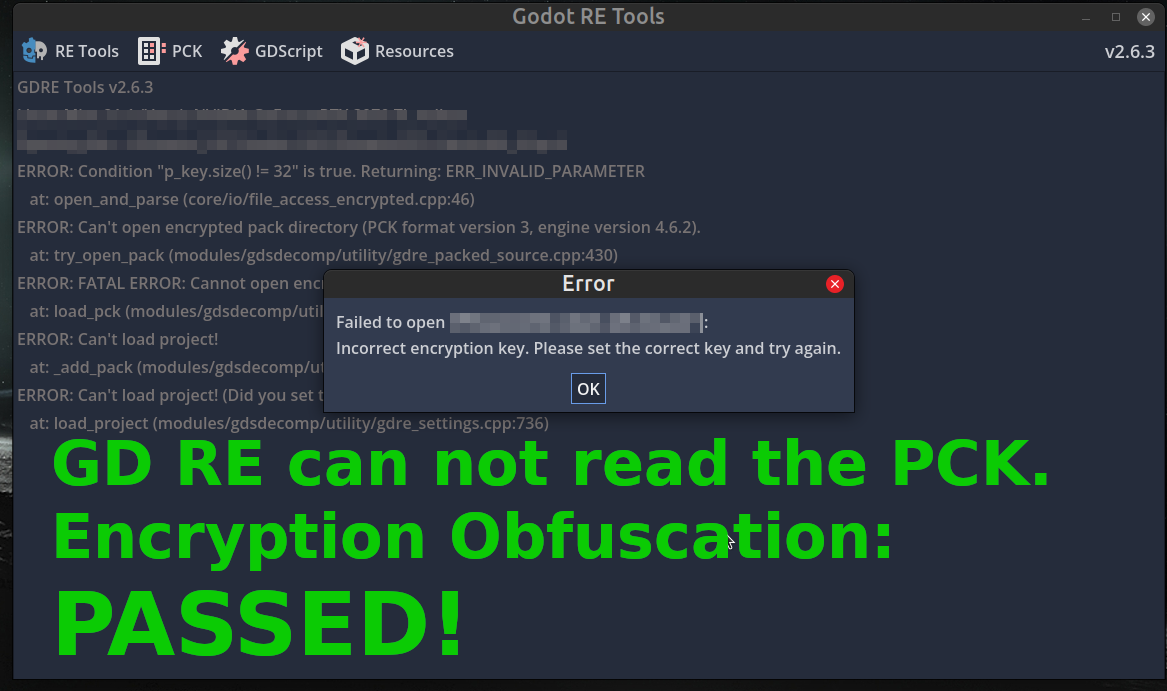
My GodotBuilder encrypted Linux export templates functioned flawlessly. Building a version of my client using the new templates and connecting to the server showed everything functioning normally. I also used Godot RE tools to test the PCK file for encryption. It passed with Godot RE tools unable to open the PCK file due to no key.
It took about one hour to build an export template order. This actually is not bad. The experience reminds me of W4 Build. The interface is easy to use straight forward and the cost is more than fair. They have done a good job and the results so far are great. Very happy to have this option.
On Godot versions. It seemed to have an option for Godot versions other than 4.6.2, but I could not select any other. This maybe in the more advance option area using the Godot engine configuration file for custom export template builds. I will ask about it. It might make sense for a smaller operation to support one version, but I will check and let you know.
Overall, I can totally recommend GodotBuilder. It’s easy to use and the results so far are excellent. I will update you on the Windows export templates build coming up next using the Godot configuration file option and on multiple Godot version support.
If you need PCK encryption and or custom export templates this an excellent low hassle way to go and worth considering. I’ll keep using it.
More soon…
Godot RE tools shows encrypted PCK support!
4 Likes
It’s great that it worked out for you and that you’re happy with everything!  Unfortunately, I won’t be able to use this service because I’m in a country under sanctions and can’t pay for it. But I’m really happy for you.
A very detailed and helpful report. 
1 Like
That has to suck… I’m not sure how to get around that one. I miss the old world when this was not an issue.
You poor poor coder. I feel sad.
@tomcat - Thanks for the tip on GodotBuilder by the way. Awesome tip and just what I was looking for.
1 Like
Hi,
I was contacted by the maintainer of GDMaim. The maintainer does not speak English very well and informed me that, what was said in the issue I opened was not what they indented to say. I would encourage you to visit the issue link at the top of this thread and read for yourself their response. I can accept this and based on their responses to me, very likely. An unfortunate misunderstanding.
From what I gather the maintainer is not the original developer and the current maintainer was kind of left holding the bag, taking on the responsibility of maintaining the plugin by themselves. They seemed a bit overwhelmed to some extent and are working to maintain the plugin for the community, with little time for issue support. Once I understood the situation (I hope I do) I decided to reengage and begin again.
So in the spirit collaboration I offered to explore using the plugin and if it ends up that I can use it I will help to support and maintain (bug and issue responses) the plugin when I have time. I like the path GDMaim has set for obfuscation and coupled with PCK encryption is a win win. I will have to explore the GDMaim code base and see how it works. I would like to see this type of obfuscation approach adapted into Godot as it seems a viable way to have Godot encrypt ready.
If you are into tokenization as a coder you could probably benefit this project. I invite you to look over the code base and see if a supporting role exist. Just be advised that the maintainer is well intended but speaks basic/simple English and may use a translator.
I will be exploring using GDMaim and looking over it’s architecture. I will keep you all upto date on how it goes.
I will continue with GodotBuilder as the go to option for obfuscation and when it makes sense, add in GDMaim’s obfuscation as well. I’ll have more on a the Windows export build using GodotBuilder very soon.
It’s all a journey.
5 Likes
I think it’s great you gave them a second chance. Tokenization is not my forté, but I also much appreciate your encouragement here
4 Likes
I was able to build an encrypted export template for Windows with GodotBuilder. The build process is so easy to do anyone can do it. It looks like they currently support Godot 4.6.2 across the build targets, so you may need to align your project to this version (more on this). The build took 43 minutes which is great and inline with what W4 Build build times where (roughly 38min). For a complete outline of the build process see my thread post here.
I used my game client project to test the GodotBuilder encrypted Windows templates and they functioned perfectly. The generated PCK files also passed encryption obfuscation tests. No issues to report.
I also took a look at the option to support importing a Godot engine configuration profile. You basically drag-and-drop your configuration file exported from your Godot editor. GodotBuilder will apply some guardrails to help insure a usable build. I tested this by removing everything in the build profile. GodotBuilders system informed me it added some features in order for the export template to have a chance of working and a successful build. This GodotBuilder profile feature is something I recommend using with cation. Removing to many or the wrong nodes and features and your GodotBuilder build might fail. For most I recommend not using this feature and going with GodotBuilder default. I will try a custom profile build shortly and let you know how it goes.
You may have to backport your project as I had to do. In my case I just imported a pre 4.6.2 version of my project into Godot 4.6.2. I then basically copied all the files from my Godot 4.6.3 project less the project file and any ‘UID’ files into the newly converted Godot 4.6.2 project folder. I restarted Godot 4.6.2 and loaded my project. It worked. This worked for me and I had no issues. I would like to know if there is a better way to do this.
GodotBuilder tends to stick with the most current stable version of Godot; stable meaning that it is stable on the export build back-end of things. This makes good sense and as long as you are willing to stick with the current supported version, not a big deal.
I’ll have more on the custom profile build soon. I recommend GodotBuilder.
2 Likes