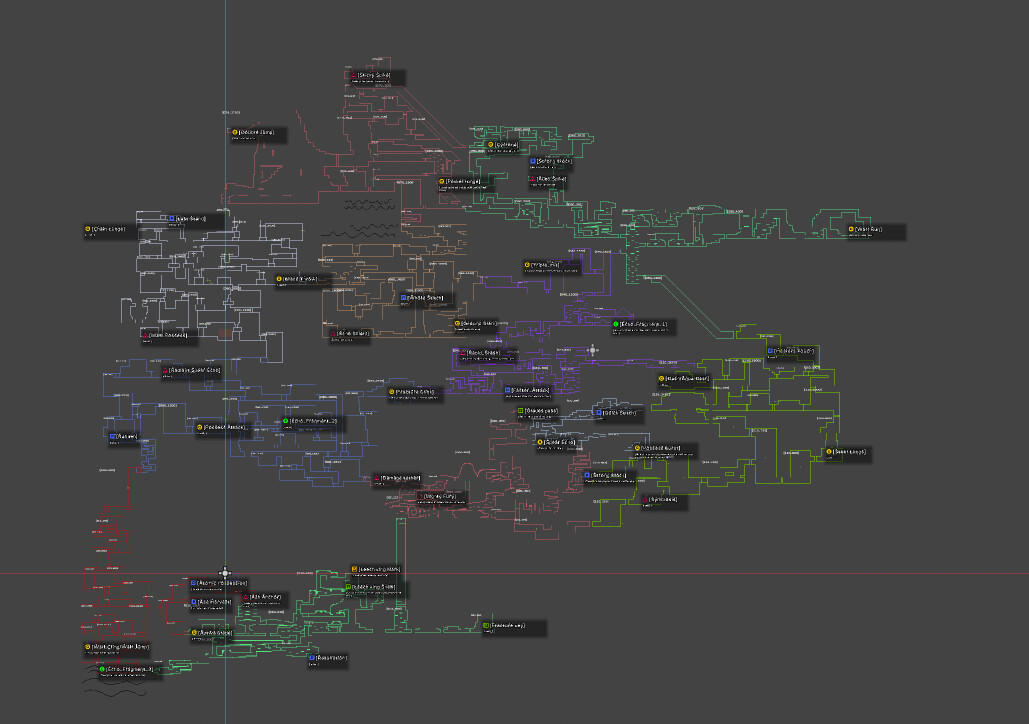
Just wanted to share how I connect room exits in my metroidvania game incase someone is also trying to figure out a similar solution.
I found it very exhausting manually inputting the scene path a room exit connects too, especially during the draft stage when things are moving around a lot, so I built a plugin that allows me to connect room exits on a canvas.
How it works:
- The plugin scans the level folder and adds all levels to the side bar, with a green check to show if the level is already on the canvas.
- The level can then be added to the canvas. Since room exits and positions are saved as resources in the level folder itself, it automatically populates all exits inside the scene on the canvas placing them in the appropriate locations on the levels’ tilemap thumbnail.
- I then connect two exits by dragging a line between them, and the connection data is stored in the room exits’ resource.
It has made my life a 100x time easier trying to connect multiple exits in about 230 rooms.
It’s currently tightly coupled to my game, but I hope can improve and decouple it as a plugin for everyone when I have a bit of time.
PS: I used Lorien infinite canvas app as a base for the canvas.
The game I’m working on is Returner: Child of Ash. It’s a metroidvania where you can possess any enemy for combat and traversal.