So your problem is persistence. Nodes only retain changes while they are in memory unless you save those changes to a disk. So if you close the scene, you lose all the scene data. If you close the game, you lose all the global data.
What I do is give each pickup in a game a bool value like @lastbender suggested, but then I save that value on disk. So let’s walk through it with my game Eternal Echoes which I made for a gam jam.
In-Game View
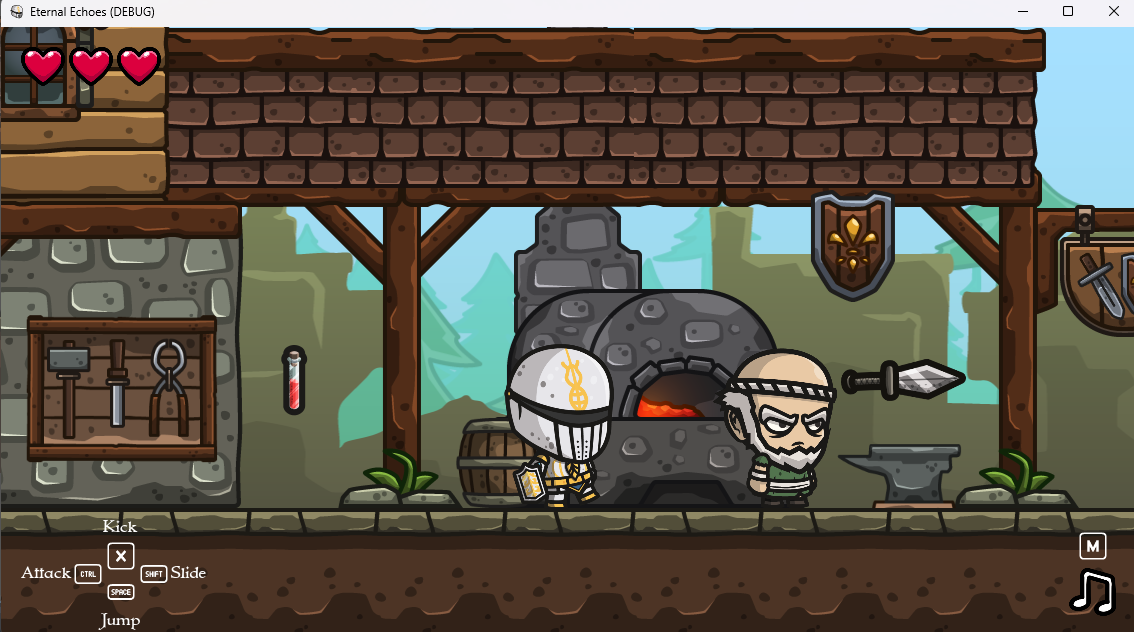
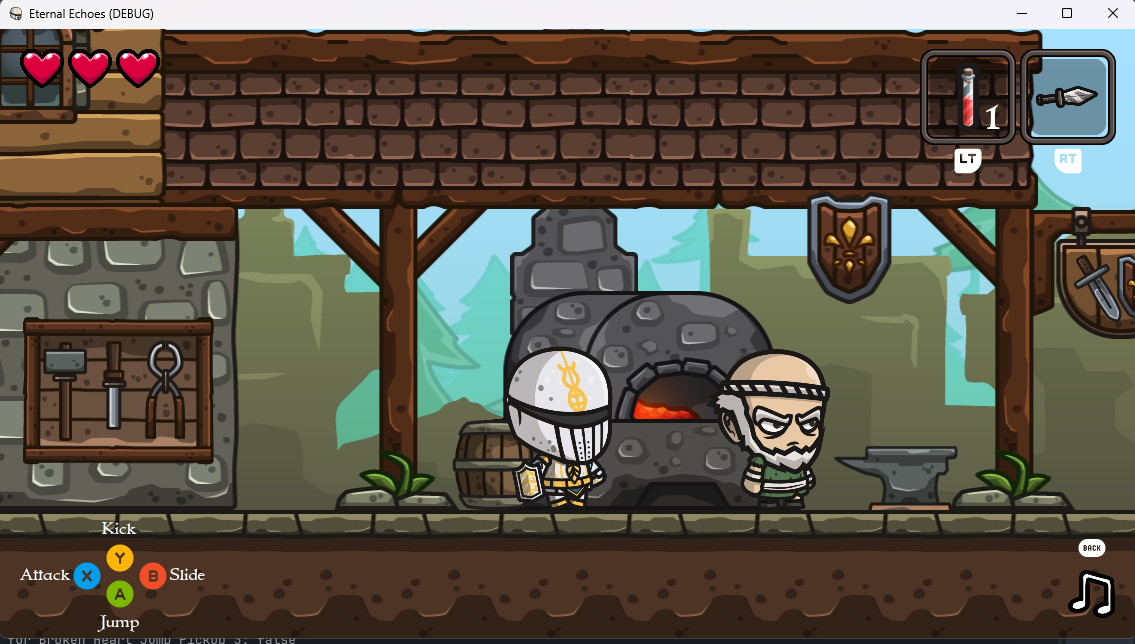
So in the game (above) we have the main character (the knight) who can pick up a potion (on the left) and throwing dagger (on the right). Once they are picked up, they are added to the character’s inventory and removed from the screen permanently (below). Also, icons appear in the upper-right corner of the screen showing they have been collected and can be used.
Editor Setup
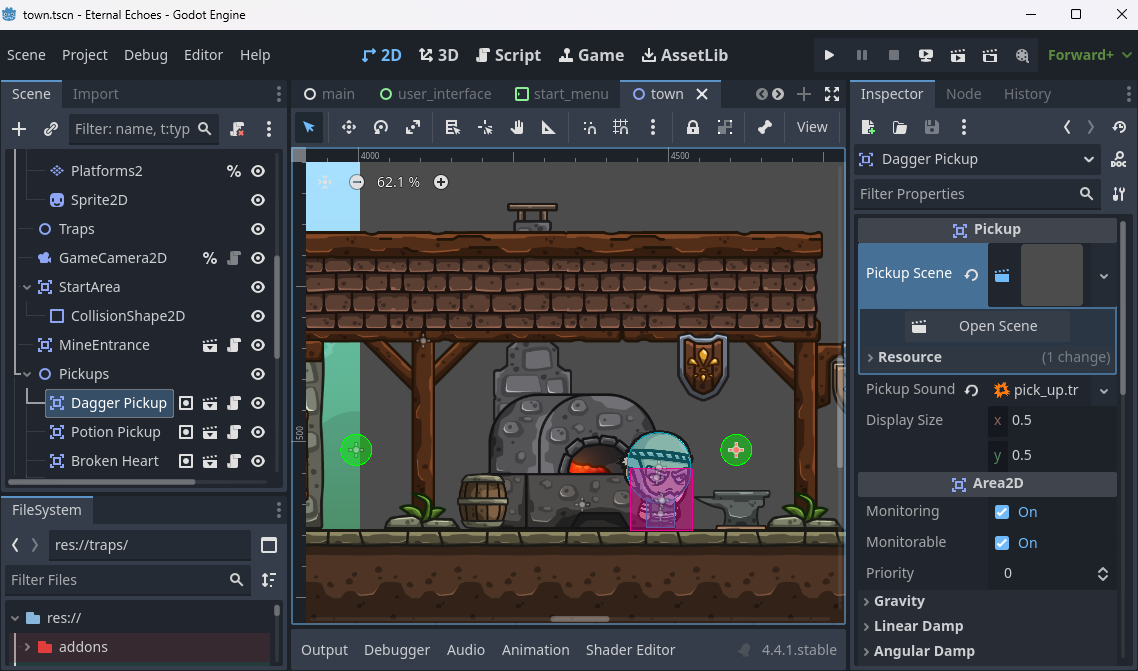
So let’s take a look at the dagger. In the screenshot below you can see that it is selected. I have a Pickup class. (We will look at the code in a moment.) It is based on an Area2D as its main job is to wait for the player to collide and give them whatever object is being held.
On the right under Pickup in the Inspector you’ll see that it has a Pickup Scene which holds the object being picked up. (We will come back to that.) It also holds a Pickup Sound for when the item is picked up. Finally it has a Display Size which is used to scale the picture stored in the Pickup Scene (which can vary).
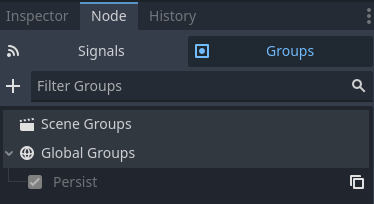
The other thing to note here is that every Pickup node has a little box next to it.  This indicates that the node is part of one or more groups. In this case, the Persist group. (Note that this group can be a Scene or Global group and will work the same.)
The Code for pickup.gd
First, let’s take a look at the code, then I’ll walk you through it.
class_name Pickup extends Area2D

@export var pickup_scene: PackedScene
@export var pickup_sound: AudioStreamPlayer
@export var display_size: Vector2 = Vector2(0.5, 0.5)

var pickup: Sprite2D
var is_collected: bool = false

func _ready() -> void:
	pickup = pickup_scene.instantiate()
	add_child(pickup)
	pickup.display(Vector2(0,0), display_size)
	body_entered.connect(_collect_item)


# Save that the player has already picked this up.
func save_node() -> bool:
	return is_collected


# This pickup has already bee collected. Remove it.
func load_node(collected: bool) -> void:
	if collected:
		queue_free()


func _collect_item(body: Node2D) -> void:
	if pickup_sound:
		pickup_sound.play()
	body.add_item(pickup_scene)
	is_collected = true
	Disk.save_game()
	remove_child.call_deferred(pickup)
	queue_free.call_deferred()
At the top of the file we are declaring this to be of type Pickup and it extends the functionality of an Area2D. Among other things, this means it can be added like any built-in node:
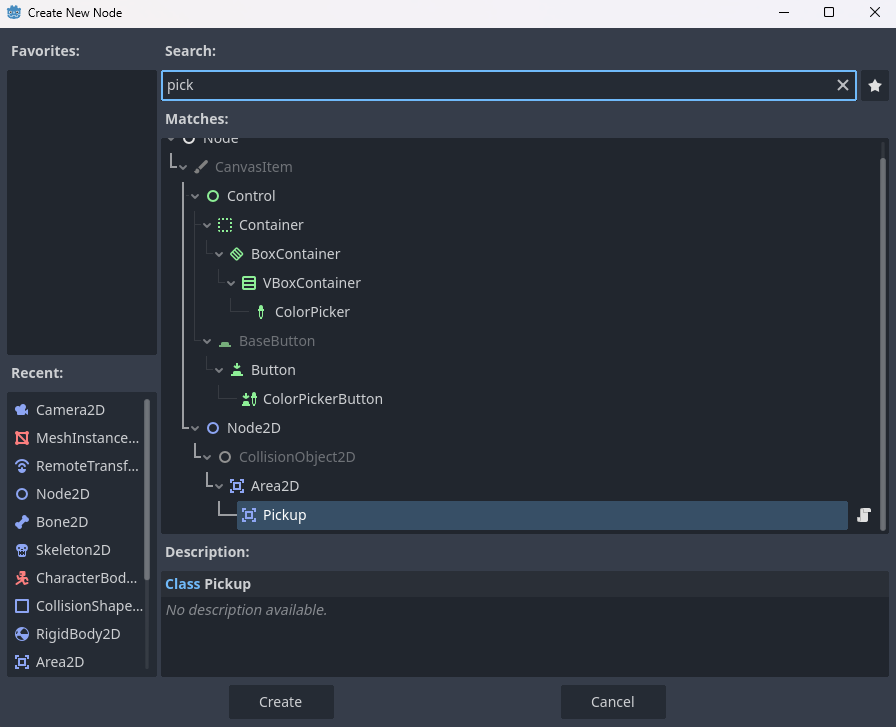
Next we are declaring three exported variables. Those are the ones that showed up in the inspector. I recommend reading up more on the types. For this code example, I have changed the pickup_sound to an AudioStreamPlayer. I use a SoundEffect object which is a custom object I use in my games. We don’t need to discuss it here, but if you’re interested, you can checkout my Sound plugin. It contains the code and information on using it.
Then we declare two internal variables. One will store the pickup_scene and display the actual texture you see in-game. The other is our is_collected bool value. This is why we’re here. It’s starts out false.
Next we have our _ready() function. It sets everything up and sets up the _body_entered signal. When the player enters this, we will call the _collect_item() function below.
After that we have our save_node() and load_node() functions. (We will go into detail on those in the next sections.)
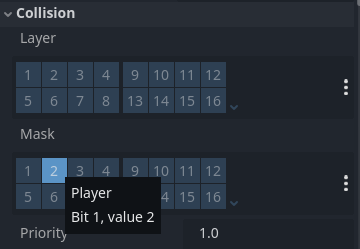
Finally, we have our _collect_item() function. The first thing you’ll notice is that I do not test if the player collided with it. However, I know that only the player can collide with it. That’s because I have physics layer 2 set aside for the player. Then I have the pickup collision mask set only on layer 2. Since by default nothing is on layer 2 and I put the player on it, I can be assured only the player will ever trigger this function.
We then check to see if a pickup_sound was set in the Inspector. If it was, we play it. If not, we ignore it. Then we add the item to the player. We know the body variable holds the player, and I know I made an add_item() function to the player. (Going into that is outside the scope of this discussion however.)
Then we get to the meat. When the player collects the item, we set the boolean value. On the very next line, we save the game calling Disk.save_game(). You’ll note we do not call save_node() here. (Again, we will go into the specifics of how this works in a minute - including what Disk is.)
Finally we do cleanup with call_deferred(). The reason for that is when this function is called, it’s in the middle of a physics pass. We can’t do anything until the physics pass is over, so we defer the calls. (Though queue_free() is always deferred so doesn’t need this.)
The Disk Plugin
The Disk plugin is another plugin I wrote for saving/loading both game data and settings. (They work a little differently.) The code is pretty simple, and pulled with a few tweaks from the Godot documentation on saving games. So if you want to read more or make your own version you can check that out. However, I am going to tell you how to use the Disk plugin so you can drop the add=on into your project and just use it if you want.
Disk is an autoload, meaning you can call it and its functions from anywhere in your code. Whenever you call Disk.save_game() it scans your entire project for any node that is in a Persist group. If it has a save_node() function defined, it calls it and takes the data it is passed and stores it.
Likewise, when you call Disk.load_game() every Persist node is checked for a load_node() function and if it exists, and there is data saved for that node, it is loaded.
Saving the Pickup Node
So let’s go back to the Pickup node and its save_node() function.
# Save that the player has already picked this up.
func save_node() -> bool:
	return is_collected
As you can see, it’s very simple. All it does is return the state of the is_collected variable. (If we wanted to save more than one variable, we would put everything in a Dictionary, and return that instead.)
When we call Disk.save() this value gets saved.
Loading the Pickup Node
In the code I’ve shown you, we don’t actually call Disk.load_game(). That is handled when we start the game. We just call it in the _ready() function of the main node of our game. (Likewise whenever we load a level.) When it is called, this node will run its load_node() code.
# This pickup has already bee collected. Remove it.
func load_node(collected: bool) -> void:
	if collected:
		queue_free()
Since all we are saving is a bool value, all we are expecting to get back is that. We then test it. If it’s true, we queue_free() this node. It never gets loaded as far as the player is concerned.
The Item (Dagger) Itself
One last thing, in the example code above, I’m using a Sprite2D for all my on-screen objects that can be picked up by the player. In this way I can display it in the Pickup scene, in the UI, and even when a dagger is thrown. There are lots of ways to do this. It’s just the one I’ve chosen.

Conclusion
There are lots of ways to store your data and save/load it. I like this approach for a number of reasons:
- Save/load code is universal for every object in the game.
- You can save or load the entire game at any time with one function call.
- You can disable saving or loading on an object while testing just by removing it from the Persist group. (If for example you want to keep your player beefed up but reset everything else for testing.)
- Disk handles the heavy lifting so there’s no need to write file save/load code.
- Disk handles data serialization, so that if you add or remove nodes for saving, your player’s save files are never corrupted.
There are a few drawbacks with this approach.
- You have to save and load all data every time. This isn’t a problem for most games, but if you have 10’s of thousands of objects it’s too much.
- The save file is not encrypted.
However both of these issues are easily overcome with a little more code. And by the time it’s an issue for you, you’ll have a better idea of how to fix it.
Good luck!