Save menu options for a retro styled game

Hi!

I’m working on some menus for saving/loading progress for my game and had a few questions. These are more preferences/opinions type of questions, so I didn’t want to put this in the Help section. It’s not an issue of getting anything to work, but rather what menu designs make sense given the context.

I’m finally getting back to working on a project that I had posted about previously here.

The goal is to make it look and feel like a retro console game from the 8-bit to 16-bit era, but to a point I want to balance that against modern PC gaming expectations and sensibilities. I’ve implemented a save feature (using JSON) that allows for saving of inventory, what’s equipped, player location, whether game events have occurred, etc. and set up a couple small menus to save during the game, and load at the title screen:
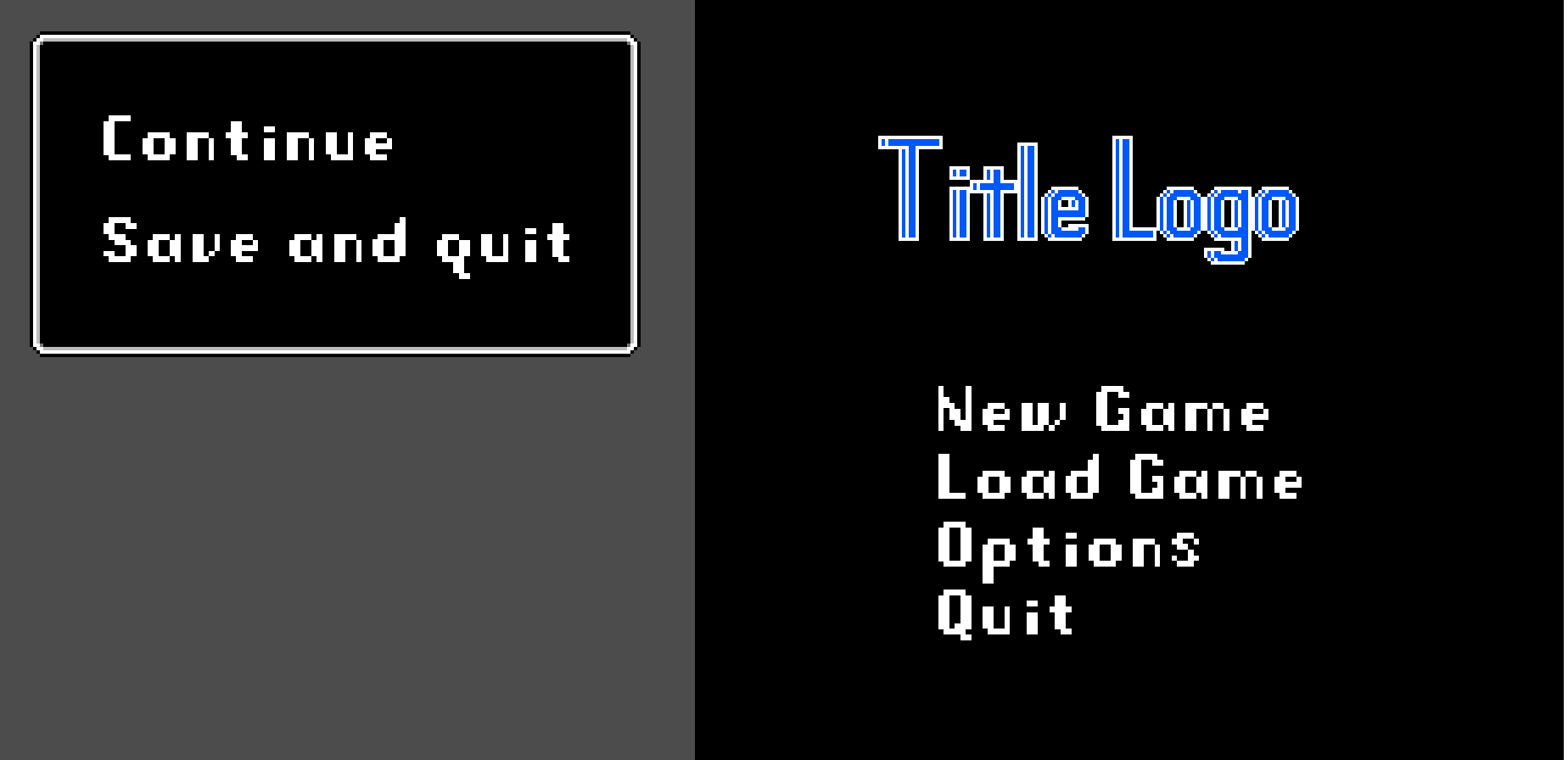
The save menu (on the left) is based on the save menu from Link’s Awakening for the Gameboy, and can be accessed at any time during gameplay. Selecting “Save and Quit” saves progress to that point, and closes out to the title screen (which is a work in progress- there will eventually be an actual title, splash, etc.) while “Continue” just resumes gameplay.

On the title menu, “New Game” starts fresh, ignoring the save data, while “Load Game” loads the save data and starts the player at the last entrance used of the last save-able room the player had been in when the game was saved.

The menu options make sense to me based on the type of games I’m trying to emulate, but would this make sense for someone playing it on their PC? Or should there be more options? Like, are players going to be frustrated that there’s not an option to quit without saving? Or an option to save and continue?

Or would working within these limitations be expected and part of the charm for a (relatively) simple retro style game? Having them start at the last save-able entrance rules out quick saves and save-scumming. Also, they could quit without saving by closing the game window during gameplay anyways. I’m thinking the player would have the option to save when they died as well, but I’m open to the idea of a “Save and Continue” option in the menu, and then just tough luck if they didn’t save before dying.

There’s also a question of whether I should have multiple save files- kinda like the “enter your name” screen on a Zelda game.

What do you guys think?

1 Like

I think having all those limitations for the game would be expected because of the retro style. However, personally I would prefer more options than fewer so I can decide which options I want to use.

Multiple save files makes sense if you’re expecting the player to have multiple playthroughs, like if you have different endings. If it’s linear and the player’s only going to do it once, multiple save files aren’t necessary. Personally I prefer multiple save files but I like to fully explore all the content a game has to offer. A compromise here would be to have an extremely limited amount of save files instead of virtually infinite saves.

I think having a quit to menu without saving would be a good idea. When you close the entire game, you have to open it again, so it would be faster to have a built-in option. I guess it depends on if you are expecting your players to have to quit without saving because they are in an unwinnable scenario or something.

1 Like

Depends on your game design.

  1. Are you absolutely sure that there’s no way for the player to get stuck in a playthrough? Multiple slots are to offload that problem onto the player so that they can recover from poor choices or game-stopping bugs.
  2. Does enforcing a single save enhance the enjoyment of the game, or does it just prevent people from playing it the way that they want? You mentioned “save-scumming” which indicates you may think derisively towards saving. If you only want people who like your way of thinking playing the game, then your current decision is adequate.
  3. If the player dies, is it permanent, destroying the save? If so, then you probably shouldn’t change the system.
  4. Do you believe that not adding those features will affect the enjoyment of more causal gamers, and therefore impact your reviews? If so, it may not be worth risking it. People expect modern features in modern games.

The kind of games you are emulating had limited or single save slots because of limited storage space because they were on cartridges. That’s why we had save points too. Because that way they didn’t have to save the state of the world, only of certain keys things which could be crammed into a small amount of data.

As someone who likes these kinds of games, if I can always proceed further, and my choices don’t really matter to the story, I am not going to care if there’s only one save. If I need more stuff, I’ll hunt more encounters. If there are plot twists that require me to replay the whole game, or chances for permadeath, I’m personally going to have a poor opinion of the game - specifically because I know it was an intended limitation, not a technical one.

2 Likes

I appreciate the feedback! I’ve thought about the possibility of doing multiple endings, but I really only have one (roughly) planned out. Exploration and finding secrets is going to feature prominently, with the possibility to complete various objectives in any order, while some will allow access to new areas (and new sets of objectives). I want to avoid any situation where the player gets trapped by their choices, or finds themselves in an unwinnable scenario. Like, if they need to use a specific item to beat a boss, they’ll have to acquire that item before being able to access the boss, and any supplies (if necessary) will be available in the boss room- the challenge would then be realizing when and how they need to use it.

I’m feeling like a few (probably three) save files might be the way to go, if for nothing else than the nostalgia factor- a call back to when different people in the same household could have their own save files on the same cartridge. I don’t know that the game is going to feel like it necessitates more than one though. I definitely don’t want to have virtually infinite save files with the relatively limited scope of things that can be saved.

Between the feedback that I’m getting on here, and talking with some coworkers, I’m thinking maybe I should just split saving and quitting into separate options? Then there would be three options, and people can save and continue playing by default, and just reopen the menu to quit when/if they feel like it.

3 Likes

Thank you for the feedback!

  1. As much as I’m trying to avoid situations where the player can get stuck, I think you’re right. For instance, I remember on a playthrough of the game Secret of Evermore when I was younger I got locked out of an area of the game due to a bug with the Verminator boss, so I see what you mean.
  2. I personally don’t view saving as some cardinal sin, but I know there’s a subset of gamers who view excessive saving as cheap, which is where the term comes from. I bring it up because with my current set up there’s not much point to it, not that it’s necessarily my way of thinking. I’m hoping my game isn’t going to be so difficult that people feel the need to save after every step, but I’m very open to the idea of having multiple save files if it will actually offer players something that they want to have. I’m asking to get a feel for what’s wanted, not to bring anyone to a particular way of thinking.
  3. No, I really don’t want to have perma-death for this type of game. I’m currently planning on treating death as little more than a slap on the wrist for the player, starting them back to the last save-able room if they choose to continue playing. Part of this “last save-able room” idea comes from if they save in a boss room, and then get killed, I don’t want the player stuck with loading into the room with the boss that just killed them.
  4. I’m not really sure. The video that I posted previously might make it look more action oriented, but I want to focus a lot on exploration, finding stuff, interacting with NPCs, etc. Not high-stakes combat.

Based on the feedback, I’m currently thinking about splitting the save menu to three separate options: Continue, Save, Quit. That way, “Save” will functionally be save and continue playing, but if they want to quit after saving they will have the option to do so. Also, having multiple (probably three?) save files. The overall story is going to be fairly linear, even if sets of individual objectives can be tackled in no particular order. I’ve been picturing it being the kinda game where most players would probably only bother with one save file, but I feel like having more is a wise idea.

1 Like

Getting locked out wasn’t the principle reason for multiple save spots.
In ye olde days of the console RPG (and other save-your-progress game genres) multiple save slots let your brother and sister play their own character.

Most old console games used multiple slot saves. I play them a lot on emulators and both those menus are bang on.
IMO:

  • set up 4 to 10 slots (I guess 3 would work too)
  • don’t offer the user the option to name them. Just name them yourself; something combination like level name:character level:time in game: score
  • agree with tough luck if user doesn’t save in good spot

Try out a couple of older RPG’s to see how it was handled way back say FF1 or a decade+ later with Lufia II. They are easy to find and play-test online.

2 Likes

In “ye olde days of gaming”, once a game shipped, there were no patches and no way to fix bugs. I’m just reporting what people who worked on those cartridge games told me. I believe you may be confusing what they were made for, with what they were used for. But perhaps you have other sources of info that I do not.

No patches for sure but plenty of bugs.
You can google them and interestingly some of them actually became features, like the aliens speeding up in Space Invaders and the Coin Box in Mario Bros.
Here is a list of bugs in the afore mentioned Final Fantasy (I’ll skip the specifics):

    Critical hit bug
    Equipment bugs
    Graphical bug
    Intelligence bug
    Invisible woman of Cornelia
    Magic bugs
    Peninsula of Power
    Resize bug
    Running glitch
    Enemy attack bug
    Stuck in a room glitch

Lufia II was rushed and is notorious for its glitches and bugs.
You can find them here.

I was playing a game (another very old console) a few months ago that I got little ways into and got lost. So I looked up some help and found out that the game is not finish-able due to a bug. The only way to finish it was to play a fan-made rom remake.

In the original 1978 Space Invaders arcade game, the aliens speed up as you shoot them because fewer enemies on screen allowed the processor to render graphics faster.

The “coin box bug” in Super Mario games most commonly refers to a famous, intentional bug in the original
Super Mario Bros. (NES), where a “?” Block would continue to produce coins indefinitely. This bug was noticed by designers who decided to keep it in the game

And of course most famously:

all-your-base-all-your-base-are-belong-to-us

1 Like

Sorry I missed a few key words there. What I meant to say was there was no way to fix bugs. It’s late and I’m tired. Probably time to get off here and go to bed. Of course there were bugs. There are always bugs. It’s just gotten worse since the advent of Internet-patchable games in the 90s.

We used to have to write giant CYA reports in the 90s saying why a game or patch shouldn’t be pushed because it would do more harm than good, because business people thought patches were magic pills with no downsides. They didn’t understand the trust that was lost with gamers when something needed multiple patches, or made things worse.

I remember one game I was working on, it was an early MMO. The more players that logged in, the slower the server got. The higher ups were told we should not to ship the new version. We were overruled. It was pushed and we all went home. The next day we came in and the game had been crashing all night long - every time 80 people logged in, the server went down. QA was blamed for not catching it until the CYA report was pointed out. We rolled back, found the problem ,and fixed it the next day.

So I got a chance to update the save menu this morning:

I simply split the functions for “Save and Quit” to two different options, but I think this is much more versatile while still being very simple.

For the save files, I was thinking about just having them numbered, and maybe displaying the number of hearts the player has in that file? and/or the name of the area they last saved in? There’s not really levels, as the player will be able wander back to past areas whenever they feel like it- and may need to in order to complete objectives. I’m thinking my save file menu will need to be a bit fancier (visually) than my in-game save menu, as it’ll be one of the first things the player sees.

2 Likes

Made a quick video showing the updated save menu here.

Haven’t added the multiple save files yet, but I’m envisioning selecting the “Save” option will open another menu where the player can select which file they would want to save to. Once the file is selected and saved, the game would resume. The “Load” option on the title screen would then open a similar menu where they could pick which file to load.

2 Likes

Was able to implement the multiple save files before work this morning, but didn’t have time to record or post anything until this evening. Anyways, this is a quick video showing how they work in game.

Visually just placeholders to show how they would work. At some point I’ll dress it up a little, with some artwork for the loading screen, maybe change the blinking cursor to something else? Rather than picking a file at the start, I figured it made more sense to start fresh with “New Game” and then the player would be able to pick which file they wanted to save to any time that they saved.

Thoughts on this approach?