As i’ve ended my research and first prototype that turned out to be unfun, i’ve got few ideas and some of them sound fun, but when i open godot idk what to do, like everything would be too hard to start even if i know, any ideas how to overcome this?
Well, if you actually share one of those ideas, others can help break it down into parts. You will learn to do these break downs soon enough. Sharing the experience with others is more fun anyway.
by i don’t know what to do is pretty much technical - i don’t know how to start working, i feel like everything is too hard to make now, or that it requires ton of abstractions ect.
Are you more interesting in making excuses or making games?
If you want to make games, you need to put in the work and get the skills. Yes, it is hard, but it is the only way to grow.
Recognize that you might suck today, but putting in the effort will make you suck less tomorrow. So it goes, until one day you realize you are competent. And then you will realize how much further you have to go.
You won’t reach that point unless you try though.
Mindset. It matters.
1 Like
but idk where to start making my game, i’ve researched stuff, i know godot, but everything seems impossible and unclear to make, what to do in this situation, ik game dev is hard
Share one fun idea and ask for help. Unless they’re so great that you think they’re unique and you don’t want to share.
Then you either just struggle alone, or find a mentor you trust. It’s all up to you.
one of them is making sandbox game with npcs pretty much, that’s all about idea for now
Is anyone forcing you to do it? If you can’t or don’t want to do it - just don’t. That’s perfectly fine.
2 Likes
i want to make a game myself, but idk where to start making it, plannng seemed to help but it haven’t helped much, maybe idea is bad? or too vague?
Break down the npc in parts:
- give it a sprite
- give it stuff to say
- make it patrol
- or chase the mouse cursor
Do anything.
Or write a nice back story first.
then i’ll try, thx for help
1 Like
I know everyone talks about tutorial hell, but if I have a general idea of what I want and don’t know how to do it, I do a search on youtube for tutorials and check them out till I find something relevant to get started. Once I’ve gone through the tutorial, I expand on it. I do it with both godot and blender because even if you have some free model pack or whatever, you will probably need to make some models or sprites. I don’t do 2d, so I don’t know what people use for sprites. Tutorials are a great jumping off point and you see how the author arranges code and things.
2 Likes
sadly there are no tutorials on what to make, i need to think and create that first
Sounds like writer’s block. I would not open godot but do something else and come back in a week.
4 Likes
It’s kind of the chicken and the egg problem. If you know what genre you are going for, you’ll find tutorials that relate to it. Sometimes on a game, I just grab some models and think about what I can do with them and get ideas that way. There is nothing scarier than a blank piece of paper.
Here’s what I do in that situation:
Follow Turotials
I just pick something and do it. 3D modelling, 2D art, making a simple platformer, whatever. My Project folder has a number of subfolders. One is Classes. Inside are folders of each place I’ve bought classes from. One is even from a Godot book (that was early on.) Once I’ve done the class, even if I didn’t like it, I have things I can look back on.
I also change the project icon for every class to match the place I learned it from. For example, you can see here that I did a class from Zenva on a Crafting System, and I referenced it for the game I’m working on now.

Setting project icons is one of those little level up things that really helps my development. It’s much easier to find projects when everything has a unique icon. You’ll note that my Godot Forum Questions project - where I create code and solutions for questions people ask - has the default icon, because well… My RPG Test Project from Godot 4.2 also has the default icon- because I created it before I started using project-specific icons. But scroll down a little farther and…

You’ll see another Zenva course for Multiplayer and a GameDev.tv course on making an Action Combat RPG (which was worth it for the Inventory screen alone). Then some plugins, and some game jam games. I often refer to my game jam games because I solve problems in them. Then I replicate the solutions to other projects when I have the time to make them better. For example yesterday I updated my Carousel Menu Plugin with a few things I added when I made Rick O’Shea two weeks ago.
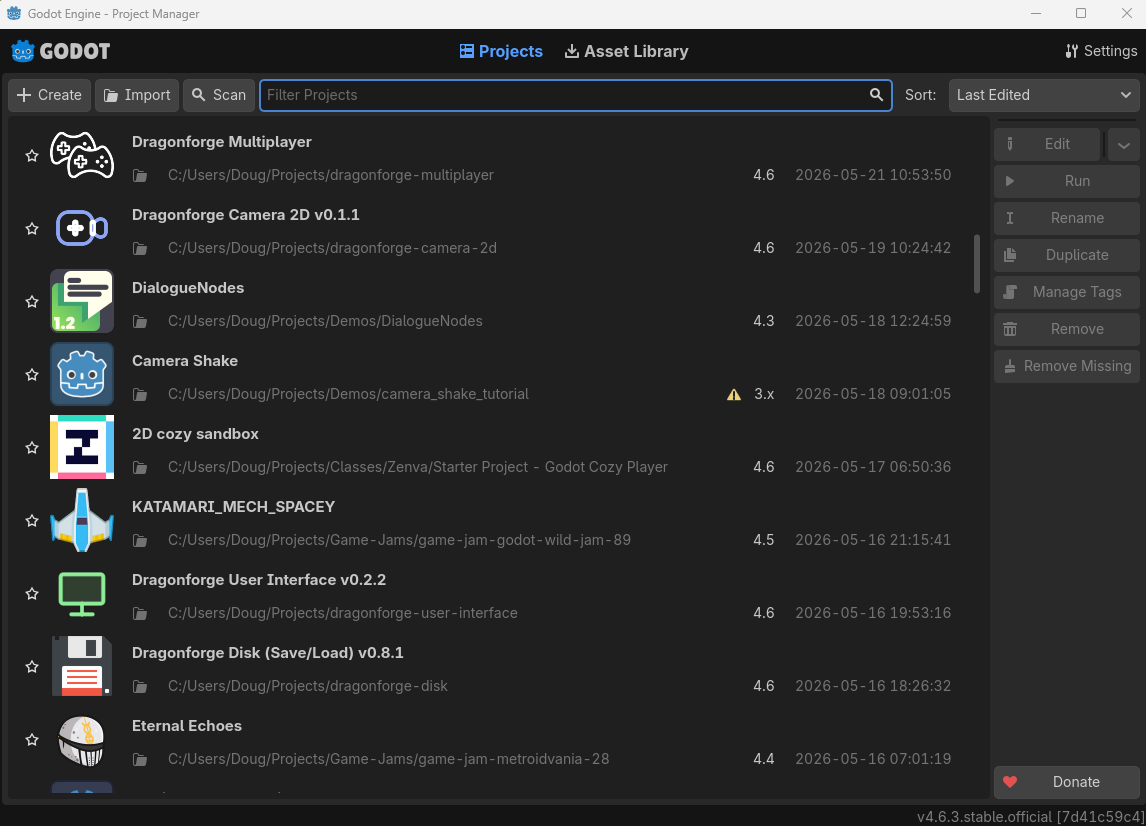
I also have a Demos folder, where I put demos that people have made that I want to look through. Like the Camera Shake and DialogueNodes ones here.
Ultimately, having all this stuff to refer back to really helps me move forward. When I need to do something, even if it’s not exactly what I need, it saves me a lot of time making a game. For example, there is no documentation on ricocheting bullets in 3D, but there is in 2D. So I applied that code in Rick O’Shea, because there was nothing online about how to do it in 3D.
I also think this is a reason to do both 2D and 3D projects - even if you only plan to work primarily in one. Also, each person you follow tutorials from will teach you new ways to do things. There are so many ways to organize Control nodes. Which is something you need in every game.
Game Jams
If you don’t know what to make, or have a bunch of ideas to choose from, but none sound like something you want to pursue fully, do a Game Jam. There’s Trijam, the 3 hour jam. There’s micro jams and mini jams. There’s week-long jams and month-long jams. There’s Godot Wild Jam #94 starting next Friday.
Jams give you a chance to see what you can do on a deadline. They help you master a lot of the skills people have been talking about in this thread. They help you get feedback. Make your goal to make the crappiest game you can in the time frame that runs. Over time, your crappiest game will start to become good.
A year ago I got 741 out of 1,002 in the GameDev.TV yearly jam. This year I got 301 out of 834. And in their Halloween Jam 6 months ago, I got 12 out of 286. Failure helps a lot. I wrote Post Mortem Devlogs for every jam I was in. You can find links to them at the top of my itch page.
So jump in and make a game in a jam, and apply them theme to whatever game idea you decide to work on. Often the jam theme helps me choose.
Read the Forums
I have learned so much reading what other people say to answer questions - even if I didn’t care about the problem the OP was having. Often I learned tips and tricks I didn’t know. Like that pressing Ctrl+D multiple times when highlighting something in the script editor allows you to change all the highlighted references at the same time. Or that holding down Alt instead of Ctrl when dragging and dropping a node into the script editor makes an @export variable instead of an @onready variable.
Just Do It
Set aside 15 minutes every day to work on your game. If it’s a drag and you want to stop after 15 minutes, stop. But on good days you’ll work more. And that habit will carry you farther than anything else you can do. It will take you through blocks, frustration, confusion, and everything else.
1 Like
I would reference the “Double Diamonds” idea, design ebbs and flows in many sequences of expanding scope and understanding, then refining that collection to a point. If you don’t know what to do then the next step is to find many things to do, jot them down in a list. Once it feels like too much stuff, assess the list, what should be cut or explored deeper.
“Double Diamonds” is pretty corpo talk especially when tried to make into a well-defined rubric.
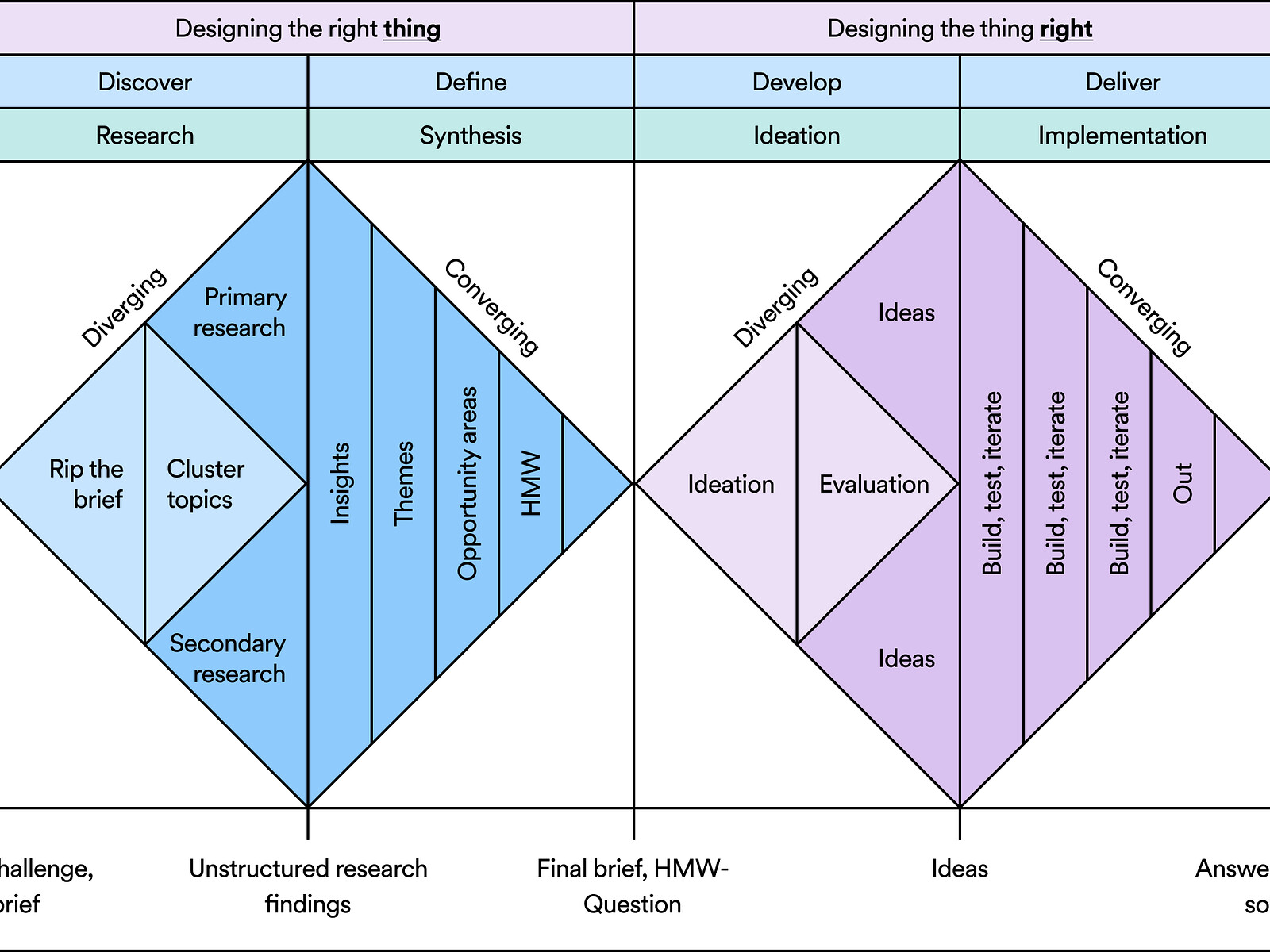
Then there’s this video which does explain the concept with more feelings in it.
3 Likes
ton of usefull tips, thx for them, and for the sacrifice to write it all xd, i’ll definitively use some of them
2 Likes
I pray to God-ot.
Seriously, whenever you feel like you don’t know what to do, don’t fight it.
Listen to your body.
Are you too overwhelmed? Take rest, don’t procrastinate and just get bored.
You can’t focus? There are too much thing going on in your environment. Hide your phone in the other room, organize your stuff, just make your workplace neat.
Motivation help you start, maintaining your body helps you stay.
In terms of Godot, all you need is to read the documentation. Although, there are some exceptions because some article are not beginner-friendly, that’s where I go to YouTube and search the topic I find hard to understand.
In terms of specific skills like Math, and Physics, just try to learn what you need. Like for example, you need to implement a grid-based jump where the player must jump along the curved line. Ask AI what you need to learn to do that. Then you can use p5js.org to visualize algorithms for example Bezier curve and lerp, write them from the scratch just using shapes and moving them with Math. You can also do that in Godot, although it won’t be as easy.
In terms of project architecture, there’s really no shortcut here, you need to read a lot. You can refer to the documentation ‘Manual’, a lot of useful stuff there. I would recommend starting from:
- Best Practices
- Scripting
Lastly, you need to know your goals. Why are you doing this? Do you like making games or do you just want to make money? Working on something that might not yield a result will demotivate a lot of people. Make sure you have the passion for making stuff, it can be learned!
1 Like