I never thought I’d live to see the day @normalized recommends the use of more awaits. This is a special day for the entire await using community.
5 Likes
You haven’t seen this beauty then, have you?
4 Likes
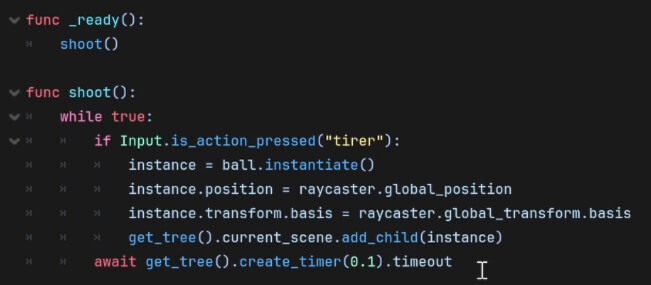
 but it d’ont work with func _process() but it is super useful for other things like my player or menu
1 Like

Btw the guy in that tutorial video hasn’t got much clue how it works. He’s just vaguely aware that some magical waiting is involved. He also calls await “a function” which it really isn’t.
6 Likes
Your while true loop is essentially the same concept as func _process(), you (or this youtuber) just reinvented the wheel.
There are a bunch of ways you can achieve the same effect. Here’s your version, just a little cleaned up and with the improvement @normalized suggested, otherwise you might be missing clicks between the checks.
extends Node

const shoot_cooldown: float = 0.1
var count: int

func _ready() -> void:
	shoot()

func shoot() -> void:
	while true:
		if Input.is_action_pressed("ui_accept"):
			## --- here goes your bullet spawning code
			count += 1
			print("shot %d" % count)
			## ---
			await get_tree().create_timer(shoot_cooldown).timeout
		else:
			await get_tree().process_frame
Here’s a version with func _process()
extends Node

const shoot_cooldown: float = 0.1
var count: int

func _process(_delta: float) -> void:
	if Input.is_action_pressed("ui_accept"):
		set_process(false)
		## --- here goes your bullet spawning code
		count += 1
		print("shot %d" % count)
		## ---
		await get_tree().create_timer(shoot_cooldown).timeout
		set_process(true)
And here’s what I would call “the proper way to do it”, using a timer and signals, no awaits:
extends Node

const shoot_cooldown: float = 0.1
@onready var timer: Timer = Timer.new()
var count: int

func _ready() -> void:
	timer.wait_time = shoot_cooldown
	timer.timeout.connect(shoot)
	add_child(timer)

func _unhandled_input(event: InputEvent) -> void:
	if event.is_action_pressed("ui_accept"):
		shoot()
		timer.start()
	elif event.is_action_released("ui_accept"):
		timer.stop()

func shoot() -> void:
	## --- here goes your bullet spawning code
	count += 1
	print("shot %d" % count)
	## ---
4 Likes
ha tanks like i am beginner i folow evry tutorials on youtube
It’s ok, everyone starts somewhere and it’s really hard to differentiate good from bad advice when you’re just beginning your journey. You’ll get the intuition for it with time. And if you’re ever in doubt - don’t hesitate to ask here on the Forum, you have plenty of experts eager to help you.
If you haven’t already, I’d recommend you go through these official tutorials, as they teach good principles:
3 Likes
thx for your advices
1 Like