All 3D models' materials broken

Godot Version

4.4.1

Question

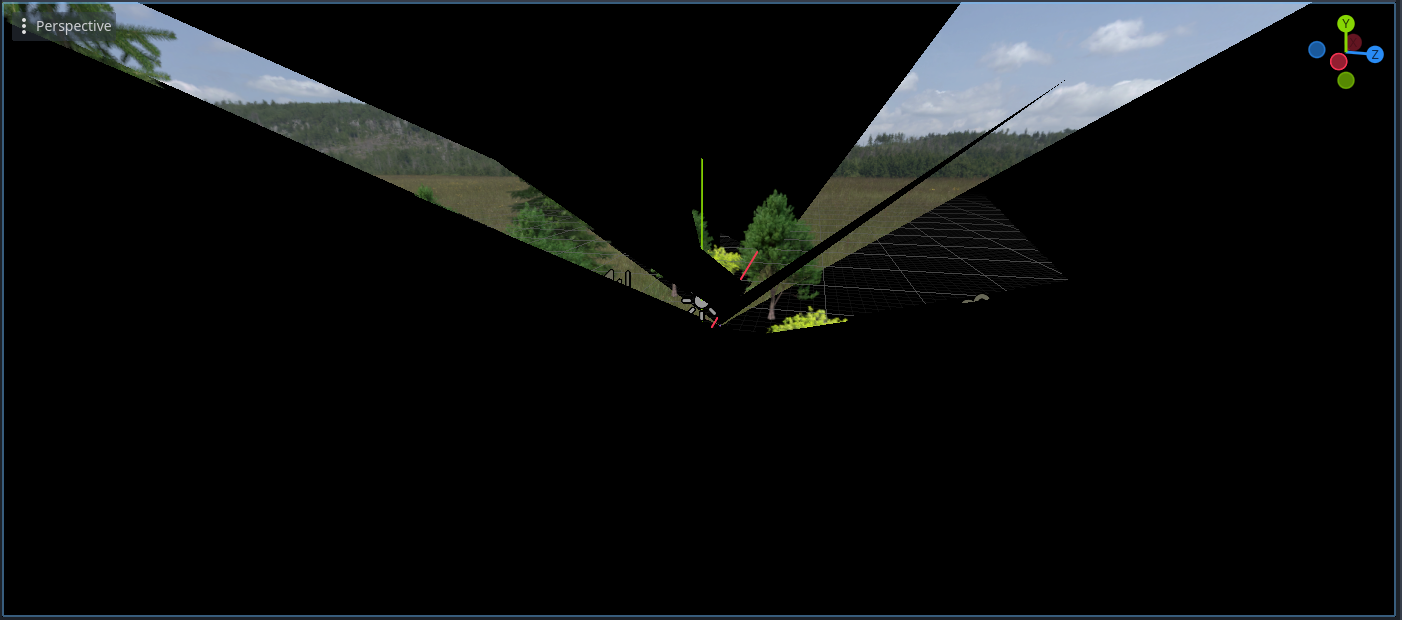
All the 3D models in my project are glitching out, flickering polygons all over the screen rapidly, in both the editor and when running. Both the CSG models I used for level prototyping and the model I got from Sketchfab are broken.

I think it has something to do with the materials, when I select the material in a node and scroll down in the properties window so the window with the material preview is out of frame, most of the flickering goes away. Changing the material or making a new one didn’t fix anything, it seems like every material in the project is broken now.
Someone posted here recently with a similar problem that turned out to be an AMD driver update.

2 Likes

That’s what it was, I rolled back my drivers and that fixed it.

2 Likes

I had the same problem, every single model in my game exploded a few days ago and I couldn’t figure out why.

For those that come after:

The driver version that seems to have caused a problem is 25.8.1

There may be a way to roll back your drivers through Adrenaline, but I personally couldn’t find it.
For a fresh install of previous drivers:

  1. Search for your Graphics card on the AMD site.
  2. Press the button that says “Previous Versions”
  3. Download an appropriate version (I just chose the most recent previous version, which was 25.6.2 at time of writing.)
  4. Download and use the AMD Cleanup utility to remove your current drivers: https://www.amd.com/en/resources/support-articles/faqs/GPU-601.html
  5. Once the drivers are removed and your computer has restarted, Install the downloaded driver from step 3.

Hope this helps people who find this, and hopefully they release a patch that fixes this soon!

This topic was automatically closed 30 days after the last reply. New replies are no longer allowed.