All text being replaced with yellow blocks

Godot Version

4.4

Question

Hello! I have released a game using godot and I received an email from a player pointing out a very strange issue. He is seeing that all the text in the game, besides text in images is appearing as yellow blocks.

I had him send me a screenshot of a specific page that uses two different font types and here is the result.

His screenshot:

My screenshot:
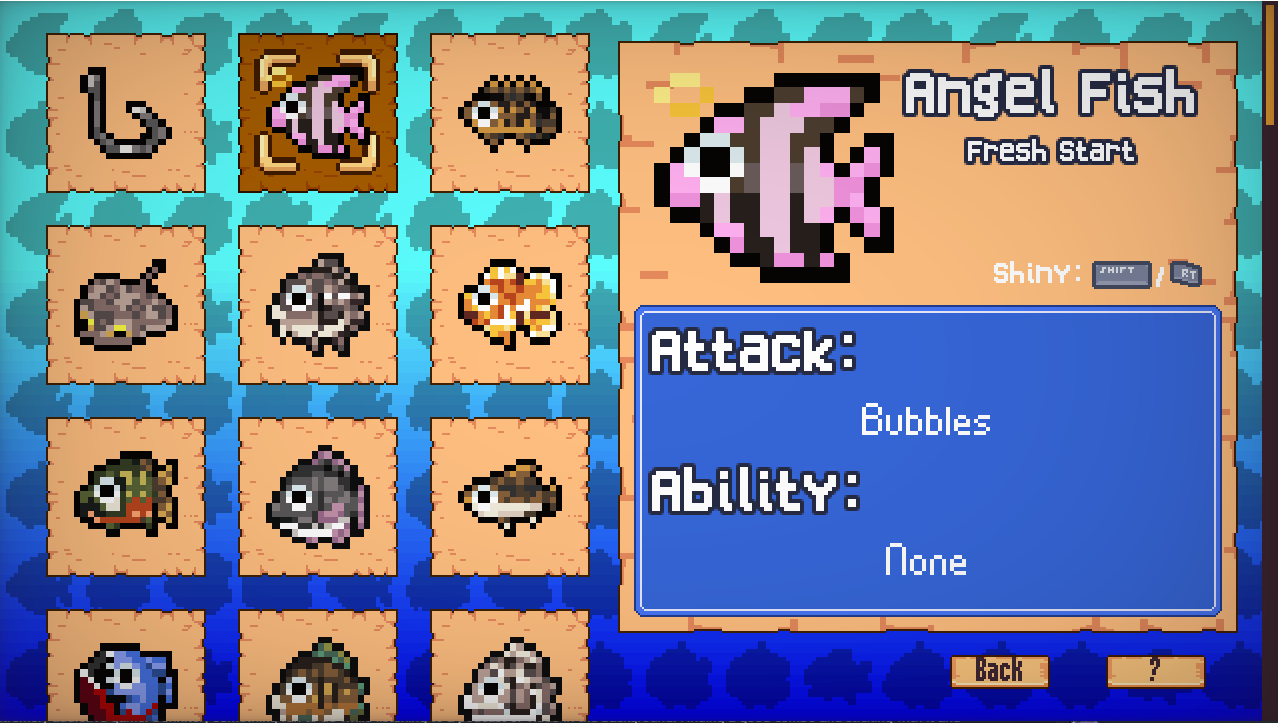
(Note: The “Shiny” section not appearing for him is intended)

Is there any reason that he may be seeing this? I’ve watched videos from people playing my game and they see all text no problem. My friends have also not had this issue so I don’t think it’s related to not having the font installed on his PC.

Thanks for reading!

1 Like
  1. How is the user running it? Web, Windows, Mac, Linux, iOS, Android?
  2. What font are you using? Is it .ttf or .otf?
  3. Are those all plain Label nodes, or do they have custom code?
  4. Is your game localized? (Translated into any other languages.)
  5. If the answer to #4 is yes, what language if the user using?
2 Likes
  1. They are using Windows
  2. Both fonts are ttf
  3. They are all plain label nodes, I do have a rich text label elsewhere in the game, I’ll see what it looks like for them
  4. Currently not localized, everything is hardcoded as English
  5. They did confirm their OS is defaulted to English

It looks like the font cache is screwy; the glyph bounding boxes appear to be correct, but they’re filled with solid color. What’s really interesting is that the outline is working properly if you assume the glyphs are all solid-filled boxes; all the black outlined text in the second image is properly black-outlined in the first. It’s just the glyph pixmaps that are bad.

I wouldn’t bet against this being a driver issue on the player’s machine.

2 Likes