Why I can’t animate a gradient texture changing the color values? Whenever i change a keyframe value its replicated to all others

At a guess the keyframe changes which gradient the rect uses, not the values of the gradient. Instead try creating several gradients (or several textures) and using the keyframes to swap them in and out.
Using several gradients won’t let me set the blend correctly. I can’t set a fade transition between then.
You want to key the “raw data” values, not the gradient property.

Oh, right, 'cause it is an array… You could do a few different things to get the effect you want, but you’re gonna need a different approach, more complex than just a gradient texture. What is this used for exactly? Maybe there’s a different way to do it without even a texture?
Perhaps using a shader with uniforms instead of a texturerect will give you what you want.
This is possible, but you will need to enter the path manually.
In this example, i am using a TextureRect and editting a color_ramp gradient.
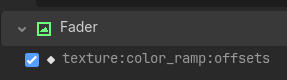
If you are not sure, add a key for the gradient and then edit the path, adding “:offsets”
By animating the offsets, you can animate the stops (offsets) on the gradient.
You can edit the offsets by clicking the keyframe and then adding the offsets you want. They go from 0.0 to 1.0, with 0.0 being the left of the gradient bar.
You can also use this to animate the colors, probably.