Godot Version
Version 4.3
Question
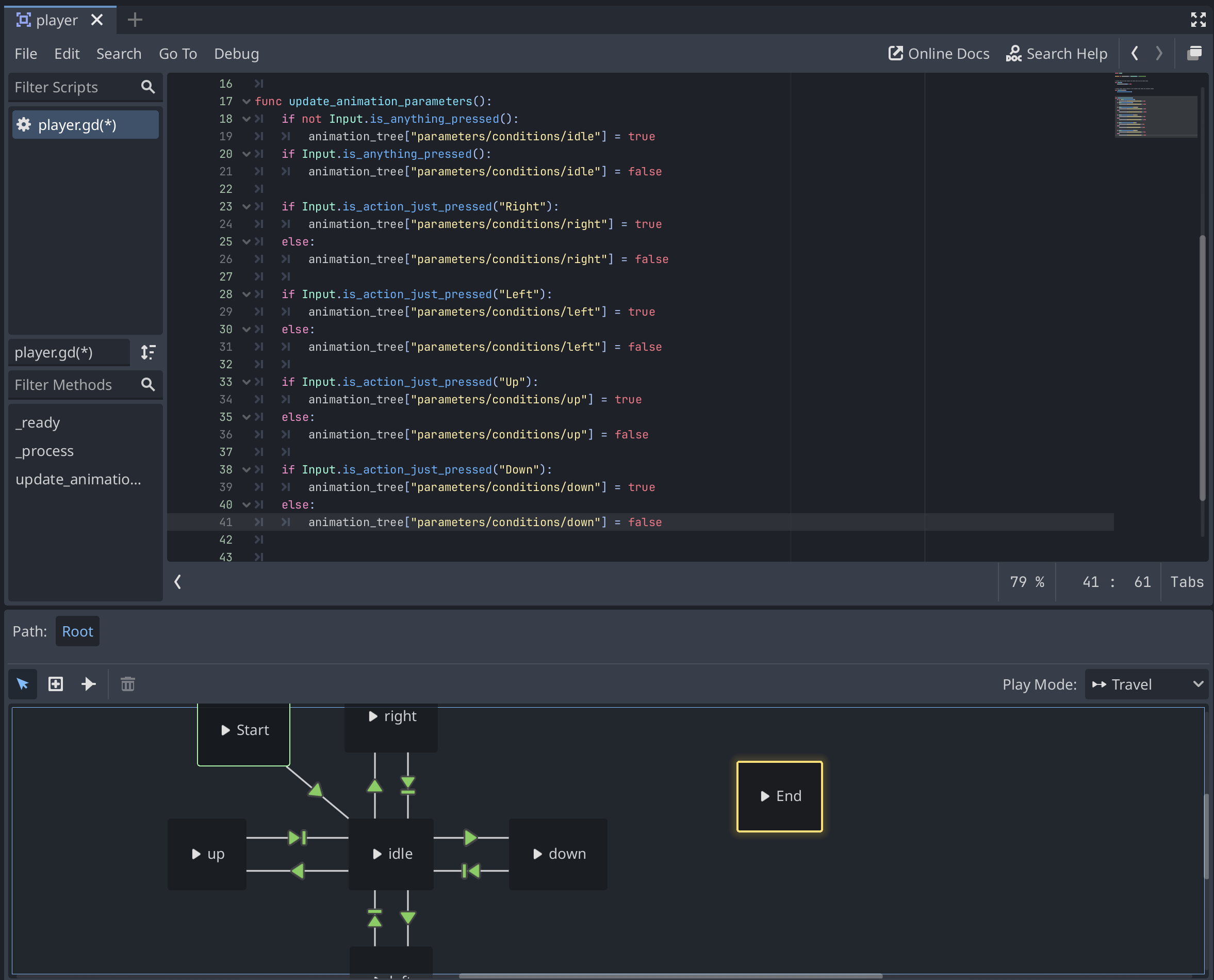
I am following a tutorial on the animation tree to play attack animations. I have been able to set the inputs for each animation properly, and if I press the input once, the animation returns to the idle animation as set in the animation tree.
My issue is that if I keep the button held for an attack, the attack stops at the last frame and does not return to the idle animation. I have looked this up but cannot find a solution. I am thinking it’s something to do with the false and true statements within the “is_action_just_pressed” function.
I am very new to coding and Godot. I did the GDQuest lessons, but then I have only followed some tutorials. So i might be missing some details on what I am supposed to do.
I am attaching a screenshot of my script.
Thank you for the help!
The issue lies within the fact that the Idle animation only plays if nothing is pressed.
Holding down any button will prevent it from playing.
You can fix this in a variety of ways depending on what you want to do with it, I personally use timers to see if the attack is over and change a variable that forces the other animations to play until the attack button is released.
That makes sense. I was struggling to find a function that would play my idle animation automatically. I have seen some ways to do this by setting the anim to play when the character’s velocity is zero, but in my game, the character doesn’t move around. It just stays in place.
Is there any function for the animation tree that could do this? I have been looking up online but I can’t seem to find anything. Thank you!
hey so I actually got it fixed by just deleting the line of code “if Input.is_anything_pressed():” that sets the idle animation to false.
Now when I hold the other inputs, the animation goes back to idle after the attack animations. I think because the idle animation is always set to true when nothing is pressed, and it never turns false for any input.
Maybe i still dont fully get it, but its solved for now haha!
In case you’re still wondering for why it’s working, here’s why I think it works:
The Idle animation is at the top of your code, and since there can only be one animation playing at every frame, it gets overriden by the other animations.
So you basically made it the default animation by removing the conditions.
that makes sense. I guess this is the solution that works for what I need. Thanks for clarifying!