I don’t know if this belongs here…
I would like to see a new feature in Godot that allows you to change the order of the Tracks in an AnimationPlayer afterwards. So simply that it is possible to move a Track up or down (using the arrow button and/or holding down the mouse button). I have not found an option for this.
3 Likes
agreed, especially once there are a large number of tracks it would be epic to be able to sort / rearrange them
here’s a work around. add a tool script to the AnimationPlayer and use this code to move the track up and down.
export(String) var track_path setget track_path_set
func track_path_set(new_value):
	track_path = new_value
export(bool) var move_track_up setget move_track_up_set
func move_track_up_set(new_value):
	var animation = get_animation("song")
	var track_index = animation.find_track(track_path)
	if new_value:
		animation.track_move_down(track_index)
	move_track_up = false
export(bool) var move_track_down setget move_track_down_set
func move_track_down_set(new_value):
	var animation = get_animation("song")
	var track_index = animation.find_track(track_path)
	if new_value:
		animation.track_move_up(track_index)
	move_track_down = false
Setting track path to the corect thing can be done by copying the path from the animation track. Just click on the name of the track, Ctrl+A, Ctrl+C, go to the exported track_path var and Ctrl+V.
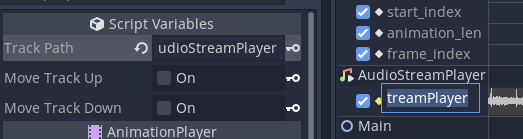
it does seam to be a lill buggy but is working for me in a pinch
EDIT: you’ll also notice that i hard coded which animation it edits, current_animation doesn’t seam to work in editor or somthn
EDIT2: also i should say that im using godot 3.5
1 Like
It already exists. Inside the animation player, click the plain list icon at the bottom toolbar of the Animation tab. It looks like an indicted list between the filter and snap buttons.
I know this is in 4.3 stable it may have been in earlier versions as well.
Once you do that, you can drag and drop the tracks into a new order.

5 Likes