Unity has this thing called AnimatorOverrideController for AnimatorController. I’m looking for the godot equivalent
Context: I have various units that all have very similar animations, and I want them to all use the same AnimationTree, even if the AnimationPlayer diverges. This tree would point to each diverging AnimationPlayer, with different animation frames and sprites, but with the same names (and pretty much representing the same actions).
What I’ve tried and didn’t work: I’ve tried doing this through derived scene inheritance, but the problem is the parent scene requires having an AnimationPlayer with empty animations, just so the parent AnimationTree can configure a node tree with animations to such names.
Then the child scene can’t assign it’s own AnimationPlayer to the AnimationTree because it’s inheriting assigning the AnimationTree from parent.
If I can’t find a solution to this I’ll just have to create a separate AnimationTree for each of my units on each of their scenes, which is more tedious and not very scalable.
The way I see it is that the AnimationPlayer is just a bank of animations for that unit so for the part you need to make portable is the tree_root of the AnimationTree (like a portable AnimationNodeBlendTree or AnimationNodeStateMachine).
This was just a thought I had and I never actually explored trying to do this. Sorry I couldn’t be of more help, what you are trying to do seems very complex to me.
I’m looking for some AnimatorOverrideController equivalent too.
So far I couldn’t find anything in that regard and finally asked ChatGPT:
To use the same animation tree for all characters you can swap out the animation library on the animation player and that this is a common way among Godot devs.
Well, I guess there is only one way to find out if that is true.
I will try this within the next days. I haven’t done much in 2D though, so I’m not sure if this approach might work for 2D as well, if it even works at all.
Also I don’t understand why you can’t edit an animation library without having a scene opended that contains an animation player.
Edit:
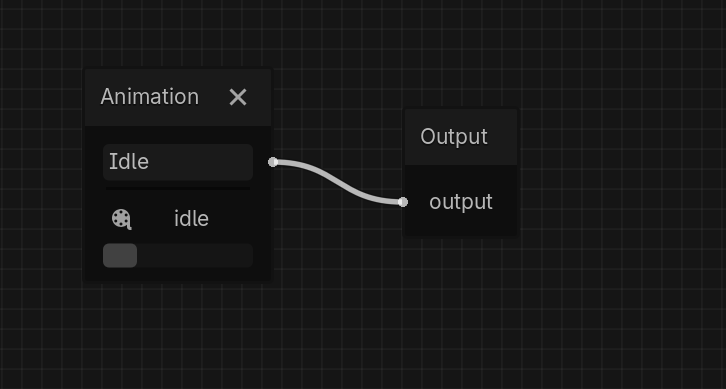
I tested it and so far it seems to work, but I used a animation tree with only 1 animation and swapped it.
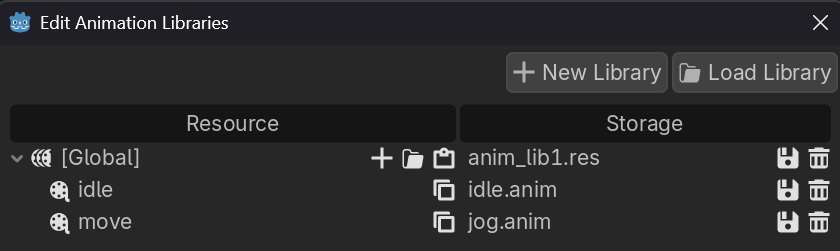
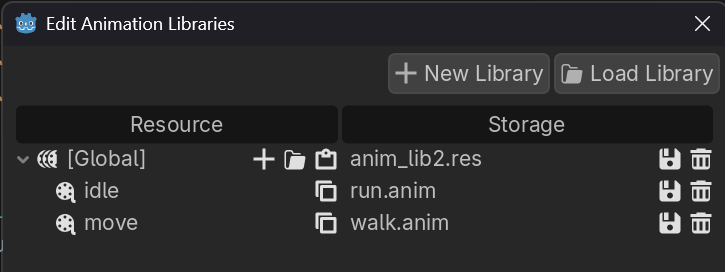
I left the animation library names empty (that’s why the in the edit screen the libraries name is displayed as [Global]), but I guess you can load and swap multiple libraries and name them accordingly.
If you name them you could load libraries overriding different libraries.
For example overriding all animations in movement: animation_player.remove_animation_library("movement") animation_player.add_animation_library("movement", next_lib)
But this I haven’t testet yet.
In my example the idle animation get replaced with the run animation:
@tool
extends Node3D

@export_tool_button("Swap") var swap_action = swap_anim_library

@export var animation_player: AnimationPlayer
@export var animation_tree: AnimationTree


@export var lib1: AnimationLibrary
@export var lib2: AnimationLibrary
@export var current_lib: AnimationLibrary


func _ready() -> void:
	current_lib = lib1
	animation_player.add_animation_library("", lib1)


func _input(event: InputEvent) -> void:
	if Input.is_action_just_pressed("ui_accept"):
		swap_anim_library()


func swap_anim_library() -> void:
	var next_lib: AnimationLibrary
	if current_lib == lib1:
		next_lib = lib2
	else:
		next_lib = lib1

	current_lib = next_lib
	animation_player.remove_animation_library("")
	animation_player.add_animation_library("", next_lib)
I will test a more complex animation tree and other things.
In the editor the animation stops playing when swapping. When running the game it keeps running after swapping, which is good.
I tried the switching animation library approach, but of course, that’s only going to work programatically… There needs to be an editor friendly solution to this.