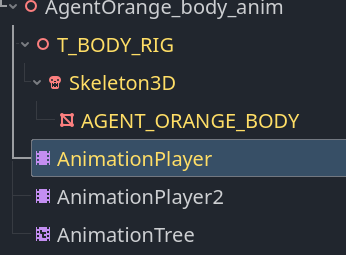
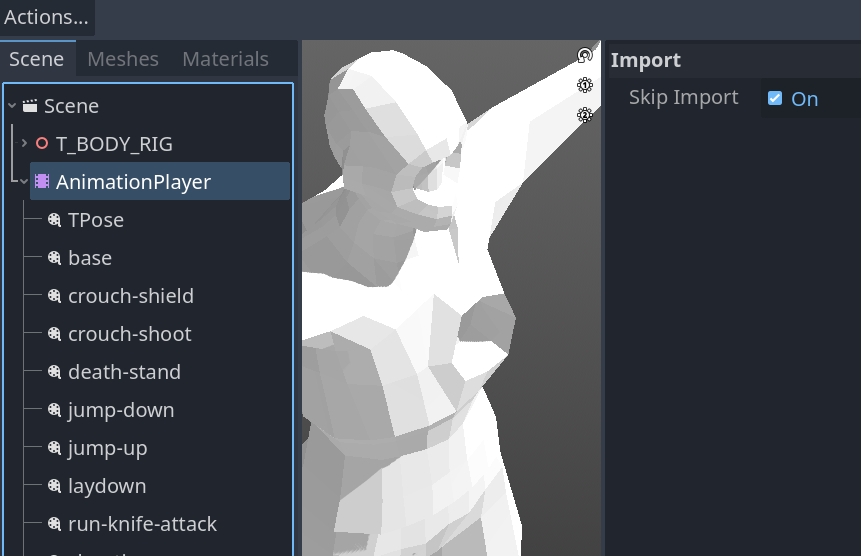
Sometimes though I need to update some of these animation .res file, however I can not do it without including animationPlayer. So when I re-import my .gltf it will create a duplicate animationPlayer and change the name of my original one (eg. @animationPlayer@12345). I then need to re-import my model without animationPlayer again, and rename my original back to animationPlayer. (as to not break my animation script)
Nevermind again. My main problem was I thought I need to re-import animation if I need it loop or non-loop. Turns out once you save as .res and add to animationPlayer you can toggle the looping there. The problems were all in my head . forgive me godot.
Actually you can set the looping with an import script, and then you don’t have to save anything externally.
I always recommend to people taking a step back and telling us the whole problem they’re actually trying to solve, and not just the issue they’re involved in. It’s easy to get myopic and think there’s only one solution to a problem. If you ask for help with the solution you’ve already decided is right, you get that. If you ask help with the problem, you more often get the solution that is right. (Or at least easier.)
Take a look at this script. It’s one of my import scripts. You can just use the AnimationPlayer part and modify it for your animations. Use or remove the rest.
@tool
extends EditorScenePostImport

enum LoopMode { LOOP_NONE, LOOP_LINEAR, LOOP_PINGPONG }
const LOOPMODE = ["LOOP_NONE", "[b][color=green]LOOP_LINEAR[/color][/b]", "[b][color=orange]LOOP_PINGPONG[/color][/b]"]
var scene_name: StringName

# Import script for characters to set up everything so no editing is needed once the character is
# instantiated.
func _post_import(scene):
	scene_name = scene.name
	print_rich("\n[b][color=red]Begin Post-import[/color] -> [color=purple]%s[/color] as [color=green]%s[/color][/b]" % [scene_name, scene.get_class()])
	print_rich("[b]Time/Date Stamp: %s[/b]\n" % [Time.get_datetime_string_from_system(false, true)])
	iterate(scene)
	return scene

func iterate(node):
	if node != null:
		# Put the character on the character layer (5) and make sure they can't walk through
		# walls (2) or destructibles (3), they can pick up loot (4), and they will bump into
		# other players (5), NPCs (6), and enemies (7).
		if node is CharacterBody3D:
			node.set_collision_layer_value(1, false)
			node.set_collision_layer_value(5, true)
			for i in range(2,8):
				node.set_collision_mask_value(i, true)
				print_rich("Post-import: [b]Masked Layer [color=green]%s[/color] [color=yellow]%s[/color][/b] -> [color=yellow][b]%s[/b][/color]" % [node.get_class(), i, get_color_string(true)])
		# Add looping animations
		if node is AnimationPlayer:
			for animation_name in node.get_animation_list():
				if animation_name.contains("Idle") or animation_name.contains("ing"):
					node.get_animation(animation_name).set_loop_mode(LoopMode.LOOP_LINEAR)
				print_rich("Post-import: [b]%s[/b] -> [b]%s[/b]" % [animation_name, LOOPMODE[node.get_animation(animation_name).get_loop_mode()]])
		# Append "_Bone" to BoneAttachment3D nodes just to prevent duplicate names in our scene tree.
		if node is BoneAttachment3D:
			print_rich("Post-import: [b]Renamed [color=green]%s[/color] [color=yellow]%s[/color][/b] -> [color=yellow][b]%s[/b][/color]" % [node.get_class(), node.name, node.name + "_Bone"])
			node.name = node.name + "_Bone"
		# We want to hide everything in the character's hands, and everything they are wearing that is removeable.
		if node is MeshInstance3D and node.get_parent() is BoneAttachment3D:
			node.set_visible(false)
			print_rich("Post-import: [b]Visibile [color=green]%s[/color] [color=yellow]%s[/color][/b] -> [color=yellow][b]%s[/b][/color]" % [node.get_class(), node.name, get_color_string(node.visible)])
		# Rotating the model to face the other direction so it moves in the correct direction when animated.
		if node is Skeleton3D:
			node.rotate_y(deg_to_rad(-180.0))
			print_rich("Post-import: [b]Rotated [color=green]%s[/color] [color=yellow]-180 degrees[/color][/b] on the [b][color=green]y-axis[/color][/b]" % [node.get_class()])
		# Recursively call this function on any child nodes that exist.
		for child in node.get_children():
			iterate(child)

# Return rich text color string for true (green)/red (false).
func get_color_string(value: bool):
	if value:
		return "[color=green]true[/color]"
	else:
		return "[color=red]false[/color]"
Thanks for the script, it looks useful. Although I’m not much of a coder so I usually try to work with the editor first.
In this case, the looping was my main problem but what if I wanted to update the actual animation .res file (eg. re-import a re-done animation from blender)? My current workflow is to re-import with animationPlayer and re-import again without animationPlayer to get rid of the extra one, then change the name back.
The yellow animationPlayer is auto-added and animationPlayer2 is the one I added (“2” was auto-name changed, which now I realized it still changes the name of my added animationPlayer)
Anyway I admit this is not really a problem, and I fully understand why there’s need to change the name. I just posted in case there is actual option that I missed.
Again, using the script would be your answer, but if it’s opaque to you as the answer, it’s not going to be the best solution for you and you should stick with what’s working for you. Once it’s in the game, it doesn’t matter how it got there.
Thanks for that, I’ll take your words for it and mark yours as solution.
Yea I try to stay with vanilla Godot for my first project. No plugins or scripts I don’t fully understand, otherwise I wouldn’t know how to fix if things gone wrong. Best not to get ahead of myself and keep it simple.
 . forgive me godot.