Godot Version
4.5
Question
I have a desktop pet game, a dog. The dog will never get any movement inputs from the player and there is basically no physics. I want to control the dog with scripts only and sometimes compute paths using a NavigationAgent3D.
I’m new to animation and godot so I made a simpel state machine that goes into a WANDER state which calls `travel(“Walk”)` which is a Blend2D node in my AnimationTree.
The Blend2D has:
(-1,0): Turn Left
(0,1): Turn Right
(0,1): Forward
(0,0): Idle

It works fine: https://imgur.com/a/zcheHAw
Now if we are in WANDER state we can control the dog with wasd. This is just to test! Since we basically need no physics and we have no user input, I don’t use any special node for my dog:
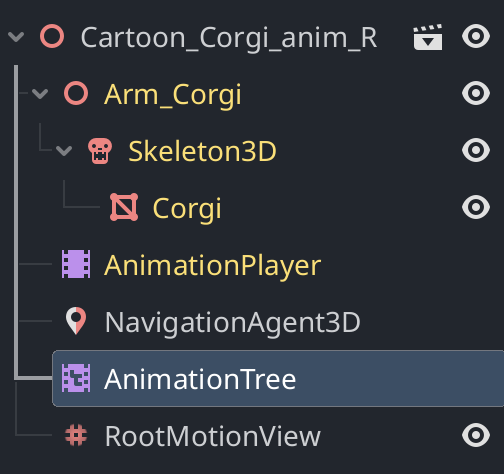
Here’s the code:
func handle_wander(delta: float) -> void:
    if last_state != current_state:
        print("ENTERING WANDER")
        state_machine.travel("Walk")
        last_state = current_state
    # Apply movement from the current animation frame
    apply_root_motion()

    #  Get Input directly from keys
    var input_vec = Vector2.ZERO
    if Input.is_key_pressed(KEY_W): input_vec.y += 1.0 # Forward
    if Input.is_key_pressed(KEY_S): input_vec.y -= 1.0 # Backward
    if Input.is_key_pressed(KEY_A): input_vec.x -= 1.0 # Left
    if Input.is_key_pressed(KEY_D): input_vec.x += 1.0 # Right

    # Update the BlendSpace
    anim_tree.set("parameters/Walk/blend_position", input_vec)

func apply_root_motion() -> void:
    var pos_delta = anim_tree.get_root_motion_position()
    var rot_delta = anim_tree.get_root_motion_rotation()

    # Maintain scale
    var my_scale = Vector3(3.0, 3.0, 3.0)

    # Rotate the basis, reset math drift with orthonormalized, then re-scale
    var new_basis = global_transform.basis * Basis(rot_delta)
    global_transform.basis = new_basis.orthonormalized().scaled(my_scale)

    # Move the dog's origin
    var movement = global_transform.basis * pos_delta
    global_position += movement
Note that since we have no special node, I just raw dog (funny) the application of the root motion. Now this leads to a sliding motion: https://imgur.com/oX7V331
Question is: How do I get rid of the sliding?
Note: If I remove the scaling, I get the same sliding effect.
Thanks in advance!