AI is a statemachine 
1 Like
“AI is a statemachine”
??? !!!
Like, what does that even mean???
I’m dead serious. It feels like every post from megamodels is from an extraterrestrial with no concept of human behavior.
No offence, but it’s a CONSTANT!
Edit: In hindsight, that was actually a really mean thing to say. I do apologize. I just kept noticing the same pattern across discussion posts and got a little annoyed.
4 Likes
If you knew how AI worked, then you would have understood what I said. It’s a statemachine because it builds it’s logic based on patterns of the past. Patterns that have worked. Based on those records it can solve a problem. The old patterns in the database are the statemachine variables.
You have judged me without even knowing anything about it.
1 Like
Is there any chance you can share some (pseudo) code? This sounds interesting to play with!
2 Likes
Well I am not sure what bit you meant. But my state manager is relatively simple,
State Manager
extends Node2D

@onready var Host: Node = get_parent()

var CurrentStateController: Node
var current_state: String = ""
var states_dict: Dictionary = {}
var is_currently_paused: bool = false


# Main
# ------------------------------------------------------------------------------
func _ready() -> void:
	_initiate_states_dict()


# Public
# ------------------------------------------------------------------------------
func change_state(new_state_name: String) -> void:
	if current_state == "Dead":
		return
	if new_state_name == current_state:
		return
	CurrentStateController.exit_state()
	current_state = new_state_name
	CurrentStateController = states_dict[current_state]
	CurrentStateController.enter_state()


func disable_state_manager() -> void:
	CurrentStateController.exit_state()
	current_state = "Dead"


# Helpers
# ------------------------------------------------------------------------------
func _initiate_states_dict() -> void:
	for StateController in get_children():
		var state_name: String = StateController.name
		states_dict[state_name] = StateController


func initialise_state_manager(initial_state: String) -> void:
	_initiate_states()
	if current_state.is_empty():
		current_state = initial_state
	CurrentStateController = states_dict[current_state]
	CurrentStateController.enter_state()


func _initiate_states() -> void:
	for state_name: String in states_dict:
		var StateController: Node2D = states_dict[state_name]
		StateController.initialize_state(Host)


func pause_current_state(new_state: bool) -> void:
	is_currently_paused = new_state
	if current_state == "Dead":
		return
	CurrentStateController.pause_state(new_state)
I think that is all relatively standard. And an enemies states might look like this:
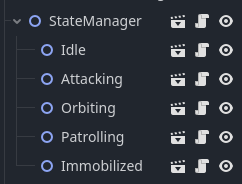
I would point out that all the states are separate scenes and shared between enemies. If an enemy can go patrolling, then it can use the same state ‘Patrolling’.
Orbiting state example
extends EnemyStateBaseClass

var Base: Node
var turn_distance: int
var min_turn_distance: int = 600
var orbiting_detection_range: int = 300


func _process(delta: float) -> void:
	var ship_facing_direction: Vector2 = Vector2.RIGHT.rotated(Actor.rotation)
	var target_direction: Vector2 = ship_facing_direction

	if is_instance_valid(Player):
		var to_player: Vector2 = (Player.global_position - Actor.global_position).normalized()
		if Actor.global_position.distance_to(Player.global_position) < orbiting_detection_range and ship_facing_direction.dot(to_player) > 0:
			Actor.BehaviourManager.handle_on_patrol_player_detected()

	if not is_instance_valid(Base):
		Actor.BehaviourManager.handle_orbit_base_lost()
		return

	var distance_to_base: float = Actor.global_position.distance_to(Base.global_position)
	if distance_to_base > turn_distance:
		# Move to base
		target_direction += Actor.global_position.direction_to(Base.global_position)
	else:
		# Rotate around base
		var direction_to_base: Vector2 = Actor.global_position.direction_to(Base.global_position)
		target_direction += direction_to_base.rotated(PI / 2)

	Actor.MovementManager.do_actor_movement(delta, target_direction)


func initialize_state(HostNode: Node) -> void:
	super(HostNode)
	turn_distance = randi_range(min_turn_distance, int(min_turn_distance * 2))


func enter_state() -> void:
	set_process(true)
	# check base exists
	if not is_instance_valid(Actor.Base):
		Actor.BehaviourManager.handle_orbit_base_lost()
		return
	Base = Actor.Base
	Actor.WeaponsManager.enable_weapons(false)
Note that the state, when it detects something it is only telling the behaviour manager to handle it. So states do not make decisions.
The behaviour manager simply defines the behaviour. It extends a base class which has common behaviours in it.
Base behaviour class
class_name BehaviourBaseClass
extends Node


# Behaviours - Player interactions
# ------------------------------------------------------------------------------
func handle_on_patrol_player_detected() -> void:
	if self.Actor.combat_enabled:
		self.Actor.StateManager.change_state("Attacking")
	else:
		self.Actor.StateManager.change_state(self.Actor.initial_state)


func handle_took_damage_from_player() -> void:
	if self.Actor.combat_enabled:
		self.Actor.StateManager.change_state("Attacking")


# Behaviours - Reactions
# ------------------------------------------------------------------------------
func handle_start_attacking() -> void:
	self.Actor.StateManager.change_state("Attacking")


func handle_attack_target_lost() -> void:
	self.Actor.StateManager.change_state(self.Actor.initial_state)


func handle_orbit_base_lost() -> void:
	self.Actor.max_targeting_distance = INF
	self.Actor.StateManager.change_state("Attacking")


func handle_base_ally_attacked() -> void:
	if self.Actor.combat_enabled:
		self.Actor.StateManager.change_state("Attacking")


func handle_ally_attacked() -> void:
	if self.Actor.combat_enabled:
		self.Actor.StateManager.change_state("Attacking")


# Behaviours - special cases
# ------------------------------------------------------------------------------
func handle_player_not_valid() -> void:
	self.Actor.StateManager.change_state(self.Actor.initial_state)


func handle_enemy_ship_exploding() -> void:
	self.Actor.StateManager.disable_state_manager()
	self.Actor.WeaponsManager.set_process(false)
	self.Actor.VisualsManager.do_explosion()


# Helpers
# ------------------------------------------------------------------------------
func is_in_groups(Ship: Node, test_groups: Array) -> bool:
	for group: String in test_groups:
		if not Ship.is_in_group(group):
			return false
	return true


# Special Hologram Ability
# ------------------------------------------------------------------------------
func handle_hologram_special_ability(new_state: bool, Hologram1: Node = null, Hologram2: Node = null) -> void:
	if not self.Actor.combat_enabled:
		return
	if new_state:
		# only sent enemies in attacking state
		var attacking_state: Node = self.Actor.StateManager.get_node("Attacking")
		if is_instance_valid(attacking_state):
			var new_target: Node = Hologram1
			if randf() > 0.5:
				new_target = Hologram2
			attacking_state.Player = new_target
			self.Actor.add_to_group("DistractedByHologram")
	else:
		# only sent enemies in group "DistractedByHologram"
		self.Actor.remove_from_group("DistractedByHologram")
		var attacking_state: Node = self.Actor.StateManager.get_node("Attacking")
		if is_instance_valid(attacking_state):
			attacking_state.Player = self.Actor.Player


func handle_enemy_immobolized(immobilization_time: int) -> void:
	self.Actor.immobilization_time = immobilization_time
	self.Actor.StateManager.change_state("Immobilized")
This is of course very game specific. It started empty, but now if I need to add something to every enemy behaviour, for instance a ‘get off the screen’ function, I can just add it here.
Then each enemy type has it’s own behaviour file that just ‘handles’ situations. Some are very short as default behaviours combined with different inital settings is enough. Like a fighter ship might behave just like a civillian ship, but its turning speeds and acceleration and fire rate and targeting distances are greater. Others override many of the functions and add in some of their own unique behaviours.
Simple behaviour script
extends EnemyBaseClass

const SHIP_FAMILY: String = "vorvath"
const SHIP_TYPE: String = "police"

@onready var WeaponScene: PackedScene = preload("res://components/weapons/enemy_weapons/red_laser/red_laser.tscn")


func _ready() -> void:
	super()
	weapons_range = 450
	max_targeting_distance = INF
	patrolling_detection_range = 400
	weapon_offset = Vector2(30, 0)
	orbs_left_on_death = 1
More complex behaviour script
extends BehaviourBaseClass

@onready var Actor: Node = get_parent()

var meander_top_speed: int = 50
var avoiding_top_speed: int = 300
var attacking_top_speed: int = 125


# Base class overides
# ------------------------------------------------------------------------------
# Civillians clan together if attacked
# On patrol they attack solo
# Dead civillian attracts all police
func handle_took_damage_from_player() -> void:
	if not Actor.combat_enabled:
		return
	if Actor.StateManager.current_state == "Attacking":
		return
	if is_instance_valid(Actor.Base):
		# Alert all ships from base
		var base_group_name: String = "group_home_base_" + str(Actor.Base.get_instance_id())
		var Ships: Array = get_tree().get_nodes_in_group(base_group_name)
		for Ship: Node in Ships:
			Ship.BehaviourManager.handle_base_ally_attacked()
	else:
		Actor.MovementManager.max_speed = attacking_top_speed
		Actor.StateManager.change_state("Attacking")


# Civillians run away from player
func handle_meandered_too_close_to_player() -> void:
	Actor.MovementManager.max_speed = avoiding_top_speed
	Actor.StateManager.change_state("Avoiding")


func handle_player_avoided() -> void:
	Actor.MovementManager.max_speed = meander_top_speed
	Actor.StateManager.change_state("Meandering")


func handle_target_avoided() -> void:
	Actor.MovementManager.max_speed = meander_top_speed
	Actor.StateManager.change_state("Meandering")


# If civillian explodes, all civillians are alerted
func handle_enemy_ship_exploding() -> void:
	super()
	AudioPlayer.play_sound_effect("explosion")

	var group_name: String = "group_ship_type_civillian"
	var Ships: Array = get_tree().get_nodes_in_group(group_name)
	for Ship: Node in Ships:
		Ship.MovementManager.max_speed = attacking_top_speed
		Ship.StateManager.change_state("Attacking")

	group_name = "group_ship_type_police"
	Ships = get_tree().get_nodes_in_group(group_name)
	for Ship: Node in Ships:
		if Ship.combat_enabled:
			Ship.MovementManager.max_speed = attacking_top_speed
			Ship.StateManager.change_state("Attacking")


func handle_leader_lost() -> void:
	Actor.initial_state = "Meandering"
	if Actor.combat_enabled:
		Actor.StateManager.change_state("Attacking")
	else:
		Actor.StateManager.change_state("Meandering")
So all my enemies have the same structures, and the only two individual scripts are the movement_manager (that contols obviously how they move) and their behaviour_manager (which controls how they behave).
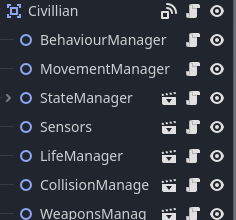
For my new game, that I started when I needed a break, I am re-assessing this approach following some advice I got on this forum. I am now doing a three level control tree.
- StrategyManager
- BehaviourManager
- StateManager
The strategy manager decides what behaviour to do, like “find food” or “rest” or “hide”. It tells the behaviour manager what to do.
The behaviour manager deals with the actual behaviour details like what happens when hunting, or finding food, or hiding, or finding a mate. It tells the state manager what the creature should be doing.
The state manager puts it into a state like go here. eat this or crouch.
I am doing this as in my next game I need the NPC’s and enemies to grow through life stages, leading to maturity, parenthood and reproduction. So the strategies they follow will differ with age. Like as a child you might “Stay near parent”, and as a young adult you may have wanderlust. I am going to try to make a simulation type game of an entire world environment. I imagine it (and have had some success with prototypes) like this:
- StrategyManager - Consciousness
- BehaviourManager - Instinctive and learned patterns/groups of actions
- StateManager - the nervous system and body movements
I am also moving away from nodes for these things too. I have not quite worked out the best way to approach this yet but I am really getting into catalogs and static functions, as well as using the power of resources, and of course just loading scripts directly.
However in the game I am currently trying to polish and finish, where the script examples above came from, the node system and behaviour and state manager combination has really given me tons of enemies who all behave very differently. Some swarm together, others hunt alone, others hide from you, others orbit planets or bases, some chase you if they have support, others will wait for support to arrive before attacking. Even though it might be a bit clunky, I still get up to 250 enemies, all behaving individually, in one scene with an FPS still over 60 FPS. It even works on mobile too (where it was originally intended for, but now I am porting it over to PC).
Anyway, sorry for the longest post in history.
I hope this was helpful in some way.
5 Likes
Thank you. This is exactly what I was looking for. It’s a great example to learn from, and I appreciate the extra bit about your new project, where you’re taking an improved approach already.
I’ve bookmarked it and will come back to this post to learn from lager.
Also, please don’t apologise for a long post like this. It’s a great bit of information you’re sharing publicly, which is what a forum is for 
2 Likes
Hi, i’m working on my first game ever, so here’s an example of the code i made:
If Input.is_action_just_pressed(“jump”):
Velocity.y = JUMP_VARIABLE
play.animatedsprite2d(“Jumping”)
I’m not really proud of that code i made, like, when i want to find a line of code that does a specific thing (like the jump code), it’s really hard to find it because of how many code lines there are, so i’m trying to find a way to clean up my code.
And i’m planning to change the AnimatedSprite2D to AnimationPlayer and Sprite2D, because i’ve seen a few people saying: don’t use animatedsprite2d!
I’m not sure if it’s worth it though…
Just telling you this if you have a better idea 
1 Like
We all start there. When you create code that could be better, you learn by making it better. You try ideas. Sometimes they work, sometimes they don’t. Be proud of the code you made and that it works. Then be proud when you learn a way to make it better.
A number of people in this thread had viable solutions. My StateMachine looks like this:
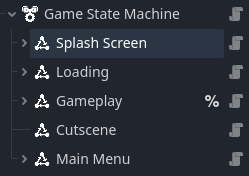
## This node is intended to be generic and manage the various states in a game.
## Each [State] of a [StateMachine] should be added as a child node of the
## [StateMachine]. Ideally a [StateMachine] should never call its own methods,
## instead being driven by a [State] changing and calling its own helper methods
## to switch state.
@icon("res://addons/dragonforge_state_machine/assets/icons/state_machine_64x64.png")
class_name StateMachine extends Node

## The initial [State] for the [StateMachine]. This can be left blank, in which
## case the [StateMachine] will typically transition when the first [State] that
## is triggered calls [method State.switch_state]
@export var starting_state: State

## If this value is false, this [StateMachine] will not change states. It is
## initially set to true once the [StateMachine] is fully constructed.
var is_running = false
## The node to which this [StateMachine] is attached and operates on.
var subject: Node

# The current State of the StateMachine. Initially defaults to the first node it
# finds beneath itself if starting_state is not defined.
@onready var _current_state: State


# Guarantees this gets run if the node is added after it has been made, or is
# reparented.
func _enter_tree() -> void:
	subject = get_parent()


# Sets up every [State] for this [StateMachine], and monitors any [State] being
# added or removed to the machine by being added or removed as child nodes
# of this [StateMachine] instance.
func _ready() -> void:
	subject = get_parent()
	# Keep intitalization from happening until the parent and all its dependants are constructed.
	# This prevents race conditions from happening where a State needs to reference things that
	# do not exist yet.
	subject.ready.connect(_on_ready)


func _on_ready() -> void:
	for state in get_children():
		if state is State:
			state._activate_state()
	self.connect("child_entered_tree", _on_state_added)
	self.connect("child_exiting_tree", _on_state_removed)

	start()


## Starts the [StateMachine] running. All machines start automatically, but
## they can be stopped at any time by calling [method StateMachine.stop] and
## restarted with [method StateMachine.start].
func start() -> void:
	if get_child_count() <= 0:
		print_rich("[color=red][b]ERROR[/b][/color]: %s State Machine has no States! Failed to start!" % [subject.name])
		return

	is_running = true

	if starting_state:
		_current_state = starting_state
		_current_state._enter_state()


## Stops the [StateMachine] from running. Stops the current [State] if one is
## running, even if [member State.can_transition] = false. So be careful with this.
## All machines start automatically, but they can be stopped at any time by
## calling [method StateMachine.stop] and restarted with [method StateMachine.start].
func stop() -> void:
	is_running = false

	if _current_state:
		_current_state._exit_state() # Run the exit code for the current state. (Even if the state says you can't exit it.)


## Should ideally be called from [method State.switch_state][br][br]
## Switch to the target [State] from the current [State]. Fails if:[br]
## 1. The [StateMachine] does not have the passed [State].[br]
## 2. The [StateMachine] is already in that [State].[br]
## 3. The current [State] won't allow a transition to happen because its [member State.can_transition] = false.[br]
## 4. The target [State] won't allow a transition to happen because its [member State.can_transition] = false (e.g. cooldown timers).
func switch_state(state: State) -> void:
	if not is_running:
		print_rich("[color=red][b]ERROR[/b][/color]: %s State Machine is off! Cannot enter %s!" % [subject.name, state.name])
		return # The StateMachine is not running.
	if not _machine_has_state(state): return # The StateMachine does not have the passed state.
	if _current_state == state: return # The StateMachine is already in that state.
	if not state.can_transition: return # The target State won't allow a transition to happen (e.g. cooldown timers).

	if _current_state:
		if not _current_state.can_transition: return # The current State won't allow a transition to happen.
		_current_state._exit_state() # Run the exit code for the current state.

	_current_state = state # Assign the new state we are transitioning to as the current state.
	_current_state._enter_state() # Run the enter code for the new current state.


## Should ideally be called from [method State.is_current_state][br][br]
## Returns true if the passed [State] is the current [State].
func is_current_state(state: State) -> bool:
	return _current_state == state


# Returns whether or not the StateMachine has this state.
# (A StateMachine has a state if the state is a child node of the StateMachine.)
func _machine_has_state(state: State) -> bool:
	for element in get_children():
		if element == state:
			return true
	return false


# Activates a state.
# (Called when a node enters the tree as a child node of this StateMachine.)
# Accepts all nodes as an argument because this is called whenever a child node
# enters the tree.
func _on_state_added(node: Node) -> void:
	if not node is State:
		return
	node._activate_state()


# Deactivates a state.
# (Called when a child node of this StateMachine leaves the tree.)
# Accepts all nodes as an argument because this is called whenever a child node
# exits the tree.
func _on_state_removed(node: Node) -> void:
	if not node is State:
		return
	node._deactivate_state()
And my State looks like this:
## An abstract virtual state for states to implement and add to a [StateMachine].[br]
## [b]NOTE:[/b] The following are turned off by default:[br]
## - process()[br]
## - physics_process()[br]
## - input()[br]
## - unhandled_input()[br]
## If you want to turn any of these on, do so in [method State._activate_state].
## Be sure to call [method super] on the first line of your method.
@icon("res://addons/dragonforge_state_machine/assets/icons/state_icon_64x64_white.png")
class_name State extends Node

## Set to false if this [State] cannot be transitioned to (or alternately, from).
## For example when waiting for a cooldown timer to expire, when a
## character is dead, or when the splash screens have been completed.
var can_transition = true
# A reference to the state machine used for switching states.
var _state_machine: StateMachine
# Used when deactivating a state and the [StateMachine] has already been deleted.
var _state_machine_name: String
# The name of the parent node of the StateMachine. Stored for logging purposes.
# NOTE: This is not guaranteed to be the same as get_owner().name
var _subject_name: String


func _ready() -> void:
	set_process(false)
	set_physics_process(false)
	set_process_input(false)
	set_process_unhandled_input(false)


## Asks the state machine to switch to this [State]. Should always be used instead of _enter_state()
## when a [State] wants to switch to itself.
func switch_state() -> void:
	_state_machine.switch_state(self)


## Returns true if this is the current [State].
func is_current_state() -> bool:
	return _state_machine.is_current_state(self)


## Called when the [State] is added to a [StateMachine].
## This should be used for initialization instead of _ready() because it is
## guaranteed to be run [i]after[/i] all of the nodes that are in the owner's
## tree have been constructed - preventing race conditions.
## [br][br][color=yellow][b]WARNING:[/b][/color]
## [br]When overriding, be sure to call [method super] on the first line of your method.
## [br][i]Never[/i] call this method directly. It should only be used by the [StateMachine]
func _activate_state() -> void:
	_state_machine = get_parent()
	_state_machine_name = _state_machine.name
	_subject_name = _state_machine.subject.name
	print_rich("[color=forest_green][b]Activate[/b][/color] [color=gold][b]%s[/b][/color] [color=ivory]%s State:[/color] %s" % [_subject_name, _state_machine_name, self.name])


## Called when a [State] is removed from a [StateMachine].
## [br][br][color=yellow][b]WARNING:[/b][/color]
## [br]When overriding, be sure to call [method super] on the first line of your method.
## [br][i]Never[/i] call this method directly. It should only be used by the [StateMachine]
func _deactivate_state() -> void:
	print_rich("[color=#d42c2a][b]Deactivate[/b][/color] [color=gold][b]%s[/b][/color] [color=ivory]%s State:[/color] %s" % [_subject_name, _state_machine_name, self.name])


## Called every time the [State] is entered.
## [br][br][color=yellow][b]WARNING:[/b][/color]
## [br]When overriding, be sure to call [method super] on the first line of your method.
## [br][i]Never[/i] call this method directly. It should only be used by the [StateMachine]
func _enter_state() -> void:
	print_rich("[color=deep_sky_blue][b]Enter[/b][/color] [color=gold][b]%s[/b][/color] [color=ivory]%s State:[/color] %s" % [_subject_name, _state_machine_name, self.name])


## Called every time the [State] is exited.
## [br][br][color=yellow][b]WARNING:[/b][/color]
## [br]When overriding, be sure to call [method super] on the first line of your method.
## [br][i]Never[/i] call this method directly. It should only be used by the [StateMachine]
func _exit_state() -> void:
	print_rich("[color=dark_orange][b]Exit[/b][/color] [color=gold][b]%s[/b][/color] [color=ivory]%s State:[/color] %s" % [_subject_name, _state_machine_name, self.name])
I made it a plugin so I can just drop it into my games, but it took a number of tries before I got it to this point.
Unless they’re addressing a problem you’re having, I wouldn’t worry about this. However if you want to test it out, create an AnimationPlayer and try it out. I’m currently working on making my code not care whether it’s using an AnimatedSprite2D or and AnimationPlayer. I use the former when I have individual sprites that make up an animation, and the latter when I have parts of a character and am using a Skeleton2D to animate it.
3 Likes