Godot Version
4.5.1
Question
Hello,
I am testing Godot on an old Linux machine [NVIDIA Geforce 9400M G and a Dual Core Pentium], but when I download the latest binary and try to open it or double-click it, nothing happens. The log shows that Godot has crashed, without giving me more details.
I wanted to test it on an ancient machine, before I wipe Windows from the family PC [i7 and Geforce 960M], replace it with Mint, and try to run Godot there.
The older PC runs Linux Mint 22.3 Cinnamon 64-bit (Ubuntu 24.04) well for its lack of power.
The System Info shows Vulkan is Disabled, which I suspect is the issue. I have no idea how to enable it and if it is even possible.
Is the hardware simply too old to run Godot? Am I overlooking another problem and can I make it run?
Do you expect that I would be able to run Godot on the newer (less ancient) PC?
As always, thanks for reading and helping.
You can use the launch argument --rendering-driver opengl3 to force OpenGL rather than vulkan. See if that helps!
I get “Illegal instruction (core dumped)”.
Just to make sure: I left the binary in Downloads for simplicity. I navigated there. I wrote./Godot_v4.5.1-stable_linux.x86_64 --rendering-driver opengl3.Error happens.
At that point I think it’s an issue with the PC itself I’m afraid, I tested it with the same version and it works fine on all my machines.
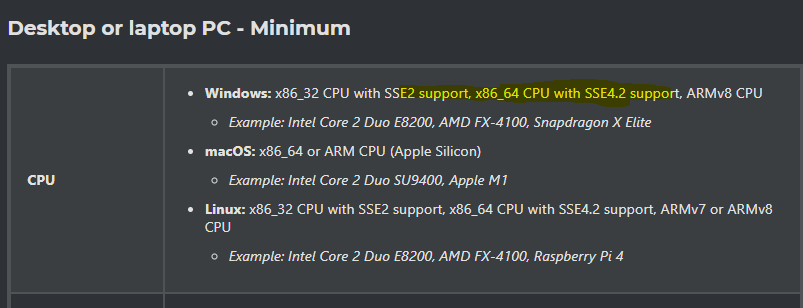
What’s the model of the dual core pentium? There’s a decent possibility it doesn’t support some version of SSE that Godot requires.
It is T4200. Maybe that’s the problem.
Thats a CPU from 2009.
At a guess its going to be the lack of SSE4.2, that processor doesn’t have SSE4 support at all as far as I can tell checking on the web.
That must be it. I was impressed that such an old PC ran more recent SW , so I decided to check Godot as well.
I will leave Godot for a more contemporary machine.  Cross your fingers.