Godot Version
4.2.2 version
Question
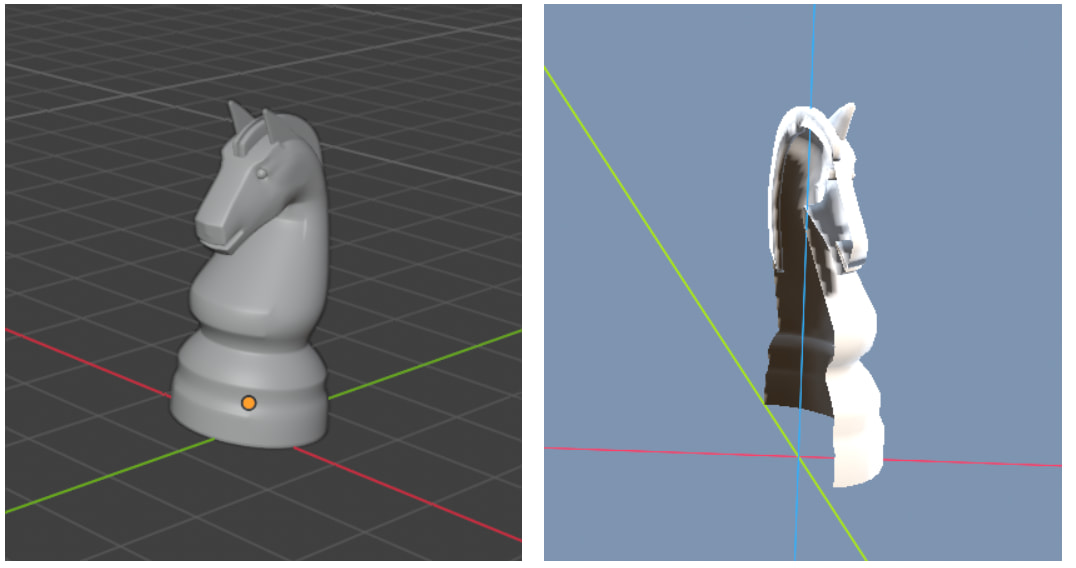
I am importing chess pieces - created in Blender - but half of the model is missing. This only happens with the knight, BTW. All other pieces import as expected. What could cause this ? I do have Blender so I can make adjustments to the models there and reimport, but in Blender it all looks fine, as shown in the attached combined image.
Try turning off backface culling, the normals might be broken
Does the piece have a mirror modifier? If you’re exporting from Blender as a gltf/glb, select ‘apply modifiers’ in the export menu.
Thanks a million. It took some time to find the option in my new Blender version but it worked in the end.
With another object the color is not imported. Does anyone know which export option I need in Blender to make this work ? Or can I apply another material on an imported blender object in some way ? I did not find that option yet…
It depends on the process by which the piece was colored in Blender. Materials set up in Blender sometimes cleanly import into Godot, but quite often they don’t. For instance, anything that uses a color ramp will not import cleanly.
Setting up materials in Godot is an option, as is using something like Material Maker. In my personal workflow I simply paint directly onto my model’s UVs, which works perfectly fine with the notable drawback that whatever you modeled looks like it stepped out of a N64/PS1 game. (Which, in my case, is what I’m aiming for, but might not be your cup of tea.)
I do have materials defined in Godot but for the imported objects there is no property where I can apply the material. It looks like I can only handle this in Blender, and for some reason all the chess pieces import with the right colours except one. It looks like I will have to learn Blender to solve this issue, unless someone can tell me how to apply another material to an imported Node3D object in Godot. The GUI does not give me any options.