So I don’t what happened, but out of now where certain features in my Godot software just make it not work. I can add sprites, duplicate nodes, move them around, open levels, but I can not rename things or when a menu pops up I can not exit out of it or click any button. These features do not work on all projects, and I can not create a new project cause when that menu pops up I cant click anything.
I have tried restarting my computer, uninstalling and reinstalling Godot, i had steam verify the files. I’m stuck
It’d be helpful to see what happens “behind the scenes”. You’ll want to run Godot via the terminal with --verbose and show us the result.
To do this, first go to where the executable is. If you’ve installed it using Steam, right-click Godot and go to Properties > Local Files > Browse Local Files.
Once you have eyes on Godot_v4.5.1-stable_win64 (or whatever version you have installed), you’ll want to right-click it and Copy as Path, or press Ctrl+Shift+C.
Then, you press Win+R to open the Run menu, and you type cmd. Alternatively, you search for cmd, and open Command Prompt from the task bar.
Then, you paste the file path you copied: Ctrl+Shift+V, followed by a space, followed by --verbose. The entire command will look something like this (if you have Godot downloaded and extracted in the default Downloads folder): "C:\Users\dpremo\Downloads\Godot_v4.5.1-stable_win64.exe" --verbose
Godot will launch as usual, and you’ll try to replicate the bug. Once you’ve confirmed it, come back and share what’s happening in the console. You can copy everything from the terminal by pressing Ctrl+Shift+A to select everything, and Ctrl+Shift+C to copy.
thanks for the quick reply! just to give an update, im trying to do what you suggested just struggling lol. But I found out everything is working just weirdly, So I can rename things it just doesn’t show what I’m typing, but if I hit rename type and hit enter, what I typed will show up. I also can click things in menus but it won’t work for like 60 seconds then if i try again the button I press works
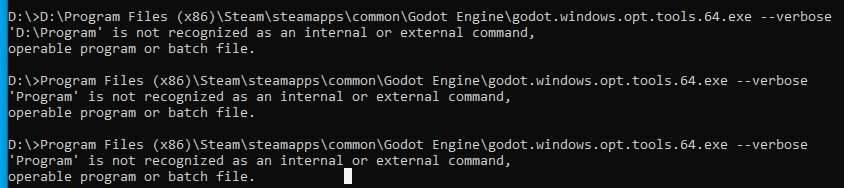
for your suggestion this is my path
D:\Program Files (x86)\Steam\steamapps\common\Godot Engine\godot.windows.opt.tools.64.exe
but when i go into cmd I’m trying to figure out the correct to type it
You forgot the opening and closing " in the file path. It’s just like you would with a String. The command should’ve been "D:\Program Files (x86)\Steam\steamapps\common\Godot Engine\godot.windows.opt.tools.64.exe" --verbose (I’m not sure if that’s the exe name for the Steam version, I’ve never used it)
I’m glad it works now, but it does sound a bit scuffed.