4.4
Only one of my base buttons is emitting a signal I think something is consuming my signals but i cant figure out what it is. I don’t really know what would be helpful to upload here as far as screenshots go so if soemone would tell me what I should show here to help figure this out plz tell me I’m really new to godot and plz help me
Hi,
You should share at least one screenshot of your UI with the buttons involved, the hierarchy tree (doesn’t have to be all the tree but at least the part where the buttons are added), and your current code.
Here are some guidelines about how you can format code properly when sharing it on the forums: Make it easier for new users to format and preview code in their posts - #4 by gertkeno

Seems like your buttons have correctly connected signals. Have you made sure that the signals all point to the correct functions?
I think so, I have them all connected to the root node of the scene so here is my code.
extends Node2D


@export var joystick_id := 0  # Usually 0 for the first controller
@export var axis_vertical := JOY_AXIS_LEFT_Y  # Vertical axis (typically 1)
@export var input_cooldown := 0.2
var controller = true
var input_timer := 0.0

func _process(_delta):
	if Input.is_action_just_pressed("Controller Confirmation"):
		$Tutorial.grab_focus()
		Input.mouse_mode = Input.MOUSE_MODE_CAPTURED
		if controller == false:
			$Tutorial.grab_focus()
		controller = true
	elif Input.is_action_just_pressed("Keyboard Confirmation"):
		controller = false
		Input.mouse_mode = Input.MOUSE_MODE_VISIBLE
		$Tutorial.release_focus()
		$"New Game".release_focus()
		$"Continue Run".release_focus()
		$Settings.release_focus()
		$Quit.release_focus()

	input_timer -= _delta

	var vertical_axis := Input.get_joy_axis(joystick_id, axis_vertical)

	if input_timer <= 0.0:
		if vertical_axis > 0.5:
			_move_focus(SIDE_BOTTOM)
			input_timer = input_cooldown
		elif vertical_axis < -0.5:
			_move_focus(SIDE_TOP)
			input_timer = input_cooldown

func _move_focus(side: int):
	var current := get_viewport().gui_get_focus_owner()
	if current == null:
		return

	var neighbor_path := current.get_focus_neighbor(side)
	if neighbor_path != NodePath(""):
		var neighbor := get_node(neighbor_path)
		if neighbor:
			neighbor.grab_focus()

func _ready() -> void:
	RenderingServer.set_default_clear_color(Color(0,0,0))
	preload("res://level_1.tscn")
	preload("res://tutorial.tscn")


func _on_new_game_pressed() -> void:
	Global.goto_scene("res://level_1.tscn")

func _on_tutorial_pressed() -> void:
	Global.goto_scene("res://tutorial.tscn")

func _on_continue_run_pressed() -> void:
	Global.load_data()
	print(Global.active_level)
	Global.goto_scene(Global.active_level)

func _on_settings_pressed() -> void:
	pass # Replace with function body.

func _on_quit_pressed() -> void:
	get_tree().quit()


func _on_tutorial_mouse_entered() -> void:
	$Tutorial/AnimationPlayer1.play("Hover1")
	print("1 activated")


func _on_tutorial_mouse_exited() -> void:
	$Tutorial/AnimationPlayer1.play_backwards("Hover1")
	print("1 deactivated")

func _on_tutorial_focus_entered() -> void:
	$Tutorial/AnimationPlayer1.play("Hover1")


func _on_tutorial_focus_exited() -> void:
	$Tutorial/AnimationPlayer1.play_backwards("Hover1")


func _on_new_game_focus_entered() -> void:
	$"New Game/AnimationPlayer2".play("Hover2")


func _on_new_game_focus_exited() -> void:
	$"New Game/AnimationPlayer2".play_backwards("Hover2")


func _on_new_game_mouse_entered() -> void:
	$"New Game/AnimationPlayer2".play("Hover2")
	print("2 activated")


func _on_new_game_mouse_exited() -> void:
	$"New Game/AnimationPlayer2".play_backwards("Hover2")
	print("2 deactivated")


func _on_continue_run_focus_entered() -> void:
	$"Continue Run/AnimationPlayer3".play("Hover3")


func _on_continue_run_focus_exited() -> void:
	$"Continue Run/AnimationPlayer3".play_backwards("Hover3")


func _on_continue_run_mouse_entered() -> void:
	$"Continue Run/AnimationPlayer3".play("Hover3")
	print("3 activated")


func _on_continue_run_mouse_exited() -> void:
	$"Continue Run/AnimationPlayer3".play_backwards("Hover3")
	print("3 deactivated")


func _on_settings_focus_entered() -> void:
	$Settings/AnimationPlayer4.play("Hover4")


func _on_settings_focus_exited() -> void:
	$Settings/AnimationPlayer4.play_backwards("Hover4")


func _on_settings_mouse_entered() -> void:
	$Settings/AnimationPlayer4.play("Hover4")
	print("4 activated")


func _on_settings_mouse_exited() -> void:
	$Settings/AnimationPlayer4.play_backwards("Hover4")
	print("4 deactivated")


func _on_quit_focus_entered() -> void:
	$Quit/AnimationPlayer5.play("Hover5")


func _on_quit_focus_exited() -> void:
	$Quit/AnimationPlayer5.play_backwards("Hover5")


func _on_quit_mouse_entered() -> void:
	$Quit/AnimationPlayer5.play("Hover5")
	print("5 activated")


func _on_quit_mouse_exited() -> void:
	$Quit/AnimationPlayer5.play_backwards("Hover5")
	print("5 deactivated")
How certain are you that they are not running? Do the print statements show up?
Are there any errors or warnings?
If that scene tree is complete then the nodes you are wanting to access are not in this scene and your get_nodes() ($ is short for get_node()) will fail.
Hi, maybe you should try connecting your signal directly through your script and give it a try to see if it’s working. Your ready function should look like this:
func _ready() -> void:
    RenderingServer.set_default_clear_color(Color(0,0,0))
	preload("res://level_1.tscn")
	preload("res://tutorial.tscn")

    # Connect your signals manually here
    $Tutorial.pressed.connect(_on_tutorial_pressed)
    $"New Game".pressed.connect(_on_new_game_pressed)
    $"Continue Run".pressed.connect(_on_continue_run_pressed)
    $Settings.pressed.connect(_on_settings_pressed)
    $Quit.pressed.connect(_on_quit_pressed)
As @sancho2 already said, you could add some print to see if you see some messages coming from your callbacks in the output console.
You can check which Control consumed the click event by clicking on the button while the game runs and going to the Misc tab in the Debugger dock. You’ll be able to see which Control node was the last clicked one. Set its Control.mouse_filter to Ignore and repeat until the button works.
Got this error.
E 0:00:01:615 main_menu.gd:54 @ _ready(): Signal ‘pressed’ is already connected to given callable ‘Node2D(main_menu.gd)::_on_tutorial_pressed’ in that object.
<C++ Error> Method/function failed. Returning: ERR_INVALID_PARAMETER
<C++ Source> core/object/object.cpp:1451 @ connect()
main_menu.gd:54 @ _ready()
I think its just from connecting my signals twice
Only the tutorial button plays the animation. The print command will only print for tutorial.
That won’t work because the signals that I am trying to get working are on_mouse_entered() and on_mouse_exited() signals so the misc tab doesn’t show it. the buttons work fine
Lets focus on one button that isn’t working; New Game.
Can you show a picture of the Inspector with the signals mouse_entered/exited connected to the function?
Also Is there the green symbol beside your _on_new_game_mouse_entered() function? It kind of looks like this ->]
You’re mixing Node2Ds with Controls. You Main Menu node is eating all your signals because it’s higher up in the tree. My guess would be it’s not fully covering the button that is getting a signal. Make the buttons children of a CanvasLayer node and the problem will likely resolve itself - as long as none of those other Node2Ds are covering it up.
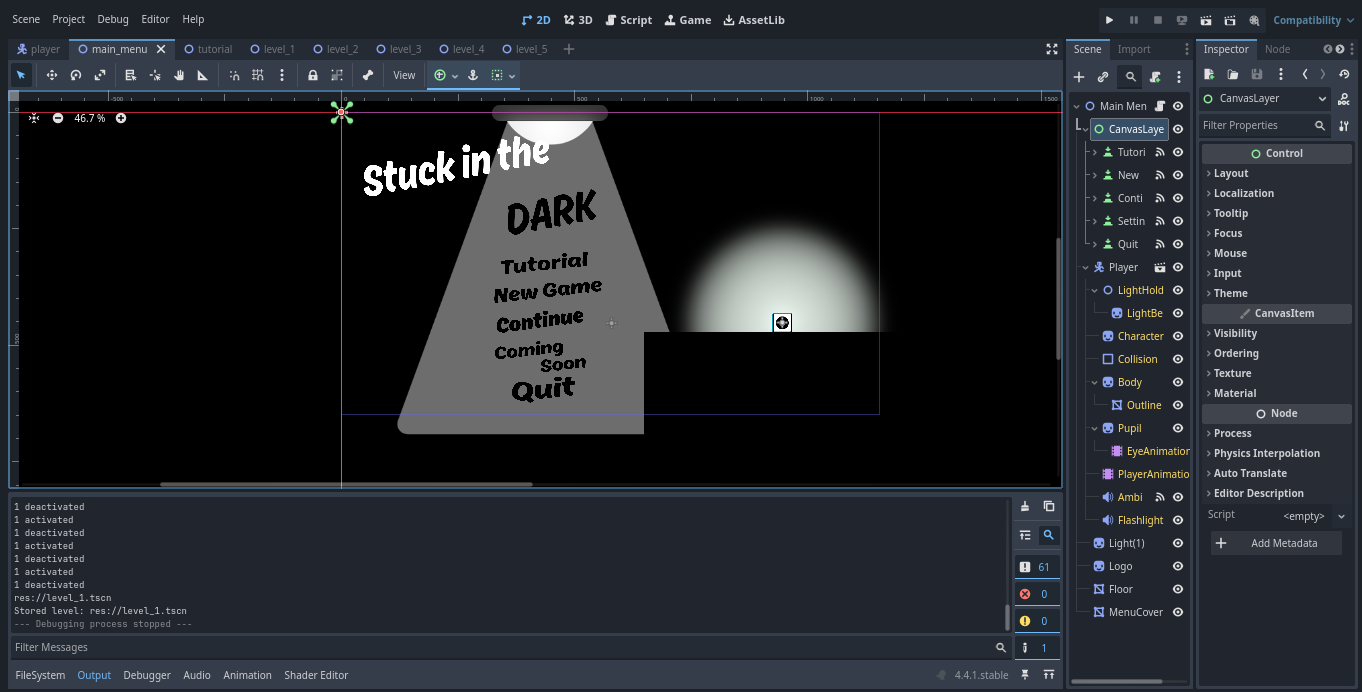
Gonna more details. Can you show us a screenshot of the whole editor, including the UI, and then a screenshot of the UI when the game is running?
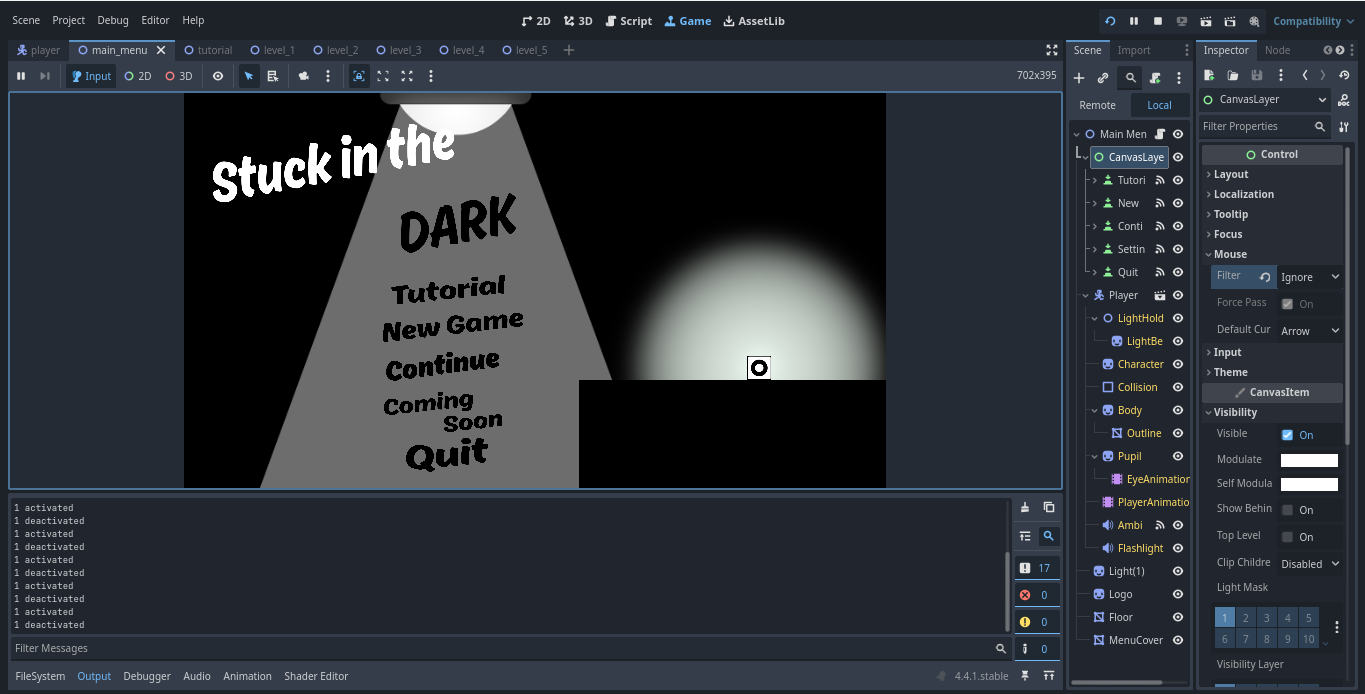
it was a canvas layer but that didn’t work
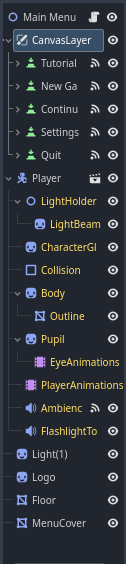
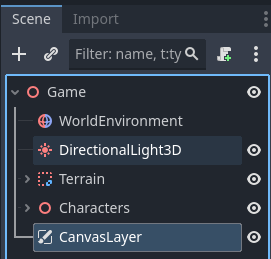
Try putting it below all the Node2D objects in the scene. Like how in my screenshot the CanvasLayer is the last thing in the node tree.
didn’t work is there another node that i can use?