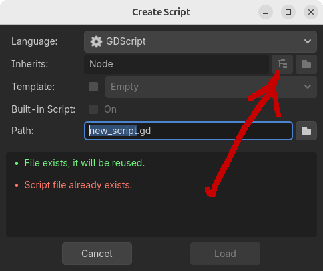
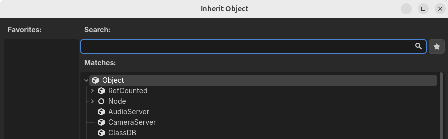
That dialog lists all the classes/nodes including extended node types.
I don’t relish the though of rebuilding that dialog since it already exists and works well.
I can’t find it however as a child of ScriptCreateDialog.
Is there anyway for my plugin to use this?
I would like show the dialog to hook onto what the user selects from it.
I looked into source code a bit and it seems that this window cannot be obtained. More precisely the window control itself can be plucked out of the scene tree panel’s ScriptCreateDialog object but the window is empty. It is only populated on the fly when shown by clicking the tree button in ScriptCreateDialog. You can check it yourself with this piece of hacky code:
var scd: ScriptCreateDialog = EditorPlugin.new().get_script_create_dialog()
scd.find_children("@Cr*", "", false, false)[0].popup_centered()
The class of this dialog is CreateDialog. It is not exposed to script. You cannot create this dialog from script. Editor’s ScriptCreateDialog object has only one direct child named @CreateDialog... so the hacky code is able to return precisely that window.
Thanks for looking at it.
Sadly rebuilding this is going to be complex. ClassDB.get_class_list() returns 1500+ class definition dictionaries and not in any hierarchy.
If I go with this, I will have to work my way up the inheritance tree for each class.
I can get the custom classes using ProjectSettings.get_global_class_list() and their respective parent classes.
I’ll keep poking around to see if someone has done this already.
Actually you could get the callable that’s connected to ‘pressed’ signal of that tree button in ScriptCreateDialog and try to call it. It’s very hacky but maybe could work.
Works perfectly. Thanks.
I see nothing hack/wrong with this method. The only thing I would say is that Godot should make it easier for plugins to access this dialog.
They should just expose CreateDialog class. You can make a feature request.
The code I posted above makes some assumptions about the scene tree structure that could change in the future versions. It could be further improved with additional error checks etc. but I tried to keep it short just as a proof of concept.
The only real annoyance here is that the ScriptCreateDialog window must be kept open. It could be re-positioned out of the visible area but that’d be even more hacky. I just minimized it. It still by far beats recreating the whole thing manually.
The opened `CreateDialog` show “Node” as root class (since it’s in "attach script to node” mode), thought I’d like for it to show Object.
I’ve tried var scd: ScriptCreateDialog = EditorPlugin.new().get_script_create_dialog() scd.config( “Object”, “res://new_resource.tres”, ) scd.popup_centered()