Godot Version
Godot 4.6
Question
Hey Everyone!
I’m following this tutorial on youtube for a quick peer-to-peer multiplayer game except I’m doing it in C# while the tutorial is in gdscript. Everything has been pretty smooth so far and I’ve been able to translate most things over without any issues.
My problem is around the 31:29 minute mark where they make the pistol shoot effect animation play across all instances. When I try and implement that in C#, the shoot animation only plays on the instance that is shooting (locally), not across all instances. Does anyone know what I am missing here?
Here is a short video showing the issue
Player C# Script:
public partial class Player : CharacterBody3D
{
	public const float Speed = 10.0f;
	public const float JumpVelocity = 10.0f;

	Camera3D Camera;
	AnimationPlayer AnimationPlayer;
	GpuParticles3D MuzzleFlash;

    public override void _Ready()
    {
		if (!IsMultiplayerAuthority()) { return; }

        Input.MouseMode = Input.MouseModeEnum.Captured;
		Camera = GetNode<Camera3D>("Camera3D");
		AnimationPlayer = GetNode<AnimationPlayer>("AnimationPlayer");
		MuzzleFlash = GetNode<GpuParticles3D>("Camera3D/Pistol/MuzzleFlash");
		Camera.Current = true;
    }

    public override void _UnhandledInput(InputEvent @event)
	{
		if (!IsMultiplayerAuthority()) { return; }

		if (@event is InputEventMouseMotion Motion)
		{
			RotateY(-Motion.Relative.X * 0.005f);
			Camera.RotateX(-Motion.Relative.Y * 0.005f);
			Vector3 rotation = Camera.Rotation;
			rotation.X = Mathf.Clamp(rotation.X, -1.5f, 1.5f);
			Camera.Rotation = rotation;
		}
		// Check if user is shooting and make sure the shooting animation isn't already playing
		if (Input.IsActionJustPressed("shoot") && AnimationPlayer.CurrentAnimation != "shoot")
		{
			Rpc(MethodName.PlayShootEffect);
		}
	}

	[Rpc(CallLocal = true)]
	public void PlayShootEffect()
	{
		GD.Print("Pew -" + $"Peer {Name}, " +
    $"Authority {IsMultiplayerAuthority()}" );
		AnimationPlayer.Stop(); // Stop animation player to prevent finicky animations
		AnimationPlayer.Play("shoot");
		MuzzleFlash.Restart();
		MuzzleFlash.Emitting = true;
	}
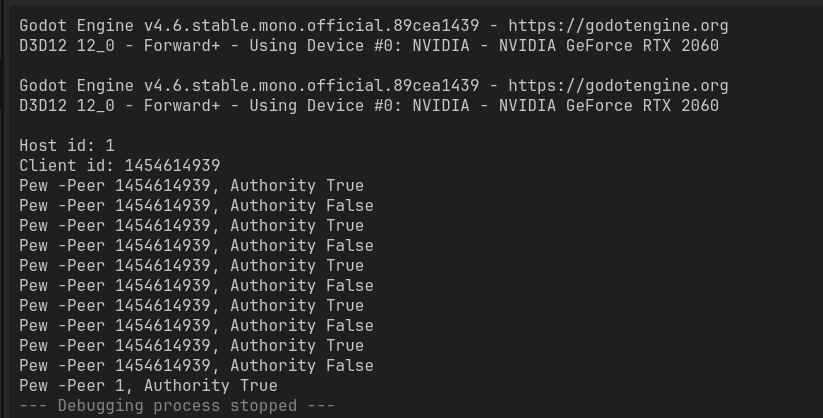
This is what that print statement prints everytime I shoot