Question
Hello people,
I’m trying to mess around with Godot but I’m now stuck on understanding the draw order. So this is how my remote tree looks right now:
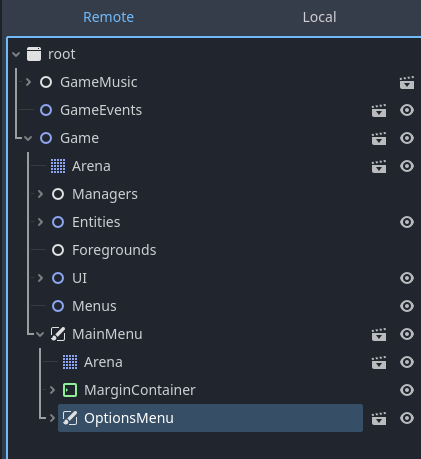
I’m not sure but I read somewhere that every child inside the Game node is being rendered on Layer 0 by default. And the CanvasLayer MainMenu is being rendered on Layer 1. So, currently both the MainMenu and OptionsMenu are being rendered on Layer 1.
- In the game, MainMenu has an option of Options and when clicked, I’m adding OptionsMenu as the child of it. But for some reason, it is not rendering at all in the UI but being added in the tree.
- When I’m changing the Layer of OptionsMenu to 2, it is rendering properly on top of MainMenu content.
- But, even if both MainMenu and OptionsMenu are on Layer 1, and when added as children to the Menus node, they seem to be working fine. So if they are working find in this case, why are they not working find in the first case?
This is the main menu

And the options menu (when working properly)
The options menu just doesn’t show up when clicked on Options in the Main menu for the first point.

I’ll really appreciate any help. I’ve been trying to understand this for hours now.