Godot Version
4.4
Question
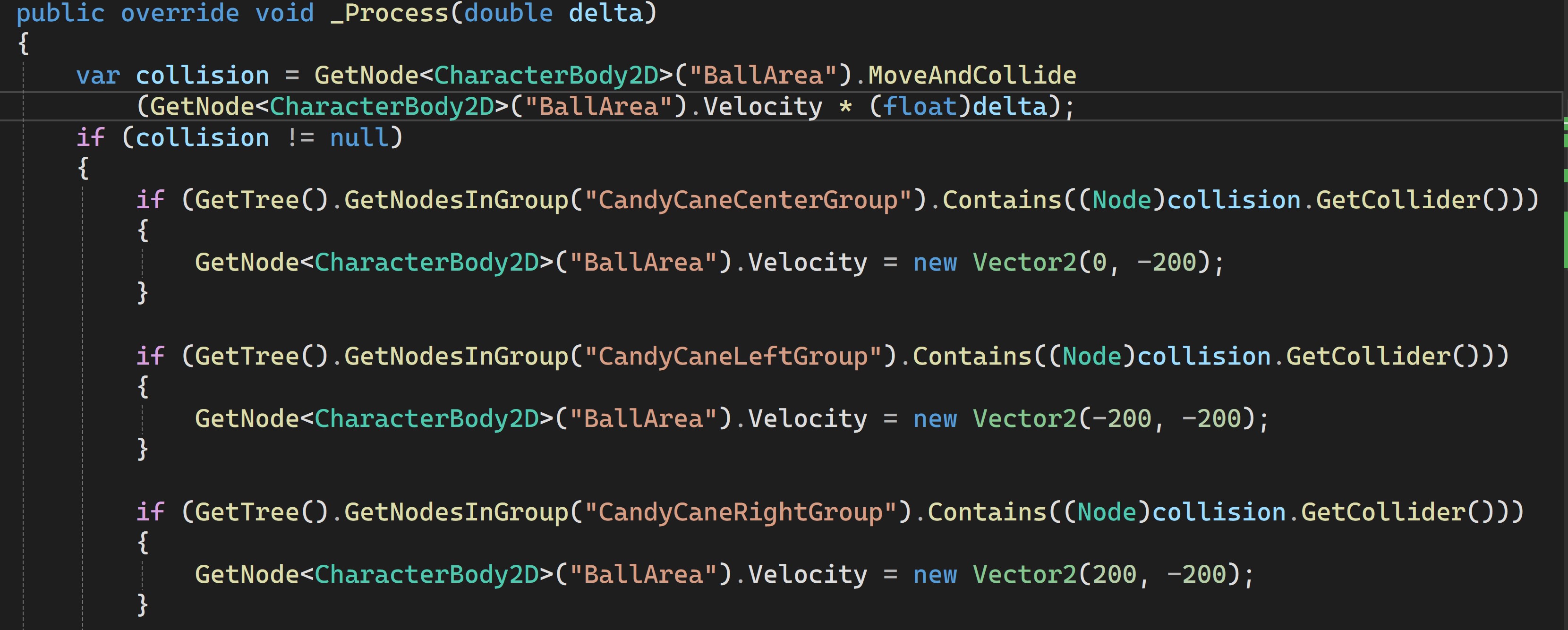
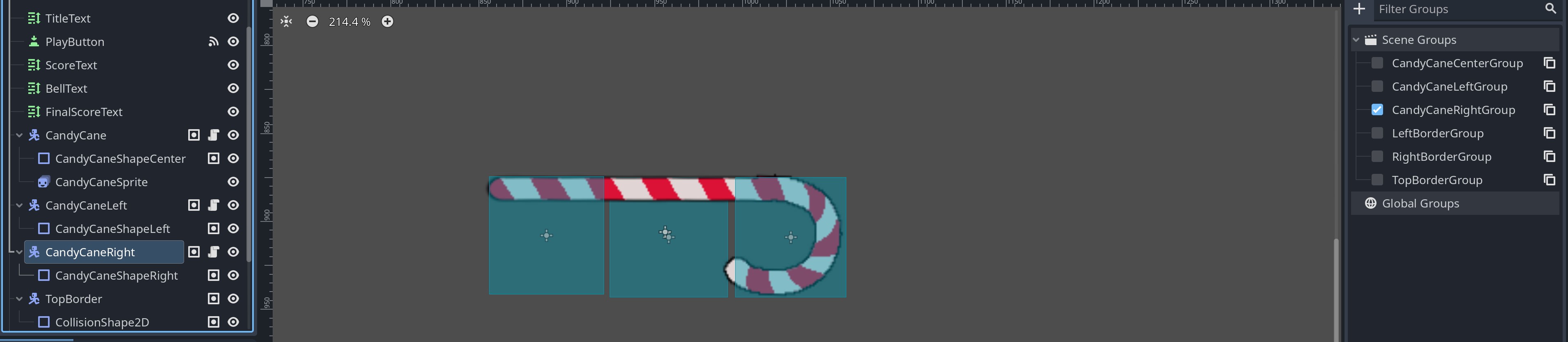
I’ve got this issue that is driving me insane. Below you can see the code and node setup where I am attempting to make a bumper that will provide different responses to another node that collides with it by passing the collision through a group to the move and collide function, based on whether it hits the right, left, or center. The node setup and code for all three are nearly identical. Despite this, the object correctly bounces off the center and left while passing through the right. I keep combing over it hoping to find the issue but no dice. I don’t know what could possibly be causing that behavior! I’ve also tested and confirmed that the collision isn’t registering on the right side vs the code for that scenario itself not providing the desired result.
What exactly are you trying to accomplish here? Your solution for whatever you are doing seems overly complex.
Also, please format your code by pasting it in and placing it between ``` on the lines above and below your code. You can press Ctrl + E as a shortcut for this.
Making something like brick breaker. Below is the full code so far for the ball, that is meant to allow it to detect collisions and bounce away at different directions based on what it hit.
public partial class Ball : Node2D
{

    public override void _Ready()
    {
        Position = new Vector2(600, 500);
        GetNode<CharacterBody2D>("BallArea").Velocity = new Vector2(0,200);
    }
    public override void _Process(double delta)
    {
        var collision = GetNode<CharacterBody2D>("BallArea").MoveAndCollide
            (GetNode<CharacterBody2D>("BallArea").Velocity * (float)delta);
        if (collision != null)
        {
            if (GetTree().GetNodesInGroup("CandyCaneCenterGroup").Contains((Node)collision.GetCollider()))
            {
                GetNode<CharacterBody2D>("BallArea").Velocity = new Vector2(0, -200);
            }

            if (GetTree().GetNodesInGroup("CandyCaneLeftGroup").Contains((Node)collision.GetCollider()))
            {
                GetNode<CharacterBody2D>("BallArea").Velocity = new Vector2(-200, -200);
            }

            if (GetTree().GetNodesInGroup("CandyCaneRightGroup").Contains((Node)collision.GetCollider()))
            {
                GetNode<CharacterBody2D>("BallArea").Velocity = new Vector2(200, -200);
            }

            if (GetTree().GetNodesInGroup("TopBorderGroup").Contains((Node)collision.GetCollider()))
            {
                GetNode<CharacterBody2D>("BallArea").Velocity = new Vector2(0, 200);
            }

            if (GetTree().GetNodesInGroup("LeftBorderGroup").Contains((Node)collision.GetCollider()))
            {
                GetNode<CharacterBody2D>("BallArea").Velocity = new Vector2(200, 0);
            }

            if (GetTree().GetNodesInGroup("RightBorderGroup").Contains((Node)collision.GetCollider()))
            {
                GetNode<CharacterBody2D>("BallArea").Velocity = new Vector2(-200, 0);
            }
        }
    }

}
Yeah ok, so this comes through every month or two. For the ball, you want to use a RigidBody2D and for the bricks a StaticBody2D and Area2D. The physics will handle themselves, and you can use the Area2D to delete the bricks.
1 Like