Godot Version
v4.6.1.stable.mono.official [14d19694e]
Question
I’m trying to implement a Camera3D that can empirically determine when it has moved too far in one direction and stop moving.
Right now I have a rectangular room which the Camera3D overlooks, and on top of each wall is a VisibleOnScreenNotifier3D. Whenever the Camera3D tries to update its position in response to player input (WASD), it checks whether any of these Notifiers are on-screen, and for each one that is, it adds an oppositional Vector3D to the Camera3D’s movement.
Here is the full code of the VisibleOnScreenNotifier3D:
public partial class OwCamBound : VisibleOnScreenNotifier3D
{
public static List<OwCamBound> visibleBounds = new();
public Vector3 relativeForward;
public override void _Ready()
{
relativeForward = new Vector3(GlobalTransform.Basis.Z.X, 0, GlobalTransform.Basis.Z.Z).Normalized();
ScreenEntered += VisibleEnable;
ScreenExited += VisibleDisable;
}
private void VisibleEnable()
{
visibleBounds.Add(this);
}
private void VisibleDisable()
{
visibleBounds.Remove(this);
}
}
and here is the relevant code for the Camera3D’s movement:
foreach (OwCamBound visBound in OwCamBound.visibleBounds)
{
camVelocity -= visBound.relativeForward;
}
camVelocity *= camMoveSpeed * delta;
if (camVelocity != Vector3.Zero)
{
Position = new Vector3(Position.X + camVelocity.X, Position.Y, Position.Z + camVelocity.Z);
}
This works about perfectly for movement in cardinal directions (i.e. the Camera3D is either parallel or perpendicular to each wall), but I’m not happy with how it behaves when the Camera3D is rotated on the other 45° increments such as Northwest; right now it can only face in these eight directions. I’d like it to instead begin disabling movement when the Notifier has passed the center of the screen.
I’ve thought of a few potential solutions for this:
- Use
UnprojectPosition(visBound.GlobalPosition) and trigonometry to calculate the area of the screen occupied by the Notifier, and check that against the center of the screen.
- Parent a more zoomed-in Camera3D to the main one, so that it is always only looking at the center portion of the screen, and tie the Notifiers to that Camera3D when the view is diagonal.
Both of these seem pretty convoluted, so I wanted to make sure there isn’t a simpler solution to my problem that I didn’t turn up before going ahead with it.
Have you considered just using a SpringArm3D to handle all that for you?
1 Like
This looks like a really useful node, and I read up on it in the docs, but I’m not sure how I would use it to program the intended behavior.
I’ve spent a good few hours trying to figure that out and/or typing up an explanation here for why I don’t think it will work, but I’d prefer to just use the system I already have in place and understand well if this new node is causing me such a conceptual headache. I definitely will keep it in the back of my mind, but for this particular problem I’ve thought of another idea, and I think it’s the best of the four.
Right now I only have VisibleOnScreenNotifier3Ds that push the Camera3D away when they’re on-screen, but I could also have ones that pull the camera in when they’re off-screen! In fact, I think it might be better to only use the latter, since they’ll be how I allow the camera to go outside the room, but not too far.
I can inscribe an octagon made of these onto the underside of the room, and not have to worry about people seeing them because “VisibleOnScreenNotifier3D uses an approximate heuristic that doesn’t take walls and other occlusion into account”.
The camera is actually built right now to be rotatable in an a number of directions equal to an arbitrary power of 2; I have it set to eight directions right now, but it could be 16 or upward. If I feel really ambitious, I could inscribe an N-sided polygon of these pulling bounds onto the bottom of the floor at runtime, where N is the power of 2 used!
I’m going to get started on this when I have the chance, but for the sake of answering the question in the thread title: it looks like there was an answer already out there, I just didn’t do a good enough job searching for it:
First you need to get an image of the 3D object with a transparent background, which you can do by mucking about with viewports and taking a screenshot, then use this method on that image.
The reason I asked, is you can do what you want with a SpringArm3D node with no code. It can detect collisions with objects like walls, or physical boundaries you set, and won’t let the camera go beyond them.
I recommend watching this video and see if you can make it work before you go down your math-heavy path.
2 Likes
This third-person controller demo is pretty good if you want to test the SpringArm3D before using one in your project:
2 Likes
Sorry I’ve been too busy to reply the past few days, but I figured out how to explain this, plus why it’s wrong! This is all considering going backward toward the wall facing the Camera3D’s direction, e.g. the Camera3D is facing North and moving South toward the South wall, stopping when it sees the top of that wall.
Since the Camera3D is pointed diagonally down at the player character, but is only supposed to move on the XZ plane, I kept getting caught up on how the Camera3D would be pushed diagonally down and toward the player once they hit the wall. But that only applies if I assume the pivot point has to be at the same coordinate as the character; if I have the pivot point above them, on the same XZ plane as the Camera3D, then that problem goes away!
But this raises another question: since the Camera3D is supposed to be able to go a bit behind walls in this case (and to not go all the way up to a wall in the opposite case), doesn’t that mean I’d have to manually set the collision bounds for the pivot point to get that behavior? Or maybe, since the Camera3D is orthogonal, I can calculate how far back those bounds should be using trigonometry and the angle of the Camera3D…
1 Like
You can set a different boundary shape. I’d use a sphere and play around with it until you get what you want. No trig necessary.
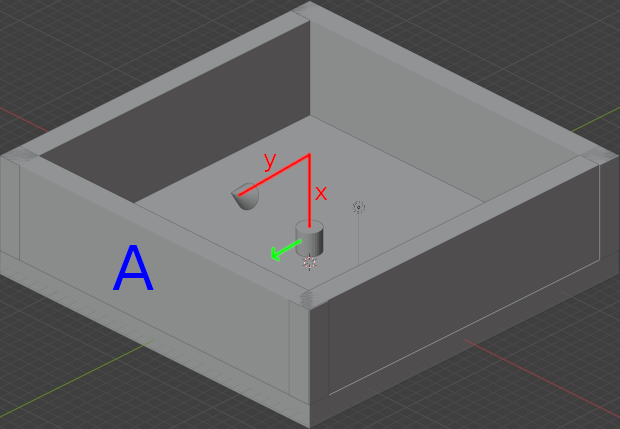
I’m not sure how setting a different boundary shape would accomplish what I’m describing. Now that I’m home I can make a quick diagram in Blender to better explain myself:
The cylinder is the player and the cone is the Camera3D, hovering in the air x meters above them and y meters in front of them.
If I have a SpringArm3D at the intersection of x and y, and the player moves in the direction of the green arrow (i.e. toward the Camera3D and Wall A), won’t the Camera3D will hit Wall A and stop moving, letting the player keep moving another y meters toward Wall A and go underneath its field of vision?
The way I’d imagine solving this is to have an invisible wall behind wall A to handle the Camera3D collision, rather than using the real wall. I’m not sure if the correct offset would be y meters, or maybe the length of the hypotenuse of x and y (which would be y × cos(30°) iirc), but that’s where the trigonometry would come in.
Sorry I’ve been talking your ear off in this thread; I’ve been using it to try and work through the problem. 
No worries. Honestly, this is why I give the player control of the camera, so that they can just rotate it if they run into the wall.
If you want, you can check out my Character3D plugin, which supports a ton of cool stuff - including switching between 1st and 3rd person cameras on the same model, handling wall collisions, and allowing seamless mouse/keyboard and controller input.
But yes, I envisioned the camera just running into the wall and stopping the character.
Another thing you could do is cull the outside of the walls so the camera can see through them - or set different visibility layers for each side of the wall, but that would require importing the wall as two pieces.
1 Like
I’ll have to take a look at both approaches: the one I described in my reply last night with the diagram, and the one I described here that uses VisibleOnScreenNotifier3D.
That’s actually the plan: I’m hoping to set it up so that the Camera3D automatically follows the player when they move around using the arrow keys, but can be moved on its own using WASD to look around too.
Anyway, thanks for all your help!