Godot Version
4.4
Question
The barrel sprite has a collision body which the character having collision body near the feet interacts with.
But, for some reason the character is also colliding with something in front of the collision body.
Sprite node hierarchy:
StaticBody2D
under that,
CollsionBody2D
Sprite2D
I had a similar problem with my wall sprite in my game.
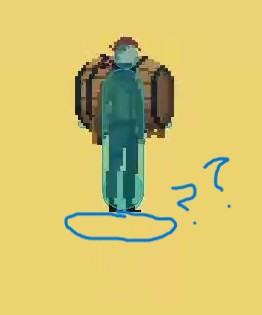
character script(if that helps):
extends CharacterBody2D
@export var SPEED = 150.0
@export var HEALTH = 100.0
var move = true
var roll_status = true
#For aim
var rotate=0
var aim_min = -75
var aim_max = 75
func _ready():
$pivot.visible = false
func _physics_process(delta):
if Input.is_action_just_pressed(‘move_1’):
$pivot.visible = false
move = not move
if move:
velocity = Vector2.ZERO
if(Input.is_action_pressed(‘left_1’)):
velocity.x -= SPEED
if(Input.is_action_pressed(‘right_1’)):
velocity.x += SPEED
if(Input.is_action_pressed(‘up_1’)):
velocity.y -= SPEED
if(Input.is_action_pressed(‘down_1’)):
velocity.y += SPEED
if(Input.is_action_just_pressed(‘shoot_1+roll_1’)):
roll()
if not move:
$pivot.visible = true
velocity = Vector2.ZERO
if Input.is_action_pressed(‘up_1’):
rotate-=5
if Input.is_action_pressed(‘down_1’):
rotate+=5
rotate = clamp(rotate,aim_min,aim_max)
$pivot.rotation_degrees = rotate
if Input.is_action_just_pressed(‘shoot_1+roll_1’):
shoot()
move_and_slide()
func shoot():
const bullet_scene = preload(“res://scenes/bullet.tscn”)
var bullet = bullet_scene.instantiate()
get_parent().add_child(bullet)
bullet.rotate = rotate
bullet.Name = ‘character’
bullet.global_position = $pivot/aim.global_position
func headshot():
dead()
func bodyshot():
HEALTH-=50
if HEALTH <= 0:
dead()
func dead():
var parent = get_tree().get_current_scene()
parent.game_over(‘\nPlayer 2 won’)
$“.”.queue_free()
func roll():
if roll_status:
SPEED+=100
$Roll.start()
roll_status = false
func _on_roll_timeout():
SPEED-=100
roll_status = true