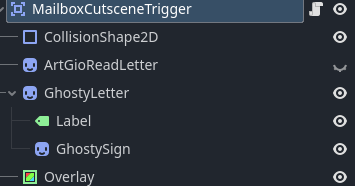
Sorry for the late reply, i had some busy days. Anyways this is the whole mailbox trigger code
extends PlayerDetectingArea

var once = true
const middle = Vector2(112, -463)
const end = Vector2(2451, -557)

var overlay

signal dialog_done

var dialog_data = [
	{"Name" = "Gio", "PortraitId" = 0, "Text" = "Yay, I finally made it! That was... less straightforward than I expected."},
	{"Name" = "Gio", "PortraitId" = 0, "Text" = "Oh, I got mail!! Now, what's this?"}
]

var dialog_data_2 = [
	{"Name" = "Gio", "PortraitId" = 0, "Text" = "The Mansion seal.. This looks like a message from the princess! Now, let's see..."}
]

var dialog_data_3= [
	{"Name" = "Gio", "PortraitId" = 0, "Text" = "The Princess is hosting a coronation ceremony!!! Wowie!!! I should totally go pack my things and move to my mansion rooms ASAP!!"},
	{"Name" = "Gio", "PortraitId" = 0, "Text" = "..."},
	{"Name" = "Gio", "PortraitId" = 0, "Text" = "..."},
	{"Name" = "Gio", "PortraitId" = 0, "Text" = "...my house is on the other side of the field..."}
]

func _ready():
	overlay = $Overlay

	for child in get_children():
		print(child)

func _input(_ev):
	if Input.is_action_just_pressed("next_text") and player_in_zone and once:
		once = false

		BulletManager.get_wrapper().fadeout_music()
		DialogManager.new_dialog(dialog_data, dialog_done, false)
		await dialog_done

		$ArtGioReadLetter.visible = true
		CutsceneManager.tween_node_globalpos($ArtGioReadLetter, global_position + middle, 1.5)
		await get_tree().create_timer(3).timeout

		DialogManager.new_dialog(dialog_data_2 ,dialog_done, false)
		await dialog_done

		CutsceneManager.tween_node_globalpos($ArtGioReadLetter, global_position + end, 0.8)
		CutsceneManager.tween_node_modulate(overlay, Color(212.0/255,232.0/255,251.0/255,1), 0.8)
		await get_tree().create_timer(1).timeout
		$GhostyLetter.global_position = BulletManager.get_player().global_position
		$GhostyLetter/Label.visible_characters = -1
		CutsceneManager.tween_node_modulate($GhostyLetter, Color(1,1,1,1), 1)
		await get_tree().create_timer(2).timeout

		BulletManager.get_wrapper().play_audio_global("res://Sound/Voiceover/VOICE_GhostyLetter.mp3", 5)
		await get_tree().create_timer(15).timeout
		CutsceneManager.tween_node_modulate($GhostyLetter/GhostySign, Color(1,1,1,1), 2)
		await get_tree().create_timer(3).timeout

		CutsceneManager.tween_node_modulate(overlay, Color(0,0,0,1), 0.8)
		DialogManager.new_dialog(dialog_data_3 ,dialog_done, false)
		await dialog_done
the dialog data variables are just how i implemented the data for my dialog system, also about anything works except when i call CutsceneManager.tween_node_modulate() with overlay as an argument.
In _ready(), i also assign the overlay variable and iterate through the children of the trigger to make sure the overlay is in them, and the overlay is missing there also. Finally, PlayerDetectingArea is a custom class that i made that just basically works like an Area2D except that when the player enters/exites, the boolean variable player_in_zone gets updated as a result